
标签:
sqlite(轻量级数据库)
1.为什么要使用数据库呢?
文件读写, NSUserDefualts, 归档, 写入的过程是覆盖, 效率比较低, 并且不支持针对某些数据的修改
2.数据库: 存放数据的仓库
数据库以表的形势存放数据
每个表都有字段, 用于标示存什么样的数据
在字段中, 有一种特殊的字段(主键), 主键数据是唯一, 不重复, 用于区分数据使用
3.常用的数据库: Oracle, SQLServer, access, sqlite(轻量级数据库, 体积小, 占用内存小, 能够满足基本的要求, 增删改查)
4.sqlite Manger 对sqlite数据库操作的软件
5.SQL: 结构化查询语句, 用于对数据库进行操作的语句
注: SQL不区分大小写, 不区分""和‘‘, 字符串要加""或‘‘
创建表
create table "表名"(列名1 类型, 列名2 类型, ...)
例如: CREATE TABLE IF NOT EXISTS "Person" ("id" INTEGER PRIMARY KEY AUTOINCREMENT NOT NULL , "name" TEXT DEFAULT 小明, "gender" TEXT DEFAULT 未知, "age" INTEGER DEFAULT 18)
插入数据
insert into "表名"(列名1 类型, 列名2 类型, ...)
例如: INSERT INTO "main"."Person" ("id","gender") VALUES (2,?1)
INSERT INTO ‘Person‘ (‘id‘, ‘name‘, ‘gender‘, ‘age‘) VALUES (%ld, ‘%@‘, ‘%@‘, %ld)
更新数据
update "表名" set "列名" = 值 where "id" = 值
例如: UPDATE "main"."Person" SET "age" = ?1 WHERE id = 5
查询数据
select (列名1, 列名2, ...) from "表名" where 条件
例如: select *from "Person"
selec *from "person" where "age" <= 18
删除数据
delete from "表名" where 条件
例如: delete from "Person" where id = 2
6.通过代码对数据库进行操作的步骤
a.创建一个单例类, 对数据库操作全部封装起来
b.对sqlite的数据库进行操作, 需要引入sqlite的框架
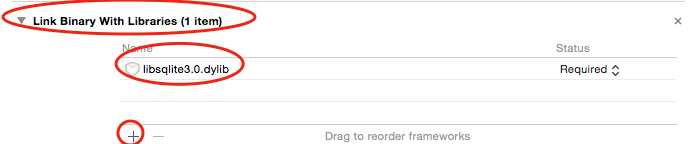
7.多次打开同一个数据库, 就会造成数据库被锁住, 导致数据库无法修改
创建一个单例类
DatabaseManager.h
#import <Foundation/Foundation.h>
@class Person;
@interface DatabaseManager : NSObject
一般来说, 一个应用只需要一个数据库就够了, 为了保证数据库管理类和数据库文件一一对应, 把数据库管理类封装成单例类
+ (DatabaseManager *)sharedDatabaseManager;
创建数据库文件, 并打开数据库
- (void)openDB;
关闭数据库
- (void)closeDB;
创建表
- (void)createTable;
增加数据
- (void)insertPerson:(Person *)person;
删除数据
- (void)deletePerson:(NSInteger)ID;
更新数据
- (void)updatePersonWithName:(NSString *)name ID:(NSInteger)ID;
查询数据
- (NSMutableArray *)sellectAllPerson;
@end
DatabaseManager..m
#import "DatabaseManager.h"
#import <sqlite3.h>
#import "Person.h"

sqlite3 *db = NULL;

@implementation DatabaseManager
创建单例
+ (DatabaseManager *)sharedDatabaseManager {
    static DatabaseManager *databaseManager = nil;
    if (databaseManager == nil) {
        databaseManager = [[DatabaseManager alloc] init];
    }
    return databaseManager;
}

打开数据库
- (void)openDB {
    判断数据库指针是否为nil, 数据库是否处于打开状态
    if (db) {
        return;
    }
    //documents的路径
    NSString *documentPath = [NSSearchPathForDirectoriesInDomains(NSDocumentDirectory, NSUserDomainMask, YES) firstObject];
    //数据库文件路径
    NSString *filePath = [documentPath stringByAppendingPathComponent:@"database2.sqlite"];
    NSLog(@"%@", filePath);
    //参数1: 数据库文件路径
    //参数2: 数据库指针
    打开指定路径的数据库文件, 如果没有数据库文件, 就创建数据库库文件, 如果有, 就直接打开, 打开以后, 把指针指向数据库的首地址, 这样就可以对数据库进行操作
    int result = sqlite3_open([filePath UTF8String], &db);
    if (result == SQLITE_OK) {
        NSLog(@"打开数据库成功");
    } else {
        NSLog(@"打开数据库失败:%d", result);
    }
}

关闭数据库
- (void)closeDB {
    if (!db) {
        return;
    }
    //关闭数据库
   int result =  sqlite3_close(db);
    //安全操作
    db = NULL;
    if (result == SQLITE_OK) {
        NSLog(@"关闭数据库成功");
    } else {
        NSLog(@"关闭数据库失败:%d", result);
    }
}

创建表
- (void)createTable {
    //参数1: 数据库的地址
    //参数2: sql语句
    //参数3: 函数指针, 当操作执行后, 去执行函数指针指向的函数
    //参数4: 回调的参数
    //参数5: 错误信息
    NSString *sqlString = @"CREATE TABLE IF NOT EXISTS \"Person\" (\"id\" INTEGER PRIMARY KEY  AUTOINCREMENT  NOT NULL , \"name\" TEXT DEFAULT 小明, \"gender\" TEXT DEFAULT 未知, \"age\" INTEGER DEFAULT 18)";
    char *error = NULL;
    int result = sqlite3_exec(db, [sqlString UTF8String], NULL, NULL, &error);
    if (result == SQLITE_OK) {
        NSLog(@"创建表成功");
    } else {
        NSLog(@"创建表失败:%d %s", result, error);
    }
}

插入数据
- (void)insertPerson:(Person *)person {
    if (!db) {
        [self openDB];
        [self createTable];
    }
    NSString *sqlString = [NSString stringWithFormat:@"INSERT INTO ‘Person‘ (‘id‘, ‘name‘, ‘gender‘, ‘age‘) VALUES (%ld, ‘%@‘, ‘%@‘, %ld)", person.ID, person.name, person.gender, person.age];
    char *error = NULL;
    //执行sql语句
    int result = sqlite3_exec(db, [sqlString UTF8String], NULL, NULL, &error);
    if (result == SQLITE_OK) {
        NSLog(@"插入成功");
    } else {
        NSLog(@"插入失败:%d %s", result, error);
    }
        [self closeDB];
}

删除数据
- (void)deletePerson:(NSInteger)ID {
    if (!db) {
        [self openDB];
        [self createTable];
    }
    NSString *sqlString = [NSString stringWithFormat:@"delete from ‘Person‘ where id = %ld", ID];
    char *error = NULL;
    //执行sql语句
    int result = sqlite3_exec(db, [sqlString UTF8String], NULL, NULL, &error);
    if (result == SQLITE_OK) {
        NSLog(@"删除成功");
    } else {
        NSLog(@"删除失败:%d %s", result, error);
    }
        [self closeDB];
}

修改数据
- (void)updatePersonWithName:(NSString *)name ID:(NSInteger)ID {
    if (!db) {
        [self openDB];
        [self createTable];
    }
    NSString *sqlString = [NSString stringWithFormat:@"update ‘Person‘ set ‘name‘ = ‘%@‘ where id = %ld", name, ID];
    char *error = NULL;
    //执行sql语句
    int result = sqlite3_exec(db, [sqlString UTF8String], NULL, NULL, &error);
    if (result == SQLITE_OK) {
        NSLog(@"更新成功");
    } else {
        NSLog(@"更新失败:%d %s", result, error);
    }
    [self closeDB];
}

查询数据
- (NSMutableArray *)sellectAllPerson {
    NSMutableArray *array = [NSMutableArray arrayWithCapacity:0];
    if (!db) {
        [self openDB];
        [self createTable];
    }
    //sql语句
    NSString *sqlString = @"select *from ‘Person‘";

    sqlite3_stmt *stmt = NULL;
    //准备sql语句
    //参数3: 语句的长度
    //参数4: 语句指针(statement)
    //参数5: 预留参数, 为未来做准备
    int result = sqlite3_prepare(db, [sqlString UTF8String], -1, &stmt, NULL);
    if (result == SQLITE_OK) {
        NSLog(@"准备成功");
        单步执行, 把一条一条数据给提取出来
      判断是否有下一行数据
        while (sqlite3_step(stmt) == SQLITE_ROW) {
            Person *person = [[Person alloc] init];
            //找第一列的整型数据
            int ID = sqlite3_column_int(stmt, 0);
            const unsigned char *name = sqlite3_column_text(stmt, 1);
            const unsigned char *gender = sqlite3_column_text(stmt, 2);
            int age = sqlite3_column_int(stmt, 3);
            NSString *name1 = [NSString stringWithUTF8String:(const char *)name];
            NSString *gender1 = [NSString stringWithUTF8String:(const char *)gender];
//            NSLog(@"%d %@ %@ %d", ID, name1, gender1, age);
            person.ID = ID;
            person.name = name1;
            person.gender = gender1;
            person.age = age;
            [array addObject:person];
            [person release];
        }
    } else {
        NSLog(@"准备失败:%d", result);
    }
    //释放语句指针
    sqlite3_finalize(stmt);
   [self closeDB];
    return array;
}
@end
自定义一个PersonCell
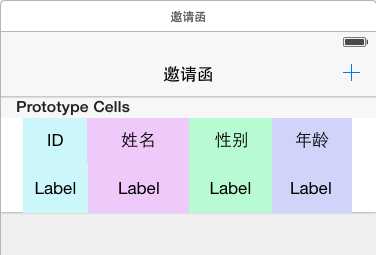
关联属性
#import <UIKit/UIKit.h>
@interface PersonCell : UITableViewCell
@property (retain, nonatomic) IBOutlet UILabel *idLabel;
@property (retain, nonatomic) IBOutlet UILabel *nameLabel;
@property (retain, nonatomic) IBOutlet UILabel *genderLabel;
@property (retain, nonatomic) IBOutlet UILabel *ageLabel;
@end
RootTableViewController.m
#import "RootTableViewController.h"
#import "DatabaseManager.h"
#import "Person.h"
#import "PersonCell.h"

@interface RootTableViewController ()

@property (nonatomic, retain) NSMutableArray *personArray;

@end

@implementation RootTableViewController

- (void)dealloc
{
    [_personArray release];
    [super dealloc];
}

- (void)viewDidLoad {
    [super viewDidLoad];
    self.tableView.rowHeight = 50;

}

- (void)didReceiveMemoryWarning {
    [super didReceiveMemoryWarning];
    // Dispose of any resources that can be recreated.
}

#pragma mark - Table view data source

- (NSInteger)numberOfSectionsInTableView:(UITableView *)tableView {
    // Return the number of sections.
    return 2;
}

- (NSInteger)tableView:(UITableView *)tableView numberOfRowsInSection:(NSInteger)section {
    // Return the number of rows in the section.
    if (section == 0) {
        return 1;
    }
    return self.personArray.count;
}

- (UITableViewCell *)tableView:(UITableView *)tableView cellForRowAtIndexPath:(NSIndexPath *)indexPath {
    if (indexPath.section == 0) {
          UITableViewCell *cell = [tableView dequeueReusableCellWithIdentifier:@"topcell" forIndexPath:indexPath];
        return cell;
    }
    PersonCell *cell = [tableView dequeueReusableCellWithIdentifier:@"cell" forIndexPath:indexPath];
    Person *person = self.personArray[indexPath.row];
    cell.idLabel.text = [NSString stringWithFormat:@"%ld", person.ID];
    cell.nameLabel.text = person.name;
    cell.genderLabel.text = person.gender;
    cell.ageLabel.text = [NSString stringWithFormat:@"%ld", person.age];
    return cell;
}

- (void)viewWillAppear:(BOOL)animated {
    [super viewWillAppear:animated];
    self.personArray = [[DatabaseManager sharedDatabaseManager] sellectAllPerson];
    [self.tableView reloadData];
}

// Override to support conditional editing of the table view.
- (BOOL)tableView:(UITableView *)tableView canEditRowAtIndexPath:(NSIndexPath *)indexPath {
    // Return NO if you do not want the specified item to be editable.
    return YES;
}

// Override to support editing the table view.
- (void)tableView:(UITableView *)tableView commitEditingStyle:(UITableViewCellEditingStyle)editingStyle forRowAtIndexPath:(NSIndexPath *)indexPath {
    if (editingStyle == UITableViewCellEditingStyleDelete) {
        //删除数据库中的数据
        [[DatabaseManager sharedDatabaseManager] deletePerson:[self.personArray[indexPath.row] ID]];
        //删除数组中的元素
        [self.personArray removeObjectAtIndex:indexPath.row];
        // Delete the row from the data source
        [tableView deleteRowsAtIndexPaths:@[indexPath] withRowAnimation:UITableViewRowAnimationFade];
    } else if (editingStyle == UITableViewCellEditingStyleInsert) {
        // Create a new instance of the appropriate class, insert it into the array, and add a new row to the table view
    }
}
AddViewController.m
#import "AddViewController.h"
#import "Person.h"
#import "DatabaseManager.h"

@interface AddViewController ()

@end

@implementation AddViewController

- (void)viewDidLoad {
    [super viewDidLoad];
    // Do any additional setup after loading the view.
}

- (void)didReceiveMemoryWarning {
    [super didReceiveMemoryWarning];
    // Dispose of any resources that can be recreated.
}


- (IBAction)back:(UIBarButtonItem *)sender {
    [self dismissViewControllerAnimated:YES completion:nil];
}

- (IBAction)done:(UIBarButtonItem *)sender {
   //创建person
    Person *person = [[Person alloc] init];
    person.ID = [self.idTextField.text integerValue];
    person.name = self.nameTextField.text;
    person.gender = self.genderTextField.text;
    person.age = [self.ageTextField.text integerValue];
     //添加到数据库
    [[DatabaseManager sharedDatabaseManager] insertPerson:person];
    //释放
    [person release];
    [self dismissViewControllerAnimated:YES completion:nil];
}
- (void)dealloc {
    [_idTextField release];
    [_nameTextField release];
    [_genderTextField release];
    [_ageTextField release];
    [super dealloc];
}
@end
效果图
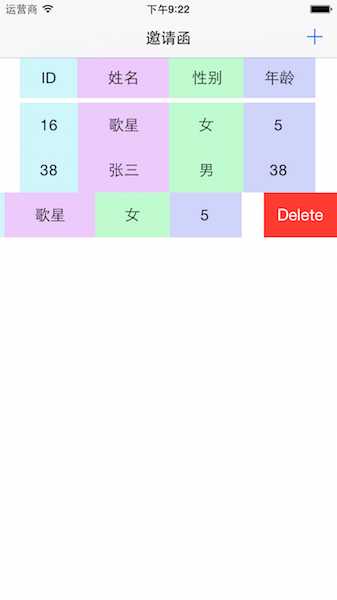
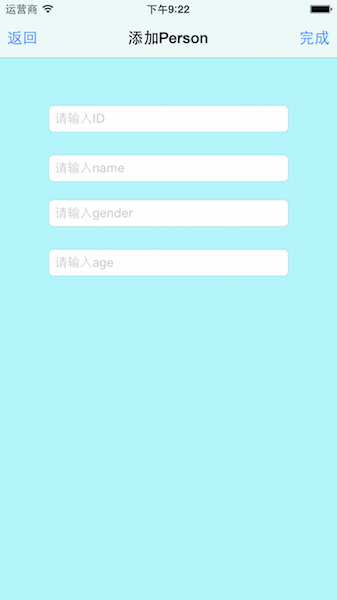
标签:
原文地址:http://www.cnblogs.com/OrangesChen/p/4963287.html
