
标签:fonts text nal dtd demo 保存 timeout 效果 ref
Date 对象常用的方法:
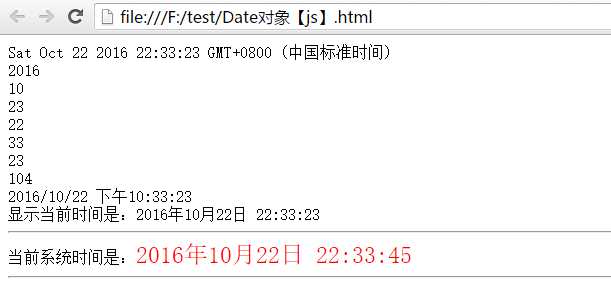
<!DOCTYPE HTML PUBLIC "-//W3C//DTD HTML 4.01 Transitional//EN" "http://www.w3.org/TR/html4/loose.dtd"><html><head><meta http-equiv="Content-Type" content="text/html; charset=utf-8"><title>Date对象【js】</title><script type="text/javascript">with(document){var date = new Date(); //启用基本存储器并取得日期和时间。write(date + "<br/>");//它代表了所保存的年份与 1900 年之间的差距。这个方法已经过时,之所以提供这个方法,是为了保持向后的兼容性。请改用 getFullYear 方法。write(date.getFullYear() + "<br/>");//返回 Date 对象中用本地时间表示的年份值。write(date.getMonth() + 1 + "<br/>");//返回 Date 对象中用本地时间表示的月份值。方法返回一个处于 0 到 11 之间的整数,它代表 Date 对象中的月write(date.getDate() + 1 + "<br/>");//返回 Date 对象中用本地时间表示的一个月中的日期值。write(date.getHours() + "<br/>");//返回 Date 对象中用本地时间表示的小时值。write(date.getMinutes() + "<br/>");//返回 Date 对象中用本地时间表示的分钟值。write(date.getSeconds() + "<br/>");//返回 Date 对象中用本地时间表示的秒钟值。write(date.getMilliseconds() + "<br/>");//返回 Date 对象中用本地时间表示的毫秒值。write(date.toLocaleString() + "<br/>");//返回一个日期,该日期使用当前区域设置并已被转换为字符串。write("显示当前时间是:" + date.getFullYear() + "年" + (date.getMonth()+1) + "月" + date.getDate() + "日 " + date.getHours() + ":" + date.getMinutes() + ":" + date.getSeconds());write("<hr/>");//===========================//获取系统时间function getCurrentTime(){//获取到当前的系统时间var date = new Date();//把当前系统时间拼装成指定的格式var timeInfo = date.getFullYear() + "年" + (date.getMonth()+1) + "月" + date.getDate() + "日 " + date.getHours() + ":" + date.getMinutes() + ":" + date.getSeconds();//找到span对象var spanObj = getElementById("currentTime");//设置span标签体的内容spanObj.innerHTML = timeInfo.fontcolor("red").fontsize("5px"); //innerHTML 属性设置或返回表格行的开始和结束标签之间的 HTML。// window.setTimeout("getCurrentTime()", 1000);//setTimeout() 只执行 code 一次。如果要多次调用,请使用 setInterval() 或者让 code 自身再次调用 setTimeoout()}//定时方法 :setInterval() 与 setTimeout()区别window.setInterval("getCurrentTime()", 1000);//定时方法:按照指定的周期(以毫秒计)来调用函数或计算表达式。, 第一个参数要指定调用的代码,第二个参数是每隔指定的毫秒数调用指定的代码。// window.setTimeout("getCurrentTime()", 1000);//setTimeout() 只执行 code 一次。如果要多次调用,请使用 setInterval() 或者让 code 自身再次调用 setTimeoout()}</script></head><body onLoad="getCurrentTime();">当前系统时间是:<span id="currentTime"></span><hr/></body></html>
标签:fonts text nal dtd demo 保存 timeout 效果 ref
原文地址:http://www.cnblogs.com/itMiracle/p/5990723.html
