
标签:tom ack 定义 tutorial 格式 alt word basic 详细
模式是一种机器可读的文档,用于描述可用的API端点,其URLS以及它们支持的操作。
模式可以是自动生成文档的有用工具,也可以用于驱动可以与API进行交互的动态客户端库。
为了提供支持REST框架的schema而使用Core API。
Core API是用于描述API的文档规范。它用于提供可用端点的内部表现格式以及API暴露的可能的交互。它可以用于服务器端或客户端。
当使用服务器端时,Core API允许API支持各种模式或超媒体格式的渲染。
When used client-side, Core API allows for dynamically driven client libraries that can interact with any API that exposes a supported schema or hypermedia format.
REST框架支持明确定义的 schema views 或自动生成的 schemas 。由于我们使用的是 viewsets and routers,我们可以只使用 the automatic schema generation 。
您需要安装coreapipython包以包含API schema 。
pip install coreapi
现在我们可以通过在URL配置中包含一个自动生成的 schema view 来为API添加一个 schema 。
from rest_framework.schemas import get_schema_view

schema_view = get_schema_view(title=‘Pastebin API‘)

urlpatterns = [
    url(r‘^schema/$‘, schema_view),
    ...
]
如果您在浏览器中访问API根端点,那么您现在应该可以看到corejson 表现层变成了一个可用的选项。
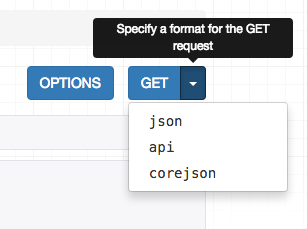
我们还可以通过在Accept header中指定所需的内容类型来从命令行请求 schema 。
$ http http://127.0.0.1:8000/schema/ Accept:application/coreapi+json
HTTP/1.0 200 OK
Allow: GET, HEAD, OPTIONS
Content-Type: application/coreapi+json

{
    "_meta": {
        "title": "Pastebin API"
    },
    "_type": "document",
    ...
默认输出样式是使用Core JSON编码。
还支持其他架构格式,如Open API(以前称为Swagger)。
现在我们的API暴露了一个 schema endpoint,我们可以使用一个动态的客户端库来与API进行交互。为了演示这个,我们来使用Core API命令行客户端。
命令行客户端可用作coreapi-cli包:
$ pip install coreapi-cli
现在检查它在命令行上可用...
$ coreapi
Usage: coreapi [OPTIONS] COMMAND [ARGS]...

  Command line client for interacting with CoreAPI services.

  Visit http://www.coreapi.org for more information.

Options:
  --version  Display the package version number.
  --help     Show this message and exit.

Commands:
...
首先,我们将使用命令行客户端加载API schema 。
$ coreapi get http://127.0.0.1:8000/schema/
<Pastebin API "http://127.0.0.1:8000/schema/">
    snippets: {
        highlight(id)
        list()
        read(id)
    }
    users: {
        list()
        read(id)
    }
我们还没有认证,所以现在我们只能看到只读端点,这与我们已经设置的API权限一致。
我们尝试列出现有的代码片段,使用命令行客户端:
$ coreapi action snippets list
[
    {
        "url": "http://127.0.0.1:8000/snippets/1/",
        "id": 1,
        "highlight": "http://127.0.0.1:8000/snippets/1/highlight/",
        "owner": "lucy",
        "title": "Example",
        "code": "print(‘hello, world!‘)",
        "linenos": true,
        "language": "python",
        "style": "friendly"
    },
    ...
一些API端点需要命名参数。例如,要获取特定代码段的高亮度HTML,我们需要提供一个id。
$ coreapi action snippets highlight --param id=1
<!DOCTYPE html PUBLIC "-//W3C//DTD HTML 4.01//EN" "http://www.w3.org/TR/html4/strict.dtd">

<html>
<head>
  <title>Example</title>
  ...
如果我们想要创建,编辑和删除代码片段,我们需要作为有效用户进行身份验证。在这种情况下,我们只需使用基本的auth。
确保用您的实际用户名和密码更换下面的<username>和<password>。
$ coreapi credentials add 127.0.0.1 <username>:<password> --auth basic
Added credentials
127.0.0.1 "Basic <...>"
现在,如果我们再次获取 schema,我们可以看到一整套可用的交互。
$ coreapi reload
Pastebin API "http://127.0.0.1:8000/schema/">
    snippets: {
        create(code, [title], [linenos], [language], [style])
        delete(id)
        highlight(id)
        list()
        partial_update(id, [title], [code], [linenos], [language], [style])
        read(id)
        update(id, code, [title], [linenos], [language], [style])
    }
    users: {
        list()
        read(id)
    }
我们现在可以与这些端点进行交互。例如,要创建新的代码段:
$ coreapi action snippets create --param title="Example" --param code="print(‘hello, world‘)"
{
    "url": "http://127.0.0.1:8000/snippets/7/",
    "id": 7,
    "highlight": "http://127.0.0.1:8000/snippets/7/highlight/",
    "owner": "lucy",
    "title": "Example",
    "code": "print(‘hello, world‘)",
    "linenos": false,
    "language": "python",
    "style": "friendly"
}
并删除片段:
$ coreapi action snippets delete --param id=7
除了命令行客户端,开发人员还可以使用客户端库与API进行交互。Python客户端库是第一个可用的,并且计划即将发布一个Javascript客户端库。
有关定制模式生成和使用Core API客户端库的更多详细信息,您需要参考完整的文档。
API(七)之Schemas & client libraries
标签:tom ack 定义 tutorial 格式 alt word basic 详细
原文地址:http://www.cnblogs.com/yangxiaoling/p/6913197.html
