
标签:css基础 set border text zoom table style mil 原来
<head>
        <meta charset="UTF-8">
        <title></title>
        <style type="text/css">
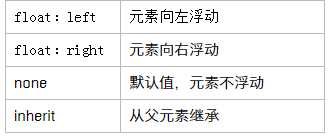
            img{float:left;}
        </style>
    </head>
    <body>
        <img src="练习/img/et02.png"/>
        <p>的你觉得你感觉饿了我今晚金额均为金额为金刚啊额价位u哦为</p>
        <p>的你觉得你感觉饿了我今晚金额均为金额为金刚啊额价位u哦为</p>
    </body>

属性值
<style>
  outer{border:1px solid black; width:300}
  .inner{width:50px; height:50px; background-color:#ff4400; float:Left;}
  .clearfix{clear:both;}
</style>
<div class="outer">
  <div class="inner"></div>
  <div class="inner"></div>
  <div class="clearfix"></div>
</div>//这是早期普遍使用的方法,但是对于有代码洁癖的人来说,解决的不够完美
2、单伪元素清除浮动(最好用)
<style>
  outer{border:1px solid black; width:300}
  .inner{width:50px; height:50px;float:Left;}
  .footer{backgrtound:#005fc3;width:200px; height:50px;}
  .clearfix:after{ content:‘‘; display:table; clear:both; height:0; visibility:hidden;}//最简单的方法
  .clearfix(zoom:1;)//兼容 ie 清除浮动
</style>
<div class="outer clearfix">
  <div class="inner"></div>
  <div class="inner"></div>
</div>
  <div class="footer"></div>
.clearfix:before, .clearfix:after{ display:table; content:"";}
.clearfix:after{ clear:both; }
.clearfix { *zoom:1;}//ie浏览器
3、给父级元素加overflow:hidden属性
<style>
  outer{border:1px solid black; width:300; overflow:hidden; zoom:1;//兼容IE}
  .inner{width:50px; height:50px; background-color:#ff4400; margin-right:20px; float:Left;}
  .footer{backgrtound:#005fc3;width:200px; height:50px;}
</style>
<div class="outer ">
  <div class="inner"></div>
  <div class="inner"></div>
  <div class="inner"></div>
</div>
overflow的使用
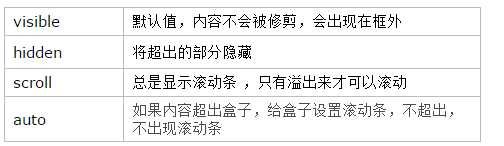
<div style="width:300px;height:300px; border:1px solid red;overflow:scroll; ">
    <p>看到你开封府发了封口费</p>
    <p>看到你开封府发了封口费</p>
    <p>看到你开封府发了封口费</p>

</div>
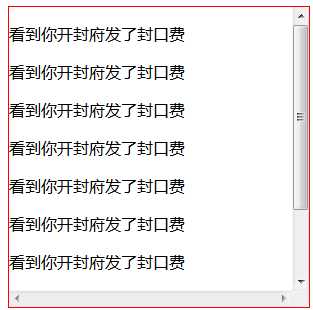
overflow设置滚动条
<div style="width:260px; height:120px; overflow:scroll;"
<div style="width:260px; height:120px; overflow-y:scrll;"></div> overflow-x(左右滚动条)
标签:css基础 set border text zoom table style mil 原来
原文地址:http://www.cnblogs.com/wdz1/p/7522062.html
