
标签:java基础
JOptionPane 有助于方便地弹出要求用户提供值或向其发出通知的标准对话框,虽然由于方法数多使 JOptionPane 类可能显得复杂,但几乎所有此类的使用都是对下列静态 showXxxDialog 方法之一的单行调用:
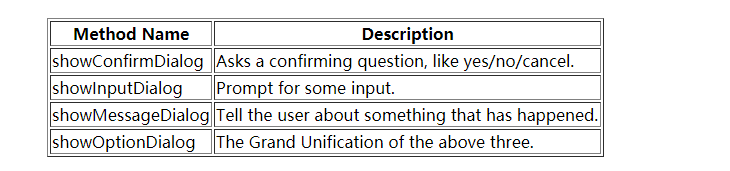
所有这些方法还可能以 showInternalXXX 风格出现,该风格使用内部窗体来保存对话框。此外还定义了多种便捷方法,这些方法重载那些基本方法,使用不同的参数列表。
所有对话框都是有模式的。在用户交互完成之前,每个 showXxxDialog 方法都一直阻塞调用者。
显示一个错误对话框,该对话框显示的 message 为 ‘alert‘:
JOptionPane.showMessageDialog(null, "alert", "alert", JOptionPane.ERROR_MESSAGE);
显示一个内部信息对话框,其 message 为 ‘information‘:
JOptionPane.showInternalMessageDialog(frame, "information","information", JOptionPane.INFORMATION_MESSAGE);
显示一个信息面板,其 options 为 "yes/no",message 为 ‘choose one‘:
JOptionPane.showConfirmDialog(null,"choose one", "choose one", JOptionPane.YES_NO_OPTION);
显示一个内部信息对话框,其 options 为 "yes/no/cancel",message 为 ‘please choose one‘,并具有 title 信息:
JOptionPane.showInternalConfirmDialog(frame,"please choose one", "information",JOptionPane.YES_NO_CANCEL_OPTION, JOptionPane.INFORMATION_MESSAGE);
显示一个警告对话框,其 options 为 OK、CANCEL,title 为 ‘Warning‘,message 为 ‘Click OK to continue‘:
Object[] options = { "OK", "CANCEL" };
JOptionPane.showOptionDialog(null, "Click OK to continue", "Warning",
JOptionPane.DEFAULT_OPTION, JOptionPane.WARNING_MESSAGE,null, options, options[0]);
显示一个要求用户键入 String 的对话框:
String inputValue = JOptionPane.showInputDialog("Please input a value");
显示一个要求用户选择 String 的对话框:
Object[] possibleValues = { "First", "Second", "Third" };
Object selectedValue = JOptionPane.showInputDialog(null,"Choose one", "Input"
JOptionPane.INFORMATION_MESSAGE, null,possibleValues, possibleValues[0]);
直接创建和使用JOptionPane
   //具体的参数含义可查阅Java文档
 JOptionPane pane = new JOptionPane(arguments);
     pane.set.Xxxx(...); // Configure
     JDialog dialog = pane.createDialog(parentComponent, title);
     dialog.show();
     Object selectedValue = pane.getValue();
     if(selectedValue == null)
       return CLOSED_OPTION;     //If there is not an array of option buttons:
     if(options == null) {
       if(selectedValue instanceof Integer)
          return ((Integer)selectedValue).intValue();
       return CLOSED_OPTION;
     }     //If there is an array of option buttons:
     for(int counter = 0, maxCounter = options.length;
        counter < maxCounter; counter++) {
        if(options[counter].equals(selectedValue))
        return counter;
     }
     return CLOSED_OPTION;
参考:在线API文档
本文出自 “卫莨” 博客,请务必保留此出处http://acevi.blog.51cto.com/13261784/1969841
标签:java基础
原文地址:http://acevi.blog.51cto.com/13261784/1969841
