
标签:nginx php
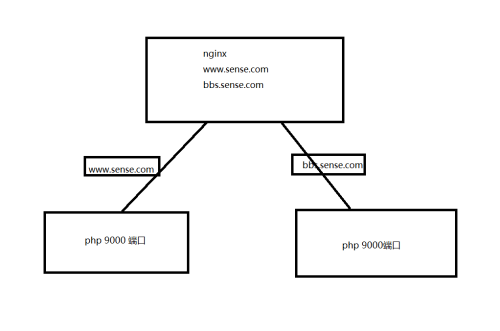
nginx配置文件:
主配置文件
[root@linux-node1 conf.d]# cat /etc/nginx/nginx.conf
user nginx;
worker_processes auto;
error_log /var/log/nginx/error.log;
pid /run/nginx.pid;

# Load dynamic modules. See /usr/share/nginx/README.dynamic.
include /usr/share/nginx/modules/*.conf;

events {
    worker_connections 1024;
}

http {
    log_format  main  ‘$remote_addr - $remote_user [$time_local] "$request" ‘
                      ‘$status $body_bytes_sent "$http_referer" ‘
                      ‘"$http_user_agent" "$http_x_forwarded_for"‘;

    access_log  /var/log/nginx/access.log  main;

    sendfile            on;
    tcp_nopush          on;
    tcp_nodelay         on;
    keepalive_timeout   65;
    types_hash_max_size 2048;

    include             /etc/nginx/mime.types;
    default_type        application/octet-stream;

    include /etc/nginx/conf.d/*.conf;
    }

[root@linux-node1 conf.d]#
include配置文件
[root@linux-node1 conf.d]# cat bbs.conf
server {
        listen       80;
        server_name  bbs.sense.com;
        access_log  /tmp/bbs.log  main;
        location / {
            root   /www/bbs;
            index  index.html index.htm;
        }
        location ~ .*\.(php|php5)?$ {
            root /www/bbs;
            fastcgi_pass  192.168.56.14:9000;
            fastcgi_index index.php;
            include fastcgi.conf;
        }
    }
[root@linux-node1 conf.d]# cat  www.conf
server {
        listen       80;
        server_name www.sense.com;
        access_log  /tmp/www.log  main;
        location / {
            root   /www/www;
            index  index.html index.htm;
        }
        location ~ .*\.(php|php5)?$ {
            root /www/www;
            fastcgi_pass  192.168.56.12:9000;
            fastcgi_index index.php;
            include fastcgi.conf;
        }
    }
[root@linux-node1 conf.d]#
2.后台php需要开启900端口,也就是说要编译或者安装php,php的监听的地址修改为本机的ip地址,不能在是127.0.0.1了 否则nginx无法代理
3.nginx每个项目代码需要保存一份,php后台每个项目需要保存一份,代码目录要一致
静态的html用户请求 请求的是nginx上面的代码,动态的请求,请求的php服务器上面的代码
举一个简单的例子:bbs.sense.com 的代码在nginx上面/www/bbs 下保存一份,也得在php所在的服务器上面的/www/bbs 下面保存一份,静态的请求请求nginx服务器的代码,动态的请求请求php服务器的代码
上面基础架构存在问题:nginx单点 php单点 nginx单点可以用keepalived解决,但是php单点必须得增加后端服务器,如果增加后端的服务器,那么nginx应该怎么配置呢
第二种架构
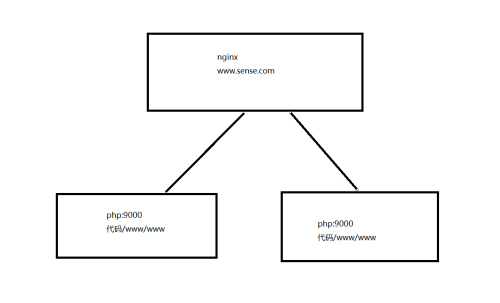
nginx主配置文件
[root@linux-node1 www]# cat /etc/nginx/nginx.conf
user nginx;
worker_processes auto;
error_log /var/log/nginx/error.log;
pid /run/nginx.pid;

# Load dynamic modules. See /usr/share/nginx/README.dynamic.
include /usr/share/nginx/modules/*.conf;

events {
    worker_connections 1024;
}

http {
    log_format  main  ‘$remote_addr - $remote_user [$time_local] "$request" ‘
                      ‘$status $body_bytes_sent "$http_referer" ‘
                      ‘"$http_user_agent" "$http_x_forwarded_for"‘;

    access_log  /var/log/nginx/access.log  main;

    sendfile            on;
    tcp_nopush          on;
    tcp_nodelay         on;
    keepalive_timeout   65;
    types_hash_max_size 2048;

    include             /etc/nginx/mime.types;
    default_type        application/octet-stream;
     upstream  fastcgiserver {
     server 192.168.56.12:9000;  ##此时是同一代码
     server 192.168.56.14:9000;  ##此时是同一代码
   }
    include /etc/nginx/conf.d/*.conf;
    }

[root@linux-node1 www]#
nginx include配置文件
[root@linux-node1 conf.d]# cat www.conf
server {
        listen       80;
        server_name www.sense.com;
        access_log  /tmp/www.log  main;
        location / {
            root   /www/www;
            index  index.html index.htm;
        }
        location ~ .*\.(php|php5)?$ {
            root /www/www;
            fastcgi_pass  fastcgiserver;  #此处有修改
            fastcgi_index index.php;
            include fastcgi.conf;
        }
    }
[root@linux-node1 conf.d]#
这样做是轮询的方式从后端的php日志依然能够得出来,静态文件还是请求nginx动态文件还是请求php服务器,nginx和后端的php服务器组依然要部署和nginx相同路径的代码
本文出自 “砖家博客” 博客,请务必保留此出处http://wsxxsl.blog.51cto.com/9085838/1975109
标签:nginx php
原文地址:http://wsxxsl.blog.51cto.com/9085838/1975109
