
基础
新建项目的,新建登录页的基本操作略,主要说下在实现登录过程碰到的问题,废话不多说,让我们进入主题。
验证码
asp.net.core2.0本身有提供system.drawing命名空间,但是没有Image,Graphics,Bitmap等对象的实现,只能引用第三方的dll来操作。
1、在vs的项目里打开nuget包管理器,搜索关键字“drawing",显示很多可用的包,选择安装"zkweb.system.drawing" 包
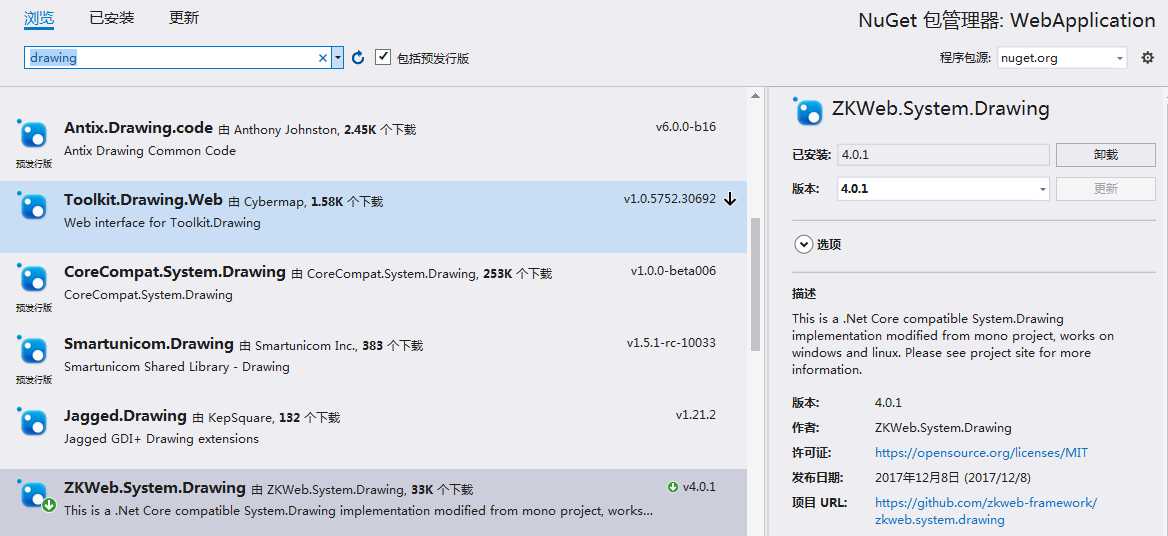
2、实现随机字符串的图片显示代码
public IActionResult ImgCode()
        {
            int Width = 100;
            int Height = 30;

            string chkCode = string.Empty;

            //颜色列表,用于验证码、噪线、噪点
            Color[] color = { Color.Black, Color.Red, Color.Blue,
                Color.Green, Color.Orange, Color.Brown, Color.DarkBlue };

            //字体列表,用于验证码
            string[] font = { "Times New Roman", "MS Mincho", "Book Antiqua", "Gungsuh", "PMingLiU", "Impact" };

            //验证码的字符集,去掉了一些容易混淆的字符
            char[] character ={ ‘2‘, ‘3‘, ‘4‘, ‘5‘, ‘6‘, ‘8‘, ‘9‘,
                                ‘A‘, ‘B‘, ‘C‘, ‘D‘, ‘E‘,‘F‘, ‘G‘,
                                ‘H‘, ‘J‘, ‘K‘, ‘L‘, ‘M‘, ‘N‘,
                                ‘P‘, ‘R‘, ‘S‘, ‘T‘, ‘W‘, ‘X‘, ‘Y‘ };

            Random rnd = new Random();

            //生成验证码字符串
            for (int i = 0; i < 4; i++)
            {
                chkCode += character[rnd.Next(character.Length)];
            }

            //保存验证码的Cookie
            //HttpCookie anycookie = new HttpCookie("validateCookie");
            //anycookie.Values.Add("ChkCode", chkCode);
            //HttpContext.Current.Response.Cookies["validateCookie"].Values["ChkCode"] = chkCode;

            Bitmap bmp = new Bitmap(Width, Height);
            Graphics g = Graphics.FromImage(bmp);
            g.Clear(Color.White);

            //画噪线
            for (int i = 0; i < 2; i++)
            {
                int x1 = rnd.Next(Width);
                int y1 = rnd.Next(Height);
                int x2 = rnd.Next(Width);
                int y2 = rnd.Next(Height);
                Color clr = color[rnd.Next(color.Length)];
                g.DrawLine(new Pen(clr), x1, y1, x2, y2);
            }

            //画验证码字符串
            for (int i = 0; i < chkCode.Length; i++)
            {
                string fnt = font[rnd.Next(font.Length)];
                Font ft = new Font(fnt, 16, FontStyle.Bold);
                Color clr = color[rnd.Next(color.Length)];
                g.DrawString(
                    chkCode[i].ToString(),
                    ft,
                    new SolidBrush(clr),
                    (float)i * 20 + 20,
                    (float)6
                    );
            }

            //画噪点
            for (int i = 0; i < 10; i++)
            {
                int x = rnd.Next(bmp.Width);
                int y = rnd.Next(bmp.Height);
                Color clr = color[rnd.Next(color.Length)];
                bmp.SetPixel(x, y, clr);
            }
            //将验证码图片写入内存流,并将其以"image/Png" 格式输出
            MemoryStream ms = new MemoryStream();

            try
            {
                bmp.Save(ms, ImageFormat.Png);
                HttpContext.Session.SetString("chkCode", chkCode);
                Response.Body.Dispose();
                return File(ms.ToArray(), @"image/png");
            }
            finally
            {
                //显式释放资源
                bmp.Dispose();
                g.Dispose();
            }
        }
3、运行webapplication正常,验证码没有显示出来,调试发现有Session的错误提示,编译时能正常通过,运行提示“Session has not been configured for this application or request.”,在startup.cs使用session服务
,代码如下:
  public void ConfigureServices(IServiceCollection services)
        {


            services.AddMvc().AddSessionStateTempDataProvider();
            services.AddSession();
        }

        // This method gets called by the runtime. Use this method to configure the HTTP request pipeline.
        public void Configure(IApplicationBuilder app, IHostingEnvironment env)
        {
            if (env.IsDevelopment())
            {

                app.UseDeveloperExceptionPage();
                app.UseBrowserLink();
            }
            else
            {
                app.UseExceptionHandler("/Home/Error");
            }

            app.UseStaticFiles();
            app.UseSession();
            app.UseMvc(routes =>
            {
                routes.MapRoute(
                    name: "default",
                    template: "{controller=Home}/{action=Index}/{id?}");
            });
        }
4、编译,刷新页面,显示验证码效果: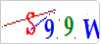
登录动作实现
登录后台,用session保存登录后用户对象信息,session方法里没有发现有能保存值是对象形式,这就有点尴尬了,难道用户的信息用多个key分别去存储,这有点不科学啊,肯定有简单的方式实现。
