
标签:jQuery html
一、文档操作1、文档操作示例
<!DOCTYPE html>
<html>
<head>
    <meta charset="UTF-8">
    <meta http-equiv="X-UA-Compatible" content="IE=edge">
    <meta name="viewport" content="width=device-width, initial-scale=1">
    <title>文档处理</title>
</head>
<body>
<button id="b1">新增</button>
<table border="1">
    <thead>
    <tr>
        <th>#</th>
        <th>姓名</th>
        <th>爱好</th>
        <th>操作</th>
    </tr>
    </thead>
    <tbody>
    <tr>
        <td>1</td>
        <td>Egon</td>
        <td>爬山</td>
        <td>
            <button>删除</button>
            <button>编辑</button>
        </td>
    </tr>
    </tbody>
</table>
<script src="https://cdn.bootcss.com/jquery/3.3.1/jquery.min.js"></script>
<script>
    // 找到新增按钮
    $("#b1").click(function () {
        // 生成一条数据
        var newTrEle = document.createElement("tr");
        $(newTrEle).html("<td>2</td> <td>Yuan</td> <td>游泳</td> <td><button>删除</button> <button>编辑</button></td>");
        // 把新创建的tr追加到tbody的最后
        $("tbody").append(newTrEle);
    });
    // 使用on方法做事件委派,否则新的数据删除操作不能成功
    $("tbody").on("click", ".delete", function () {
        // this指向的是实际触发事件的元素,删除按钮当前行数据
        $(this).parent().parent().remove();
    })
</script>
</body>
</html>
2、批量操作示例
<!DOCTYPE html>
<html>
<head>
    <meta charset="UTF-8">
    <meta http-equiv="X-UA-Compatible" content="IE=edge">
    <meta name="viewport" content="width=device-width, initial-scale=1">
    <title>批量操作示例</title>
</head>
<body>
<table border="1">
  <thead>
  <tr>
    <th>#</th>
    <th>姓名</th>
    <th>操作</th>
  </tr>
  </thead>
  <tbody>
  <tr>
    <td><input type="checkbox"></td>
    <td>Egon</td>
    <td>
      <select>
        <option value="1">上线</option>
        <option value="2">下线</option>
        <option value="3">停职</option>
      </select>
    </td>
  </tr>
  <tr>
    <td><input type="checkbox"></td>
    <td>Alex</td>
    <td>
      <select>
        <option value="1">上线</option>
        <option value="2">下线</option>
        <option value="3">停职</option>
      </select>
    </td>
  </tr>
  <tr>
    <td><input type="checkbox"></td>
    <td>Yuan</td>
    <td>
      <select>
        <option value="1">上线</option>
        <option value="2">下线</option>
        <option value="3">停职</option>
      </select>
    </td>
  </tr>
  <tr>
    <td><input type="checkbox"></td>
    <td>EvaJ</td>
    <td>
      <select>
        <option value="1">上线</option>
        <option value="2">下线</option>
        <option value="3">停职</option>
      </select>
    </td>
  </tr>
  </tbody>
</table>
<input type="button" id="b1" value="全选">
<input type="button" id="b2" value="取消">
<input type="button" id="b3" value="反选">
<script src="https://cdn.bootcss.com/jquery/3.3.1/jquery.min.js"></script>
<script>
  var flag = false;
  $(window).keydown(function (event) {                  // shift按键按下的时候 把flag 设置 true
      if (event.keyCode === 16){
          flag = true;
      }
  });
  $(window).keyup(function (event) {                      // shift按键抬起来的时候 把flag设置成 false
      if (event.keyCode === 16 ){
          flag = false;
      }
  });
    $("select").change(function () {                   // 给 select 绑定 change 示例
      // 判断当前select 这一行的 checkbox有没有被选中
        var currentCheckbox  = $(this).parent().parent().find(":checkbox").prop("checked");
        if (flag && currentCheckbox){                    // 只有在批量操作模式下才进行后续操作
        var selectValue = $(this).val();                 // 取到当前select被选中的值
        $("input[type='checkbox']:checked").parent().parent().find("select").val(selectValue);  // 把所有checkbox被选中的那些行的select设置成相同值
        }
    });
    //全选
    $("#b1").click(function(){
        $("input[type='checkbox']").prop("checked",true);
    })
    //取消
    $("#b2").click(function () {
       $("input[type='checkbox']").prop("checked", false);
    });
    // 反选
    $("#b3").click(function(){
        $("input[type='checkbox']").each(function(){
            if ($(this).prop("checked")) {
                $(this).prop("checked",false);
            }else {
            $(this).prop("checked",true);
            }
        })
    })
</script>
</body>
</html>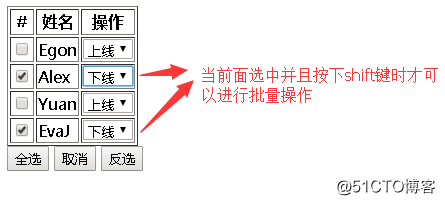
3、hover事件示例
<!DOCTYPE html>
<html>
<head>
    <meta charset="UTF-8">
    <meta http-equiv="X-UA-Compatible" content="IE=edge">
    <meta name="viewport" content="width=device-width, initial-scale=1">
    <title>hover事件</title>
    <style>
        * {
            margin: 0;
            padding: 0;
        }
        .nav {
            background-color: #4d4d4d;
            height: 50px;
        }
        .nav ul {
            list-style-type: none;
            float: right;
        }
        .nav li {
            line-height: 50px;
            float: left;
            padding: 0 10px;
            color: white;
            position: relative;
        }
        .son {
            height: 100px;
            width: 200px;
            background-color: blue;
            position: absolute;
            top: 50px;
            right: 0;
            display: none;
        }
        .clearfix:after {
            content: "";
            display: block;
            clear: both;
        }
        .hover .son {
            display: block;
        }
    </style>
</head>
<body>
<div class="nav clearfix">
    <ul>
        <li>登录</li>
        <li>注册</li>
        <li>购物车
            <p>空空如也~</p>
        </li>
    </ul>
</div>
<script src="https://cdn.bootcss.com/jquery/3.3.1/jquery.min.js"></script>
<script>
    $(".nav li").hover(
        function () {
            // 鼠标移上去要做的事儿
            $(this).addClass("hover");
        },
        function () {
            // 鼠标移出来要做的事儿
            $(this).removeClass("hover");
        }
    )
</script>
</body>
</html>
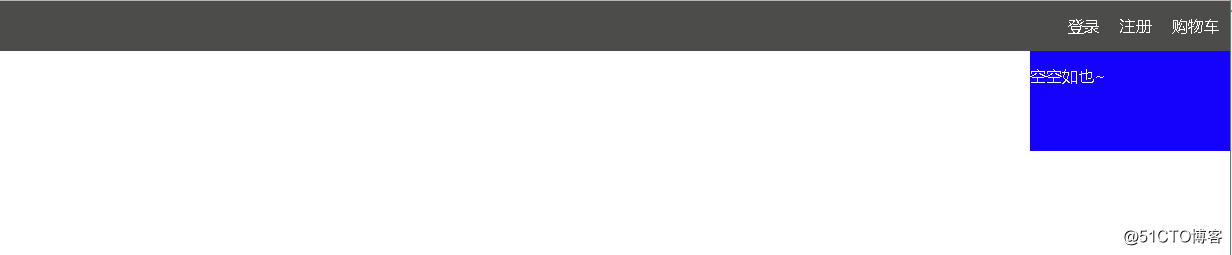
效果图:
二、jQuery动画效果
1、用法
// 基本
show([s,[e],[fn]])
hide([s,[e],[fn]])
toggle([s],[e],[fn])
// 滑动
slideDown([s],[e],[fn])
slideUp([s,[e],[fn]])                 //$("#i1").slideUp(2000)    2秒滑动到屏幕顶部消失
slideToggle([s],[e],[fn])
// 淡入淡出
fadeIn([s],[e],[fn])
fadeOut([s],[e],[fn])                   //$("#i1").fadeOut(2000)   2秒淡出屏幕
fadeTo([[s],o,[e],[fn]])                //$("#i1").fadeTo(2000,0.5)  2秒从当前状态到0.5的透明度状态
fadeToggle([s,[e],[fn]])
// 自定义(了解即可)
animate(p,[s],[e],[fn])             //$("#i1").animate({width:"800px"},2000)  2秒把元素变成宽度为800px大小
2、点赞动画示例
<!DOCTYPE html>
<html>
<head>
  <meta charset="UTF-8">
  <meta http-equiv="x-ua-compatible" content="IE=edge">
  <meta name="viewport" content="width=device-width, initial-scale=1">
  <title>点赞动画示例</title>
  <style>
    div {
      position: relative;
      display: inline-block;
    }
    div>i {
      display: inline-block;
      color: red;
      position: absolute;
      right: -16px;
      top: -5px;
      opacity: 1;
    }
  </style>
</head>
<body>
<div id="d1">点赞</div>
<script src="https://cdn.bootcss.com/jquery/3.3.1/jquery.min.js"></script>
<script>
  $("#d1").on("click", function () {
    var newI = document.createElement("i");
    newI.innerText = "+1";
    $(this).append(newI);
    $(this).children("i").animate({
      opacity: 0
    }, 1000)
  })
</script>
</body>
</html>
三、each和data
1、.each()
.each(function(index, Element)):
描述:遍历一个jQuery对象,为每个匹配元素执行一个函数。
.each() 方法用来迭代jQuery对象中的每一个DOM元素。每次回调函数执行时,会传递当前循环次数作为参数(从0开始计数)。关键字 this 总是指向当前DOM元素。
// 为每一个li标签添加foo
$("li").each(function(){
$(this).addClass("c1");
});
注意: jQuery的方法返回一个jQuery对象,遍历jQuery集合中的元素 - 被称为隐式迭代的过程。当这种情况发生时,它通常不需要显式地循环的 .each()方法:
也就是说,上面的例子没有必要使用each()方法,直接像下面这样写就可以了:
$("li").addClass("c1"); // 对所有标签做统一操作
在遍历过程中可以使用 return false提前结束each循环。
<!DOCTYPE html>
<html>
<head>
    <meta charset="UTF-8">
    <meta http-equiv="X-UA-Compatible" content="IE=edge">
    <meta name="viewport" content="width=device-width, initial-scale=1">
    <title>each循环示例</title>
    <style>
        .c1 {
            height: 100px;
            background-color: red;
            border-bottom: 1px solid black;
        }
    </style>
</head>
<body>
<div>111</div>
<div>222</div>
<div>333</div>
<script src="https://cdn.bootcss.com/jquery/3.3.1/jquery.min.js"></script>
</body>
</html>
var $divEles = $("div");
$divEles.each(function(){
    console.log(this);
})
$("div").each(function(){
    console.log(this);
})


显示结果:
<div>111</div>
<div>222</div>
<div>333</div>
2、.data()
在匹配的元素集合中的所有元素上存储任意相关数据或返回匹配的元素集合中的第一个元素的给定名称的数据存储的值。
.data(key, value):
$("div").data("k",100);         //给所有div标签都保存一个名为k,值为100
$("div").data("k");             //返回第一个div标签中保存的"k"的值
$("div").removeData("k"); //移除元素上存放k对应的数据标签:jQuery html
原文地址:http://blog.51cto.com/qidian510/2091364
