
标签:list 公交 ima 计算 else ice print 直接 res
Object。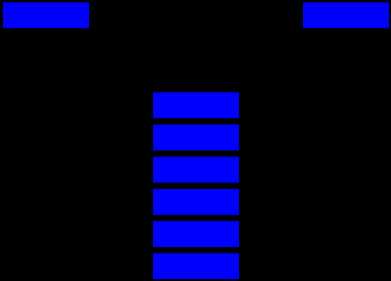
生活中常见的Stack的例子比如一摞书,你最后放上去的那本你之后会最先拿走;又比如浏览器的访问历史,当点击返回按钮,最后访问的网站最先从历史记录中弹出。
Stack一般具备以下方法:
以对象形式实现栈
    <script type="text/javascript">
        function Stack() {
            this.count = 0;
            this.storage = {};
            //将一个元素推入栈顶
            this.push = function (value) {
                this.storage[this.count] = value;
                this.count++;
            }
            //移除栈顶元素,并返回被移除的元素
            this.pop = function () {
                if (this.count === 0) {
                    return undefined;
                }
                this.count--;
                var result = this.storage[this.count];
                delete this.storage[this.count];
                return result;
            }
            //返回栈顶元素
            this.peek = function () {
                return this.storage[this.count - 1];
            }
            //栈中是否有元素
            this.isEmpty = function () {
                //使用es6语法判断对象中属性长度
                //return Object.keys(this.storage).length==0;
                return this.count==0;
            }
            //移除栈中所有元素
            this.clear = function () {
                this.count = 0
                //return this.storage={};
            }
            //返回栈中元素的个数
            this.size = function () {
                return this.count;
            }
        }


        var newStack = new Stack();
        newStack.push("第一个元素");
        newStack.push("第二个元素");
        newStack.push("第三个元素");
        console.log("打印栈中元素个数:" + newStack.size());
        console.log("打印栈中栈顶元素:" + newStack.peek());
        console.log("打印栈中移除元素:" + newStack.pop());
        console.log("移除栈顶元素后再次打印栈中栈顶元素:" + newStack.peek());
        console.log("判断栈中是否有元素:" + newStack.isEmpty());
        console.log("移除栈中所有元素:" + newStack.clear());
        console.log("移除后判断栈中是否有元素:" + newStack.isEmpty());
        console.log("打印栈中移除元素:" + newStack.pop());
    </script>
以数组形式实现栈
    <script type="text/javascript">
        function Stack() {
            //保存栈内元素的数组
            this.dataStore = [];
            //top用来记录栈顶位置,初始化为0
            this.top = 0;

            this.push = function (element) {
                this.dataStore[this.top++] = element;   // 先在top位置加入元素,之后top加1
            }
            this.pop = function () {
                // top先减1,然后返回top位置的元素
                return this.dataStore[--this.top];
            }
            this.peek = function peek() {
                return this.dataStore[this.top - 1];
            }


            this.isEmpty = function clear() {
                return this.top ==0;
            }

            this.clear = function clear() {
                this.top = 0;
            }

            this.length = function length() {
                return this.top;
            }
        }
        var newStack = new Stack();
        newStack.push("第一个元素");
        newStack.push("第二个元素");
        newStack.push("第三个元素");
        console.log("打印栈中元素个数:" + newStack.length());
        console.log("打印栈中栈顶元素:" + newStack.peek());
        console.log("打印栈中移除元素:" + newStack.pop());
        console.log("移除栈顶元素后再次打印栈中栈顶元素:" + newStack.peek());
        console.log("判断栈中是否有元素:" + newStack.isEmpty());
        console.log("移除栈中所有元素:" + newStack.clear());
        console.log("移除后判断栈中是否有元素:" + newStack.isEmpty());
    </script>
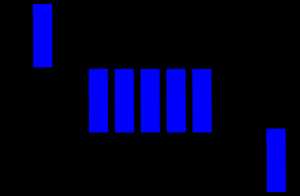
Queue和Stack有一些类似,不同的是Stack是先进后出,而Queue是先进先出。Queue在生活中的例子比如排队上公交,排在第一个的总是最先上车;又比如打印机的打印队列,排在前面的最先打印。
Queue一般具有以下常见方法:
Javascript中的Array已经具备了Queue的一些特性,所以我们可以借助Array实现一个Queue类型:
    <script type="text/javascript">
        function Queue() {
            var collection = [];
            //返回队列所有元素
            this.print = function () {
                return collection;
            }
            //入列,向队列尾部增加一个元素
            this.enqueue = function (element) {
                collection.push(element);
            }
            //出列,移除队列头部的一个元素并返回被移除的元素
            this.dequeue = function () {
                return collection.shift();
            }
            //获取队列的第一个元素
            this.front = function () {
                return collection[0];
            }
            //判断队列是否为空
            this.isEmpty = function () {
                return collection.length === 0;
            }
            //清除队列
            this.clear = function () {
                items = [];
            };
            //获取队列中元素的个数
            this.size = function () {
                return collection.length;
            }
        }
        var newQueue= new Queue();
        newQueue.enqueue("第一个元素");
        newQueue.enqueue("第二个元素");
        newQueue.enqueue("第三个元素");
        console.log("打印队列中元素个数:" + newQueue.size());
        console.log("打印队列中第一个元素:" + newQueue.front());
        console.log("打印队列中所有元素:" + newQueue.print());
        console.log("打印队列中移除元素:" + newQueue.dequeue());
        console.log("移除队列元素后再次打印队列中所有元素:" + newQueue.print());
        console.log("判断队列中是否有元素:" + newQueue.isEmpty());
        console.log("移除队列中所有元素:" + newQueue.clear());
        console.log("移除后判断队列中是否有元素:" + newQueue.isEmpty());
    </script>
Queue还有个升级版本,给每个元素赋予优先级,优先级高的元素入列时将排到低优先级元素之前。区别主要是enqueue方法的实现:
    <script type="text/javascript">
        function PriorityQueue() {
            var collection = [];
            //返回队列所有元素
            this.print = function () {
                return collection;
            }
            //入列,向队列尾部增加一个元素
            this.enqueue = function (element) {
                collection.push(element);
            }
            //出列,移除队列头部的一个元素并返回被移除的元素
            this.dequeue = function () {
                return collection.shift();
            }
            //获取队列的第一个元素
            this.front = function () {
                return collection[0];
            }
            //判断队列是否为空
            this.isEmpty = function () {
                return collection.length === 0;
            }
            //清除队列
            this.clear = function () {
                items = [];
            };
            //获取队列中元素的个数
            this.size = function () {
                return collection.length;
            }
            //优先队列
            this.priorityEnqueue = function (element) {
                if (this.isEmpty()) {
                    collection.push(element);
                } else {
                    var added = false;
                    for (var i = 0; i < collection.length; i++) {
                        if (element[1] < collection[i][1]) {
                            collection.splice(i, 0, element);
                            added = true;
                            break;
                        }
                    }
                    if (!added) {
                        collection.push(element);
                    }
                }
            }
        }
        var newQueue = new PriorityQueue();
        newQueue.enqueue("第一个元素");
        newQueue.enqueue("第二个元素");
        newQueue.enqueue("第三个元素");
        console.log("打印队列中元素个数:" + newQueue.size());
        console.log("打印队列中第一个元素:" + newQueue.front());
        console.log("打印队列中所有元素:" + newQueue.print());
        console.log("打印队列中移除元素:" + newQueue.dequeue());
        console.log("移除队列元素后再次打印队列中所有元素:" + newQueue.print());
        console.log("判断队列中是否有元素:" + newQueue.isEmpty());
        console.log("移除队列中所有元素:" + newQueue.clear());
        console.log("移除后判断队列中是否有元素:" + newQueue.isEmpty());

        newQueue.priorityEnqueue([‘gannicus‘, 3]);
        newQueue.priorityEnqueue([‘spartacus‘, 1]);
        newQueue.priorityEnqueue([‘crixus‘, 2]);
        newQueue.priorityEnqueue([‘oenomaus‘, 4]);

        console.log("优先队列中所有元素:" + newQueue.print());

    </script>
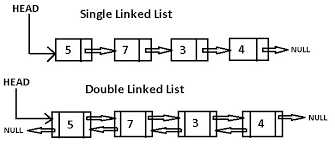
链表是一种链式数据结构,链上的每个节点包含两种信息:节点本身的数据和指向下一个节点的指针。链表和传统的数组都是线性的数据结构,存储的都是一个序列的数据,但也有很多区别,如下表:
| 比较维度 | 数组 | 链表 |
|---|---|---|
| 内存分配 | 静态内存分配,编译时分配且连续 | 动态内存分配,运行时分配且不连续 |
| 元素获取 | 通过Index获取,速度较快 | 通过遍历顺序访问,速度较慢 |
| 添加删除元素 | 因为内存位置连续且固定,速度较慢 | 因为内存分配灵活,只有一个开销步骤,速度更快 |
| 空间结构 | 可以是一维或者多维数组 | 可以是单向、双向或者循环链表 |
一个单向链表通常具有以下方法:
单向链表的Javascript实现:
标签:list 公交 ima 计算 else ice print 直接 res
原文地址:https://www.cnblogs.com/zhuochong/p/11627598.html
