
标签:color doctype xxxxxx import xxxxx img for hal 查询
首先数据库长这样
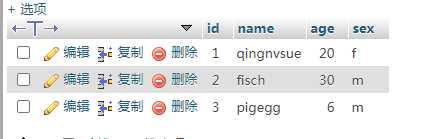
我们想将name和age列显示到web页面
上代码sqlshowweb.py
from flask import Flask
from flask import render_template
import pymysql

app = Flask(__name__)


@app.route(‘/‘)
def index():
    conn = pymysql.connect(host=‘39.106.168.84‘, user=‘flask_topvj_net‘, password=‘xxxxxxxx‘, port=3306,
                        db=‘flask_topvj_net‘)
    cur = conn.cursor()
    sql = "SELECT `name`, `age` FROM `student` WHERE 1"
    cur.execute(sql)
    u = cur.fetchall()
    conn.close()
    return render_template(‘index.html‘,u=u)
if __name__ == ‘__main__‘:
    app.debug = True
    app.run(port=8003)
index.html
<!DOCTYPE html>
<html lang="en">
<head>
    <meta charset="UTF-8">
    <title>Title</title>
</head>
<body>

    <table class="table table-bordered">
    <tr>
        <th>name</th>
        <th>age</th>

    </tr>
        {% for i in u %}
            <tr>
                <td>{{ i[0] }}</td>
                <td>{{ i[1] }}</td>

            </tr>
        {% endfor %}
    </table>

</body>
</html>
运行结果
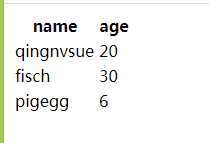
代码在git上 https://github.com/qingnvsue/flask 的sql文件夹
python的flask框架查询数据库,将数据库的某几列显示到web页面
标签:color doctype xxxxxx import xxxxx img for hal 查询
原文地址:https://www.cnblogs.com/qingnvsue/p/13019974.html
