
标签:
APP管理界面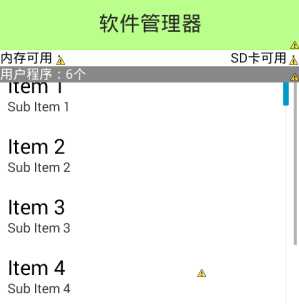
<FrameLayoutandroid:layout_width="fill_parent"android:layout_height="fill_parent" ><LinearLayoutandroid:id="@+id/ll_loading"android:layout_width="fill_parent"android:layout_height="fill_parent"android:gravity="center"android:orientation="vertical"android:visibility="invisible" ><ProgressBarandroid:layout_width="wrap_content"android:layout_height="wrap_content" /><TextViewandroid:layout_width="wrap_content"android:layout_height="wrap_content"android:text="正在加载程序信息..." /></LinearLayout><ListViewandroid:overScrollMode="never"//去除滚动时的动画android:fastScrollEnabled="true"//有了右侧的导航栏android:id="@+id/lv_app_manager"android:layout_width="fill_parent"android:layout_height="fill_parent" ></ListView><TextViewandroid:id="@+id/tv_status"android:layout_width="fill_parent"android:layout_height="wrap_content"android:text="用户程序:6个"android:textColor="#ffffff"android:background="#ff888888"/></FrameLayout>
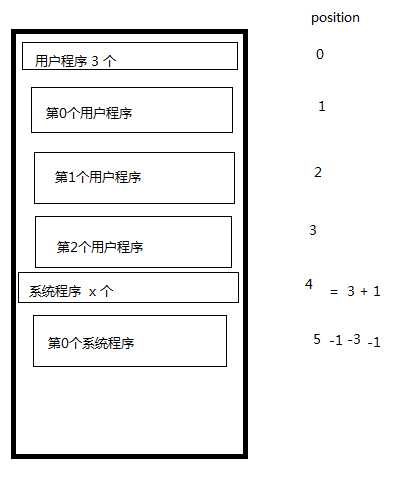
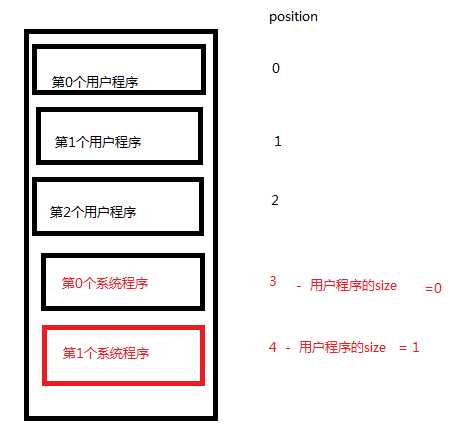
public class AppInfo {private Drawable icon;private String name;private String packname;private boolean inRom;//true为手机内存 false为外部内存private boolean userApp;//true 用户 false 系统.....}
/*** 业务方法,提供手机里面安装的所有的应用程序信息*/public class AppInfoProvider {/*** 获取所有的安装的应用程序信息。* @param context 上下文* @return*/public static List<AppInfo> getAppInfos(Context context){PackageManager pm = context.getPackageManager();//获取包的管理器List<AppInfo> appInfos = new ArrayList<AppInfo>();//存放所有应用程序信息集合AppInfo appInfo = null;List<PackageInfo> PackInfos = pm.getInstalledPackages(0);//所有的安装在系统上的应用程序包信息 0为不关心特殊的标记for (PackageInfo packageInfo : PackInfos) {String packName = packageInfo.packageName;//获取包名Drawable icon = packageInfo.applicationInfo.loadIcon(pm);//获取应用程序图标String name = packageInfo.applicationInfo.loadLabel(pm).toString();//获取应用程序名称int flag = packageInfo.applicationInfo.flags;appInfo = new AppInfo();if((flag&ApplicationInfo.FLAG_SYSTEM) == 0){//用户程序appInfo.setUserApp(true);}else{ //系统程序appInfo.setUserApp(false);}if((flag&ApplicationInfo.FLAG_EXTERNAL_STORAGE) == 0){//手机内存appInfo.setInRom(true);}else{appInfo.setInRom(false);}appInfo.setPackname(packName);appInfo.setIcon(icon);appInfo.setName(name);appInfos.add(appInfo);}return appInfos;}}
public class AppManagerActivity extends Activity implements OnClickListener {//手机内存和SD卡的剩余存储空间private TextView tv_avail_rom;private TextView tv_avail_sd;//加载进度private LinearLayout ll_loading;//ListViewprivate ListView lv_app_manager;//Adpaterprivate AppManagerAdapter adapter;//应用程序包集合private List<AppInfo> appInfos; //所有应用程序包集合private List<AppInfo> userAppInfos;//所有用户程序包集合private List<AppInfo> systemAppInfos;//所有系统程序包集合//程序信息的状态private TextView tv_status;//被点击的条目private AppInfo appInfo;//悬浮窗体private PopupWindow popupWindow;private LinearLayout ll_start;//开启private LinearLayout ll_uninstall;//卸载private LinearLayout ll_share;//分享private ApplockDao dao;@Overrideprotected void onCreate(Bundle savedInstanceState) {super.onCreate(savedInstanceState);setContentView(R.layout.activity_app_manager);dao = new ApplockDao(this);tv_status = (TextView) findViewById(R.id.tv_status);tv_avail_rom = (TextView) findViewById(R.id.tv_avail_rom);tv_avail_sd = (TextView) findViewById(R.id.tv_avail_sd);lv_app_manager = (ListView) findViewById(R.id.lv_app_manager);ll_loading = (LinearLayout) findViewById(R.id.ll_loading);showAvailableSize();//显示存储的剩余空间fillData();// 给listview注册一个滚动的监听器lv_app_manager.setOnScrollListener(new OnScrollListener() {//当前滚动的状态@Overridepublic void onScrollStateChanged(AbsListView view, int scrollState) {switch (scrollState) {case OnScrollListener.SCROLL_STATE_FLING: //开始滚动break;case OnScrollListener.SCROLL_STATE_TOUCH_SCROLL://正在滚动break;case OnScrollListener.SCROLL_STATE_IDLE://停止滚动break;}}// 滚动的时候调用的方法。// firstVisibleItem 第一个可见条目在listview集合里面的位置。@Overridepublic void onScroll(AbsListView view, int firstVisibleItem,int visibleItemCount, int totalItemCount) {dismissPopupWindow();if(userAppInfos != null && systemAppInfos != null){if(firstVisibleItem > userAppInfos.size()){tv_status.setText("系统程序:"+systemAppInfos.size()+"个");}else{tv_status.setText("用户程序:"+userAppInfos.size()+"个");}}}});/*** 设置listview的点击事件*/lv_app_manager.setOnItemClickListener(new OnItemClickListener() {@Overridepublic void onItemClick(AdapterView<?> parent, View view,int position, long id) {if(position == 0 || position == userAppInfos.size()+1){ //如果是"用户程序" 或者 "系统程序" 的小标签则直接返回return;}else if(position <= userAppInfos.size()){int newPosition = position - 1;appInfo = userAppInfos.get(newPosition);}else{int newPosition = position-1-userAppInfos.size()-1;appInfo = systemAppInfos.get(newPosition);}dismissPopupWindow();View contentView = View.inflate(getApplicationContext(),R.layout.popup_app_item,null);ll_uninstall = (LinearLayout) contentView.findViewById(R.id.ll_uninstall);ll_start = (LinearLayout) contentView.findViewById(R.id.ll_start);ll_share = (LinearLayout) contentView.findViewById(R.id.ll_share);//为悬浮窗体的各项设置点击事件ll_uninstall.setOnClickListener(AppManagerActivity.this);ll_start.setOnClickListener(AppManagerActivity.this);ll_share.setOnClickListener(AppManagerActivity.this);//弹出悬浮窗体popupWindow = new PopupWindow(contentView,-2,-2);popupWindow.setBackgroundDrawable(new ColorDrawable(Color.TRANSPARENT));int[] location = new int[2];view.getLocationInWindow(location);int dip = 60;int px = DensityUtil.dip2px(getApplicationContext(),dip);popupWindow.showAtLocation(parent,Gravity.LEFT|Gravity.TOP,px,location[1]);ScaleAnimation sa = new ScaleAnimation(0.3f, 1.0f, 0.3f, 1.0f,Animation.RELATIVE_TO_SELF, 0,Animation.RELATIVE_TO_SELF, 0.5f);sa.setDuration(300);AlphaAnimation aa = new AlphaAnimation(0.5f, 1.0f);aa.setDuration(300);AnimationSet set = new AnimationSet(false);set.addAnimation(aa);set.addAnimation(sa);contentView.startAnimation(set);}});}/*** 显示存储的剩余空间*/public void showAvailableSize(){long romSize = getAvailSpace(Environment.getDataDirectory().getAbsolutePath());//手机内部存储大小long sdSize = getAvailSpace(Environment.getExternalStorageDirectory().getAbsolutePath());//外部存储大小tv_avail_rom.setText("内存可用空间: "+Formatter.formatFileSize(this,romSize));tv_avail_sd.setText("SD卡可用空间:"+Formatter.formatFileSize(this,sdSize));}/*** 获取某个目录的可用空间*/public long getAvailSpace(String path){StatFs statfs = new StatFs(path);long size = statfs.getBlockSize();//获取分区的大小long count = statfs.getAvailableBlocks();//获取可用分区块的个数return size*count;}/*** 填充Adapter数据*/public void fillData(){ll_loading.setVisibility(View.VISIBLE);//让加载程序的界面显示出来new Thread(){public void run() {//所有应用程序包的集合appInfos = AppInfoProvider.getAppInfos(AppManagerActivity.this);userAppInfos = new ArrayList<AppInfo>();systemAppInfos = new ArrayList<AppInfo>();for (AppInfo info : appInfos) {if(info.isUserApp()){ //如果是 用户程序userAppInfos.add(info);}else{systemAppInfos.add(info);}}// 加载listview的数据适配器runOnUiThread(new Runnable() {@Overridepublic void run() {if(adapter == null){ //如果适配器为空 则创建适配器对象 为listview设置adapteradapter = new AppManagerAdapter();lv_app_manager.setAdapter(adapter);}else{//adapter.notifyDataSetChanged(); //动态更新ListView}ll_loading.setVisibility(View.INVISIBLE);}});};}.start();}/*** ListView的适配器*/private class AppManagerAdapter extends BaseAdapter{@Overridepublic int getCount() {return userAppInfos.size()+1+systemAppInfos.size()+1;}@Overridepublic View getView(int position, View convertView, ViewGroup parent) {AppInfo appInfo;if(position == 0){ //显示用户程序有多少个的小标签TextView tv = new TextView(getApplication());tv.setTextColor(Color.WHITE);tv.setBackgroundColor(Color.GRAY);tv.setText("用户程序:"+userAppInfos.size()+"个");return tv;}else if(position == (userAppInfos.size()+1)){TextView tv = new TextView(getApplicationContext());tv.setTextColor(Color.WHITE);tv.setBackgroundColor(Color.GRAY);tv.setText("系统程序:"+systemAppInfos.size()+"个");return tv;}else if(position <= userAppInfos.size()){int newPosition = position-1;appInfo = userAppInfos.get(newPosition);}else{int newPosition = position-1-userAppInfos.size()-1;appInfo = systemAppInfos.get(newPosition);}View view;ViewHolder holder;// 不仅需要检查是否为空,还要判断是否是合适的类型去复用if(convertView != null && convertView instanceof RelativeLayout){view = convertView;holder = (ViewHolder) view.getTag();}else{view = View.inflate(getApplicationContext(),R.layout.list_item_appinfo,null);holder = new ViewHolder();holder.iv_icon = (ImageView) view.findViewById(R.id.iv_app_icon);holder.tv_location = (TextView) view.findViewById(R.id.tv_app_location);holder.tv_name = (TextView) view.findViewById(R.id.tv_app_name);view.setTag(holder);}holder.iv_icon.setImageDrawable(appInfo.getIcon());holder.tv_name.setText(appInfo.getName());if(appInfo.isInRom()){holder.tv_location.setText("手机内存");}else{holder.tv_location.setText("外部存储");}return view;}@Overridepublic Object getItem(int position) {return null;}@Overridepublic long getItemId(int position) {return 0;}}static class ViewHolder {TextView tv_name;TextView tv_location;ImageView iv_icon;}
标签:
原文地址:http://www.cnblogs.com/liuyu0529/p/4993798.html
