
记录一下使用zabbix监控nginx状态,关于这方面的网上大把大把的。
操作环境版本
zabbix-agent:3.0.3
zabbix-server:3.0.3
1、修改nginx配置文件,内容示例如下
# sed -n ‘13,18p‘ default.conf
    location /nginx_status {
        stub_status on;
        access_log off;
        allow 127.0.0.1;
        deny all;
    }
注:只允许127.0.0.1,拒绝其他即可
2、nginx监控脚本内容如下
# cat nginx_status.sh
#!/bin/bash
#check nginx status
ip=127.0.0.1
port=80
#echo $ip:$port
function active()  {
    /usr/bin/curl http://$ip:$port/nginx_status 2>/dev/null|grep "Active"|awk ‘{print $NF}‘
                   }

function reading() {
    /usr/bin/curl http://$ip:$port/nginx_status 2>/dev/null|grep "Reading"|awk ‘{print $2}‘
                   }

function writing() {
    /usr/bin/curl http://$ip:$port/nginx_status 2>/dev/null|grep "Writing"|awk ‘{print $4}‘
                   }

function waiting() {

    /usr/bin/curl http://$ip:$port/nginx_status 2>/dev/null|grep "Waiting"|awk ‘{print $6}‘
                   }

function accepts() {
    /usr/bin/curl http://$ip:$port/nginx_status 2>/dev/null|awk ‘NR==3{print $1}‘

                   }

function handled() {

    /usr/bin/curl http://$ip:$port/nginx_status 2>/dev/null|awk ‘NR==3{print $2}‘
                   }

function requests(){

    /usr/bin/curl http://$ip:$port/nginx_status 2>/dev/null|awk ‘NR==3{print $3}‘
                   }

case $1 in
   active)
          active
        ;;
  reading)
         reading
        ;;
  writing)
          writing
        ;;
  waiting)
          waiting
        ;;
  accepts)
          accepts
        ;;
  handled)
          handled
        ;;
  requests)
          requests
        ;;
       *)
          exit 1
        ;;
esac
赋予执行权限即可chmod +x nginx_status.sh
3、userparameter配置文件
# cat userparameter_nginx.conf
UserParameter=nginx[*],/bin/bash /etc/zabbix/scripts/nginx_status.sh $1
4、修改zabbix-agentd配置文件,然后重启服务即可。吧UnsafeUserParameters修改为1即可。
# grep -i unsafe zabbix_agentd.conf
### Option: UnsafeUserParameters
UnsafeUserParameters=1
# systemctl restart zabbix-agent.service
5、导入模板,然后在相应的主机上连接此模板即可
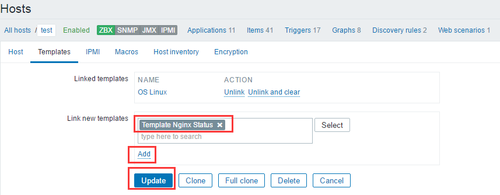
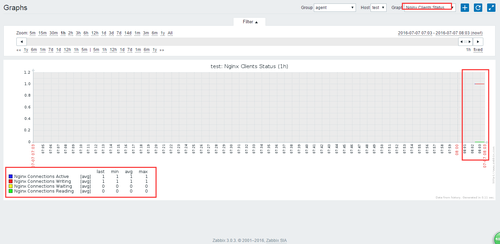
稍等片刻可以看到已经有数据显示了。。。
nginx Status 说明:
Activeconnections:对后端发起的活动连接数;
server accepts 7520:nginx 总共处理了7520个连接;
handled:成功创建了7520次握手;
requests:总共处理了7522请求。
Reading:读取客户端的连接数
Writing: 响应数据到客户端的数量
Waiting: 开启 keep-alive 的情况下,这个值等于 active – (reading+writing), 意思就是 Nginx 已经处理完正在等候下一次请求指令的驻留连接.
本文出自 “村里的男孩” 博客,请务必保留此出处http://noodle.blog.51cto.com/2925423/1811701
原文地址:http://noodle.blog.51cto.com/2925423/1811701
