
标签:zabbix监控
说明此处配置针对的是zabbix3.0版本
利用zabbix的自动发现(LLD)功能结合脚本可以实现上面的需求,实现对IIS站点的动态添加,动态监控。
效果图:
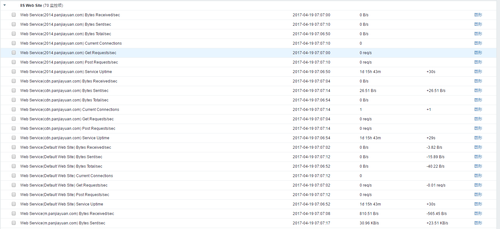
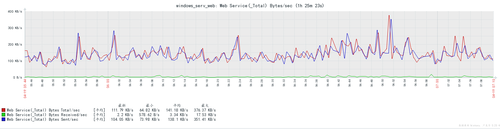
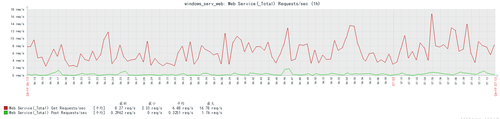
具体配置步骤:
1、 zabbix服务端配置
配置过滤正则表达式:
依次选择Administration->General->Regular expressions。创建新的正则表达式“IISSite for discovery”,会在后面的模板中引用。正则表达式的名字不能有错,否则导入模板报错。
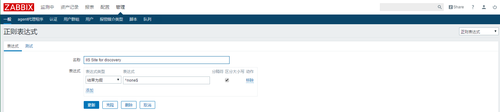
导入模块
将内容拷贝到文本文件后缀名改为”.xml”,如:Template IIS Web Site3.0.xml 也可以下载附件!
然后在WEB页面分别选择:配置è模版è导入,选择编辑的文件TemplateIIS Web Site3.0.xml,提示导入成功就OK了
<?xmlversion="1.0" encoding="UTF-8"?>
<zabbix_export>
<version>3.0</version>
<date>2016-09-22T03:55:42Z</date>
<groups>
<group>
<name>Templates</name>
</group>
</groups>
<templates>
<template>
<template>Template IIS WebSite</template>
<name>Template IIS WebSite</name>
<description/>
<groups>
<group>
<name>Templates</name>
</group>
</groups>
<applications>
<application>
<name>IIS WebSite</name>
</application>
</applications>
<items/>
<discovery_rules>
<discovery_rule>
<name>IIS Web Sitediscovery</name>
<type>0</type>
<snmp_community/>
<snmp_oid/>
<key>iis.site.discovery</key>
<delay>600</delay>
<status>0</status>
<allowed_hosts/>
<snmpv3_contextname/>
<snmpv3_securityname/>
<snmpv3_securitylevel>0</snmpv3_securitylevel>
<snmpv3_authprotocol>0</snmpv3_authprotocol>
<snmpv3_authpassphrase/>
<snmpv3_privprotocol>0</snmpv3_privprotocol>
<snmpv3_privpassphrase/>
<delay_flex/>
<params/>
<ipmi_sensor/>
<authtype>0</authtype>
<username/>
<password/>
<publickey/>
<privatekey/>
<port/>
<filter>
<evaltype>0</evaltype>
<formula/>
<conditions>
<condition>
<macro>{#WEB_SERVICE}</macro>
<value>@IIS Site for discovery</value>
<operator>8</operator>
<formulaid>A</formulaid>
</condition>
</conditions>
</filter>
<lifetime>0</lifetime>
<description/>
<item_prototypes>
<item_prototype>
<name>{#WEB_SERVICE} Current Connections</name>
<type>0</type>
<snmp_community/>
<multiplier>0</multiplier>
<snmp_oid/>
<key>perf_counter[\{#WEB_SERVICE}\Current Connections]</key>
<delay>30</delay>
<history>90</history>
<trends>365</trends>
<status>0</status>
<value_type>3</value_type>
<allowed_hosts/>
<units/>
<delta>0</delta>
<snmpv3_contextname/>
<snmpv3_securityname/>
<snmpv3_securitylevel>0</snmpv3_securitylevel>
<snmpv3_authprotocol>0</snmpv3_authprotocol>
<snmpv3_authpassphrase/>
<snmpv3_privprotocol>0</snmpv3_privprotocol>
<snmpv3_privpassphrase/>
<formula>1</formula>
<delay_flex/>
<params/>
<ipmi_sensor/>
<data_type>0</data_type>
<authtype>0</authtype>
<username/>
<password/>
<publickey/>
<privatekey/>
<port/>
<description/>
<inventory_link>0</inventory_link>
<applications>
<application>
<name>IIS Web Site</name>
</application>
</applications>
<valuemap/>
<logtimefmt/>
<application_prototypes/>
</item_prototype>
<item_prototype>
<name>{#WEB_SERVICE} Service Uptime</name>
<type>0</type>
<snmp_community/>
<multiplier>0</multiplier>
<snmp_oid/>
<key>perf_counter[\{#WEB_SERVICE}\Service Uptime]</key>
<delay>30</delay>
<history>90</history>
<trends>365</trends>
<status>0</status>
<value_type>3</value_type>
<allowed_hosts/>
<units>s</units>
<delta>0</delta>
<snmpv3_contextname/>
<snmpv3_securityname/>
<snmpv3_securitylevel>0</snmpv3_securitylevel>
<snmpv3_authprotocol>0</snmpv3_authprotocol>
<snmpv3_authpassphrase/>
<snmpv3_privprotocol>0</snmpv3_privprotocol>
<snmpv3_privpassphrase/>
<formula>1</formula>
<delay_flex/>
<params/>
<ipmi_sensor/>
<data_type>0</data_type>
<authtype>0</authtype>
<username/>
<password/>
<publickey/>
<privatekey/>
<port/>
<description/>
<inventory_link>0</inventory_link>
<applications>
<application>
<name>IIS Web Site</name>
</application>
</applications>
<valuemap/>
<logtimefmt/>
<application_prototypes/>
</item_prototype>
<item_prototype>
<name>{#WEB_SERVICE} Bytes Received/sec</name>
<type>0</type>
<snmp_community/>
<multiplier>0</multiplier>
<snmp_oid/>
<key>perf_counter[\{#WEB_SERVICE}\Total BytesReceived]</key>
<delay>30</delay>
<history>90</history>
<trends>365</trends>
<status>0</status>
<value_type>0</value_type>
<allowed_hosts/>
<units>B/s</units>
<delta>1</delta>
<snmpv3_contextname/>
<snmpv3_securityname/>
<snmpv3_securitylevel>0</snmpv3_securitylevel>
<snmpv3_authprotocol>0</snmpv3_authprotocol>
<snmpv3_authpassphrase/>
<snmpv3_privprotocol>0</snmpv3_privprotocol>
<snmpv3_privpassphrase/>
<formula>1</formula>
<delay_flex/>
<params/>
<ipmi_sensor/>
<data_type>0</data_type>
<authtype>0</authtype>
<username/>
<password/>
<publickey/>
<privatekey/>
<port/>
<description/>
<inventory_link>0</inventory_link>
<applications>
<application>
<name>IIS Web Site</name>
</application>
</applications>
<valuemap/>
<logtimefmt/>
<application_prototypes/>
</item_prototype>
<item_prototype>
<name>{#WEB_SERVICE} Bytes Sent/sec</name>
<type>0</type>
<snmp_community/>
<multiplier>0</multiplier>
<snmp_oid/>
<key>perf_counter[\{#WEB_SERVICE}\Total Bytes Sent]</key>
<delay>30</delay>
<history>90</history>
<trends>365</trends>
<status>0</status>
<value_type>0</value_type>
<allowed_hosts/>
<units>B/s</units>
<delta>1</delta>
<snmpv3_contextname/>
<snmpv3_securityname/>
<snmpv3_securitylevel>0</snmpv3_securitylevel>
<snmpv3_authprotocol>0</snmpv3_authprotocol>
<snmpv3_authpassphrase/>
<snmpv3_privprotocol>0</snmpv3_privprotocol>
<snmpv3_privpassphrase/>
<formula>1</formula>
<delay_flex/>
<params/>
<ipmi_sensor/>
<data_type>0</data_type>
<authtype>0</authtype>
<username/>
<password/>
<publickey/>
<privatekey/>
<port/>
<description/>
<inventory_link>0</inventory_link>
<applications>
<application>
<name>IIS Web Site</name>
</application>
</applications>
<valuemap/>
<logtimefmt/>
<application_prototypes/>
</item_prototype>
<item_prototype>
<name>{#WEB_SERVICE} Bytes Total/sec</name>
<type>0</type>
<snmp_community/>
<multiplier>0</multiplier>
<snmp_oid/>
<key>perf_counter[\{#WEB_SERVICE}\Total BytesTransferred]</key>
<delay>30</delay>
<history>90</history>
<trends>365</trends>
<status>0</status>
<value_type>0</value_type>
<allowed_hosts/>
<units>B/s</units>
<delta>1</delta>
<snmpv3_contextname/>
<snmpv3_securityname/>
<snmpv3_securitylevel>0</snmpv3_securitylevel>
<snmpv3_authprotocol>0</snmpv3_authprotocol>
<snmpv3_authpassphrase/>
<snmpv3_privprotocol>0</snmpv3_privprotocol>
<snmpv3_privpassphrase/>
<formula>1</formula>
<delay_flex/>
<params/>
<ipmi_sensor/>
<data_type>0</data_type>
<authtype>0</authtype>
<username/>
<password/>
<publickey/>
<privatekey/>
<port/>
<description/>
<inventory_link>0</inventory_link>
<applications>
<application>
<name>IIS Web Site</name>
</application>
</applications>
<valuemap/>
<logtimefmt/>
<application_prototypes/>
</item_prototype>
<item_prototype>
<name>{#WEB_SERVICE} Get Requests/sec</name>
<type>0</type>
<snmp_community/>
<multiplier>0</multiplier>
<snmp_oid/>
<key>perf_counter[\{#WEB_SERVICE}\Total Get Requests]</key>
<delay>30</delay>
<history>90</history>
<trends>365</trends>
<status>0</status>
<value_type>0</value_type>
<allowed_hosts/>
<units>req/s</units>
<delta>1</delta>
<snmpv3_contextname/>
<snmpv3_securityname/>
<snmpv3_securitylevel>0</snmpv3_securitylevel>
<snmpv3_authprotocol>0</snmpv3_authprotocol>
<snmpv3_authpassphrase/>
<snmpv3_privprotocol>0</snmpv3_privprotocol>
<snmpv3_privpassphrase/>
<formula>1</formula>
<delay_flex/>
<params/>
<ipmi_sensor/>
<data_type>0</data_type>
<authtype>0</authtype>
<username/>
<password/>
<publickey/>
<privatekey/>
<port/>
<description/>
<inventory_link>0</inventory_link>
<applications>
<application>
<name>IIS WebSite</name>
</application>
</applications>
<valuemap/>
<logtimefmt/>
<application_prototypes/>
</item_prototype>
<item_prototype>
<name>{#WEB_SERVICE} Post Requests/sec</name>
<type>0</type>
<snmp_community/>
<multiplier>0</multiplier>
<snmp_oid/>
<key>perf_counter[\{#WEB_SERVICE}\Total Post Requests]</key>
<delay>30</delay>
<history>90</history>
<trends>365</trends>
<status>0</status>
<value_type>0</value_type>
<allowed_hosts/>
<units>req/s</units>
<delta>1</delta>
<snmpv3_contextname/>
<snmpv3_securityname/>
<snmpv3_securitylevel>0</snmpv3_securitylevel>
<snmpv3_authprotocol>0</snmpv3_authprotocol>
<snmpv3_authpassphrase/>
<snmpv3_privprotocol>0</snmpv3_privprotocol>
<snmpv3_privpassphrase/>
<formula>1</formula>
<delay_flex/>
<params/>
<ipmi_sensor/>
<data_type>0</data_type>
<authtype>0</authtype>
<username/>
<password/>
<publickey/>
<privatekey/>
<port/>
<description/>
<inventory_link>0</inventory_link>
<applications>
<application>
<name>IIS Web Site</name>
</application>
</applications>
<valuemap/>
<logtimefmt/>
<application_prototypes/>
</item_prototype>
</item_prototypes>
<trigger_prototypes>
<trigger_prototype>
<expression>{Template IIS WebSite:perf_counter[\{#WEB_SERVICE}\ServiceUptime].change(0)}<0</expression>
<name>{#WEB_SERVICE} on {HOST.NAME} has just beenrestarted</name>
<url/>
<status>0</status>
<priority>2</priority>
<description/>
<type>0</type>
<dependencies/>
</trigger_prototype>
</trigger_prototypes>
<graph_prototypes>
<graph_prototype>
<name>{#WEB_SERVICE} Bytes/sec</name>
<width>900</width>
<height>200</height>
<yaxismin>0.0000</yaxismin>
<yaxismax>100.0000</yaxismax>
<show_work_period>1</show_work_period>
<show_triggers>1</show_triggers>
<type>0</type>
<show_legend>1</show_legend>
<show_3d>0</show_3d>
<percent_left>0.0000</percent_left>
<percent_right>0.0000</percent_right>
<ymin_type_1>0</ymin_type_1>
<ymax_type_1>0</ymax_type_1>
<ymin_item_1>0</ymin_item_1>
<ymax_item_1>0</ymax_item_1>
<graph_items>
<graph_item>
<sortorder>0</sortorder>
<drawtype>0</drawtype>
<color>C80000</color>
<yaxisside>0</yaxisside>
<calc_fnc>2</calc_fnc>
<type>0</type>
<item>
<host>Template IIS Web Site</host>
<key>perf_counter[\{#WEB_SERVICE}\Total BytesTransferred]</key>
</item>
</graph_item>
<graph_item>
<sortorder>1</sortorder>
<drawtype>0</drawtype>
<color>00C800</color>
<yaxisside>0</yaxisside>
<calc_fnc>2</calc_fnc>
<type>0</type>
<item>
<host>Template IIS Web Site</host>
<key>perf_counter[\{#WEB_SERVICE}\Total BytesReceived]</key>
</item>
</graph_item>
<graph_item>
<sortorder>2</sortorder>
<drawtype>0</drawtype>
<color>0000C8</color>
<yaxisside>0</yaxisside>
<calc_fnc>2</calc_fnc>
<type>0</type>
<item>
<host>Template IIS Web Site</host>
<key>perf_counter[\{#WEB_SERVICE}\Total Bytes Sent]</key>
</item>
</graph_item>
</graph_items>
</graph_prototype>
<graph_prototype>
<name>{#WEB_SERVICE} Requests/sec</name>
<width>900</width>
<height>200</height>
<yaxismin>0.0000</yaxismin>
<yaxismax>100.0000</yaxismax>
<show_work_period>1</show_work_period>
<show_triggers>1</show_triggers>
<type>0</type>
<show_legend>1</show_legend>
<show_3d>0</show_3d>
<percent_left>0.0000</percent_left>
<percent_right>0.0000</percent_right>
<ymin_type_1>0</ymin_type_1>
<ymax_type_1>0</ymax_type_1>
<ymin_item_1>0</ymin_item_1>
<ymax_item_1>0</ymax_item_1>
<graph_items>
<graph_item>
<sortorder>0</sortorder>
<drawtype>0</drawtype>
<color>C80000</color>
<yaxisside>0</yaxisside>
<calc_fnc>2</calc_fnc>
<type>0</type>
<item>
<host>Template IIS Web Site</host>
<key>perf_counter[\{#WEB_SERVICE}\Total Get Requests]</key>
</item>
</graph_item>
<graph_item>
<sortorder>1</sortorder>
<drawtype>0</drawtype>
<color>00C800</color>
<yaxisside>0</yaxisside>
<calc_fnc>2</calc_fnc>
<type>0</type>
<item>
<host>Template IIS Web Site</host>
<key>perf_counter[\{#WEB_SERVICE}\Total Post Requests]</key>
</item>
</graph_item>
</graph_items>
</graph_prototype>
</graph_prototypes>
<host_prototypes/>
</discovery_rule>
</discovery_rules>
<macros/>
<templates/>
<screens/>
</template>
</templates>
</zabbix_export>查看模版内容:
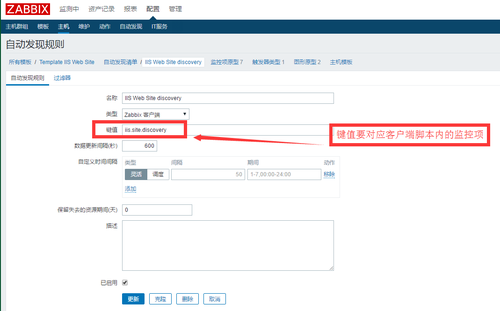
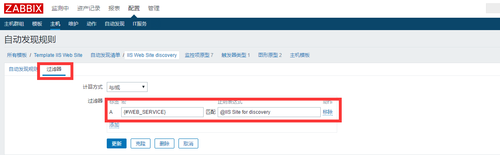
监控项:
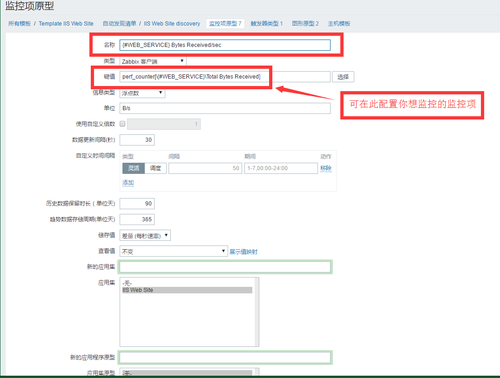
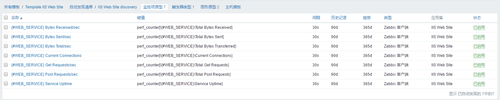
这里使用了windows性能计数器来监控IIS站点各项指标。下面介绍下各监控项的含义:
{#WEB_SERVICE} Bytes Received/sec:IIS站点接收数据字节的速率
{#WEB_SERVICE} Bytes Sent/sec:IIS站点发送数据字节的速率
{#WEB_SERVICE} Bytes Total/sec:IIS站点的总传输数据字节的速率,是Received/sec和Sent/sec的和。
{#WEB_SERVICE} Get Requests/sec:IIS站点的GET请求速率
{#WEB_SERVICE} Post Requests/sec:IIS站点的POST请求速率
以上5个监控项是取的平均值,使监控数据更加准确、平滑。
{#WEB_SERVICE} Current Connections:当前与IIS站点建立连接的数量
{#WEB_SERVICE} Service Uptime:IIS站点的启动时间
以上2个监控项是取的当前瞬时值。
触发器:
{#WEB_SERVICE}on {HOST.NAME} has just been restarted:重启IIS站点的报警

图形:
{#WEB_SERVICE} Bytes/sec:数据传输速率图形,包括数据接收速率、发送速率、总的速率。
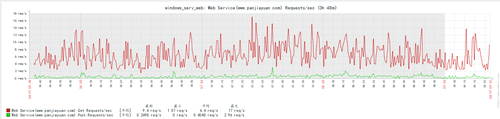
{#WEB_SERVICE} Requests/sec:http请求速率图形,包括GET请求速率和POST请求速率。
zabbix server会根据以上原型对发现出来的每一个站点创建相应的监控项、触发器、图形。

2、zabbix客户端配置
下面要在被监控的IIS服务器上做配置。
首先上传IIS站点自动发现脚本LLD_Web_Service.bat到C盘根目录。
脚本内容如下:
C:\ LLD_Web_Service.bat
@echo off
SETLOCAL ENABLEDELAYEDEXPANSION
echo {
echo     "data":[
for /F "tokens=* delims=" %%i IN (‘typeperf -qx^|find "Web Service"^|find "CurrentConnections"‘) DO (
    set j=%%i
    for /F "tokens=1 delims=\" %%k in("%%i") DO (
    echo        {
    echo             "{#WEB_SERVICE}":"%%k"
    echo        },
    )
)
echo         {
echo             "{#WEB_SERVICE}":"none"
echo         }
echo     ]
echo }然后修改zabbixagent的配置文件,增加自定义参数:
UnsafeUserParameters=1 #开启用户自定义脚本功能
UserParameter=iis.site.discovery,C:\LLD_Web_Service.bat #建立客户机监控项
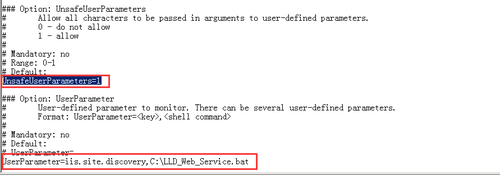
修改完毕重启zabbix agent使配置生效。
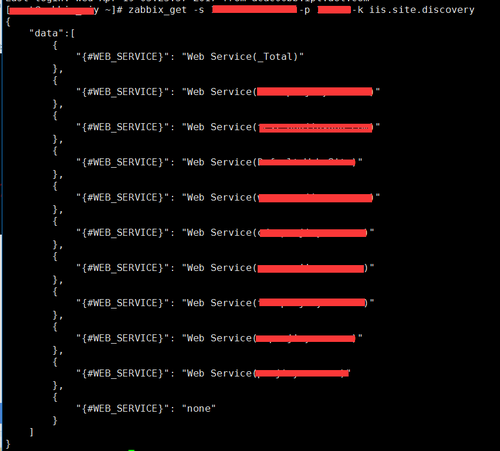
在zabbix server服务器上测试下客户端是否配置成功:使用zabbix_get命令获取脚本执行结果,脚本返回一段json数据就算成功了:
将模版应用到主机,查看监控结果:
本文出自 “80后小菜鸟” 博客,请务必保留此出处http://zhangxinqi.blog.51cto.com/9668428/1917484
标签:zabbix监控
原文地址:http://zhangxinqi.blog.51cto.com/9668428/1917484
