
一、io简介
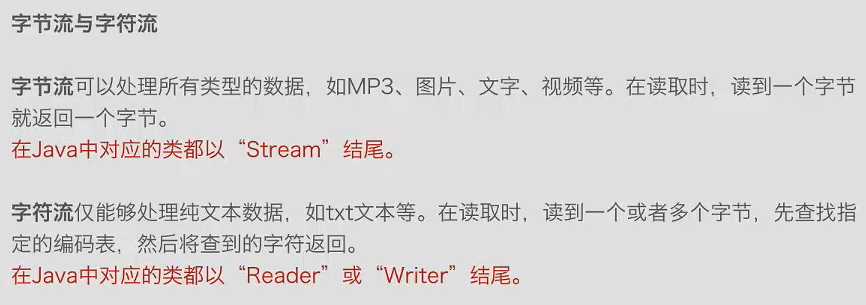
字节:byte,计算机中存储数据的单元,一个字节有8位,是一个很具体的存储空间
字符:人们使用的记号,抽象意义上的符号,如 ‘1’ ‘中’ ‘a‘ ‘$‘
字符集和编码:
- 有哪些字符
- 规定每个字符分别用一个还是多个字节存储、用哪些字节存储
io就是输入与输出,即“读”和“写”
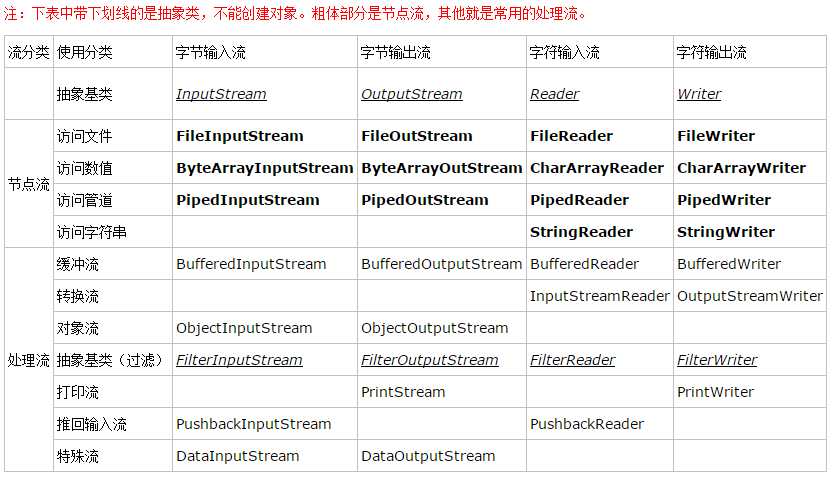
根据数据走向:输入流、输出流;根据处理的数据类型:字节流、字符流
二、字节输入流
import java.io.File;
import java.io.FileInputStream;
import java.io.IOException;

public class InputStreamTest {

	public static void main(String[] args) {

		File file = new File("text.txt");
		try {
			// 1、创建一个名为text的文件
			file.createNewFile();

			FileInputStream fis = new FileInputStream("text.txt");

                //从输入流中读取数据的下一个字节,返回0-255间的int值,读到末尾返回-1
			// fis.read();

			// 将输入流中的数据读取到字节数组中
			byte[] input = new byte[1];
			fis.read(input);
			String str = new String(input);
			System.out.println(str);
              fis.close();
		} catch (IOException e) {
			// TODO Auto-generated catch block
			e.printStackTrace();
		}
	}
}
String 和 byte []间的转换
- byte [] strbyte = str.getBytes();
- String st = new String(byte);
三、字节输出流


 1 import java.io.FileOutputStream;
 2 import java.io.IOException;
 3
 4 public class OutputStreamTest {
 5
 6     public static void main(String[] args) {
 7         try {
 8             // 打开输入流
 9             FileOutputStream fos = new FileOutputStream("textw.txt");
10
11             // 要写入的数据
12             String str = "写入数据:1234";
13             byte[] out = str.getBytes();
14
15             // 把数据写入到指定文件中
16             fos.write(out);
17
18             // 关闭流
19             fos.close();
20
21         } catch (IOException e) {
22             // TODO Auto-generated catch block
23             e.printStackTrace();
24         }
25     }
26
27 }
四、通过字节流实现文件拷贝
 1 import java.io.FileInputStream;
 2 import java.io.FileNotFoundException;
 3 import java.io.FileOutputStream;
 4 import java.io.IOException;
 5
 6 public class CopyStream {
 7
 8     public static void main(String[] args) {
 9         try {
10             // 创建输入输出流,从text.txt文件中读取数据,把读取到的数据存到textnew.txt中
11             FileInputStream fis = new FileInputStream("text.txt");
12             FileOutputStream fos = new FileOutputStream("textnew.txt");
13
14             // 存储数据的数组
15             byte[] shuju = new byte[50];
16
17             while (fis.read(shuju) != -1) {
18                 fis.read(shuju);
19             }
20
21             // 将字节数组中的数据写入到textnew.txt
22             fos.write(shuju);
23
24             fis.close();
25             fos.close();
26         } catch (FileNotFoundException e) {
27             // TODO Auto-generated catch block
28             e.printStackTrace();
29         } catch (IOException e) {
30             // TODO Auto-generated catch block
31             e.printStackTrace();
32         }
33
34     }
35
36 }
