
一、集合框架
1、集合框架定义
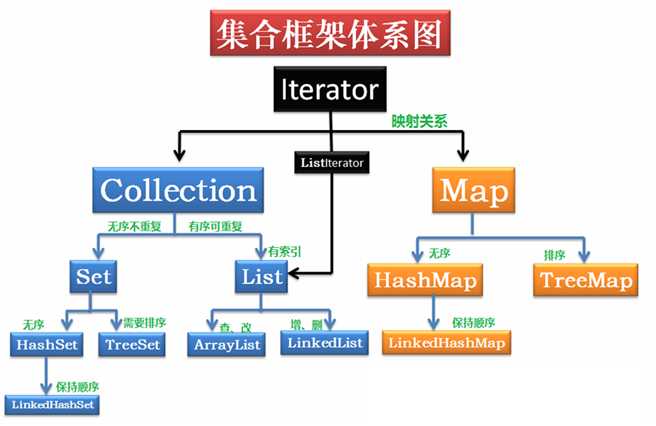
集合框架是一个用来代表和操纵集合的统一架构。所有的集合框架都包含如下内容:
- 接口:是代表集合的抽象数据类型。接口允许集合独立操纵其代表的细节。在面向对象的语言,接口通常形成一个层次。
- 实现(类):是集合接口的具体实现。从本质上讲,它们是可重复使用的数据结构。
- 算法:是实现集合接口的对象里的方法执行的一些有用的计算,例如:搜索和排序。这些算法被称为多态,那是因为相同的方法可以在相似的接口上有着不同的实现。
除了集合,该框架也定义了几个Map接口和类。Map里存储的是键/值对。尽管Map不是collections,但是它们完全整合在集合中。
二、List 接口
1、ArrayList 的使用
ArrayList 是一个集合容器类。
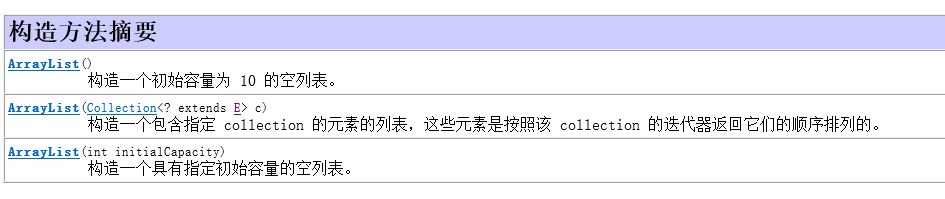
1、ArrayList 的构造方法
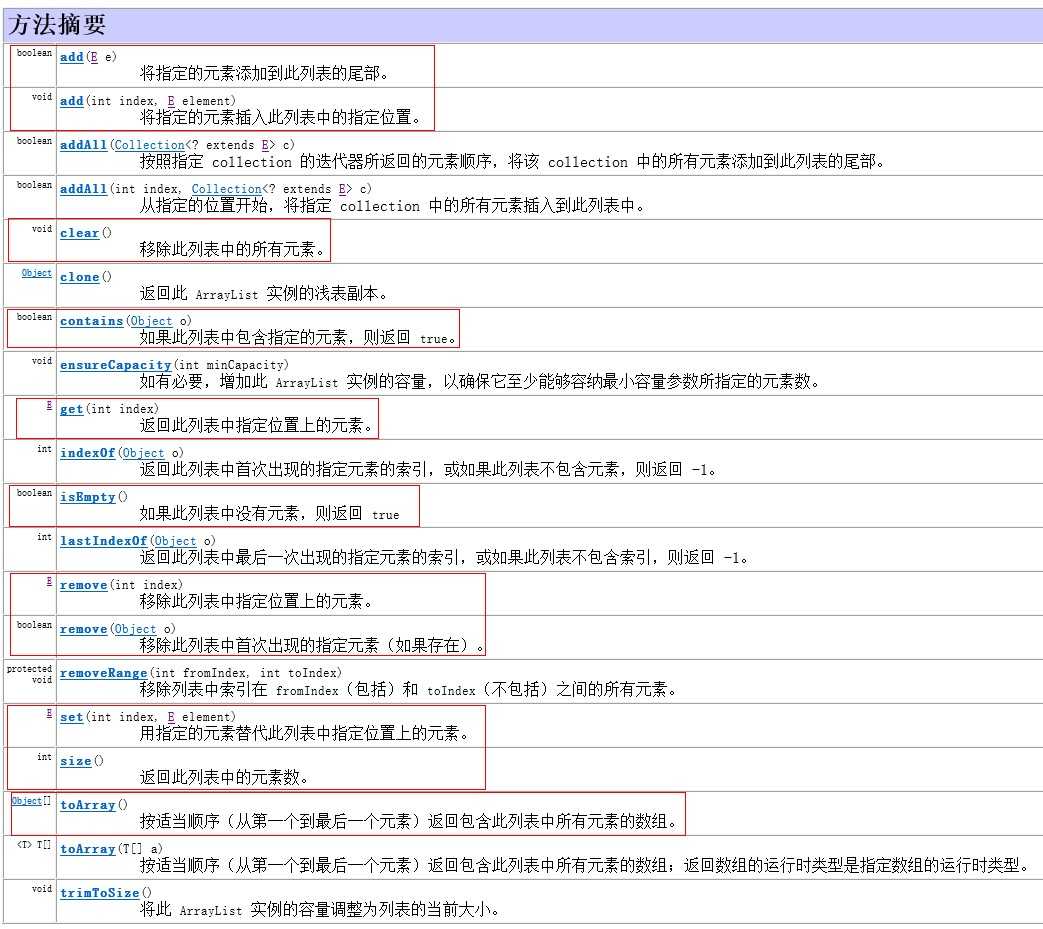
2、 ArrayList 方法
测试ArrayList:

 1 import org.junit.Test;
 2
 3 import java.util.ArrayList;
 4 import java.util.Iterator;
 5 import java.util.ListIterator;
 6
 7 public class ArrayListTest {
 8
 9     /**
10      * 测试ArrayList
11      */
12     @Test
13     public void test() {
14         ArrayList<Object> list = new ArrayList<>();
15
16         list.add("test1");
17         list.add("test2");
18         list.add("test3");
19         list.add("test4");
20
21         list.add(1, "test5"); //插入 1 是索引
22         System.out.println(list);  //[test1, test5, test2, test3, test4]  打印出值,因为ArrayList覆写了 toString方法
23         System.out.println("size:" + list.size());  //size:5
24
25         //遍历ArrayList 1、普通for循环
26         for (int i = 0; i < list.size(); i++) {
27             System.out.println(" list = " + list.get(i));
28         }
29         System.out.println("=======");
30         for (Object o : list) {  //2、增强for循环
31             System.out.println(" list = " + o);
32         }
33         System.out.println("=======");
34         //3.迭代器遍历ArrayList
35         Iterator<Object> iterator = list.iterator();
36         while (iterator.hasNext()) {
37             System.out.println(" list = " + iterator.next());
38         }
39         System.out.println("=======");
40         //ListIterator迭代
41         ListIterator<Object> listIterator = list.listIterator();
42         while (listIterator.hasNext()) {
43             System.out.println(" list = " + listIterator.next());
44         }
45         System.out.println("=======");
46         while (listIterator.hasPrevious()) {
47             //反向打印,顺序相反
48             System.out.println(" list = " + listIterator.previous());
49         }
50     }
51 }
2、LinkedList 使用
基于链表结构的集合 LinkedList。LinkedList 属于 java.util 包下面,也实现Iterable接口,说明可以使用迭代器遍历;LinkedList 还实现 Deque<E>,Queue<E> 操作。Deque 和 Queue 是 LinkedList 的父接口,那么 LinkedList 也可以看成一种 Deque 或者 Queue;Queue表示一种队列,也是一种数据结构,它的特点是先进先出,因此在队列这个接口里面提供了一些操作队列的方法,同时LinkedList也具有这些方法;Deque(Double ended queues双端队列),支持在两端插入或者移除元素; 那也应该具有操作双端队列的一些方法;LinkedList 是他们的子类,说明都具有他们两者的方法;LinkedList也可以充当队列,双端队列,堆栈多个角色。
1、 LinkedList 构造方法

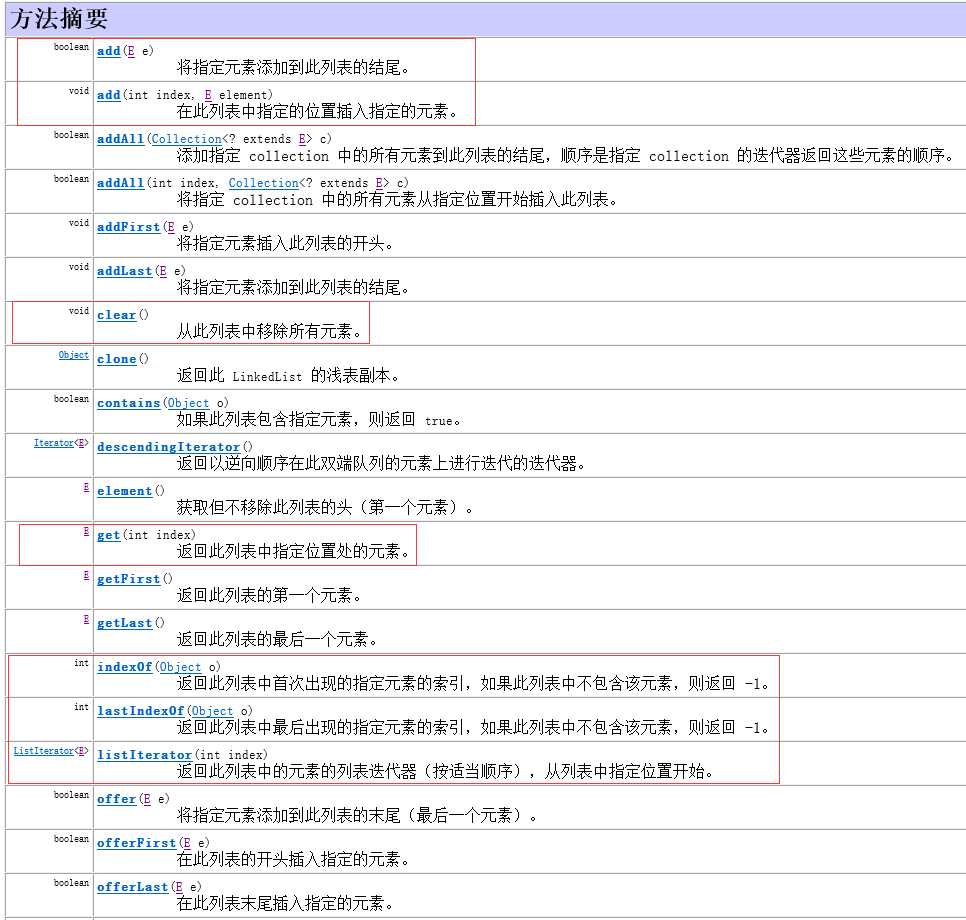
2、 LinkedList 方法
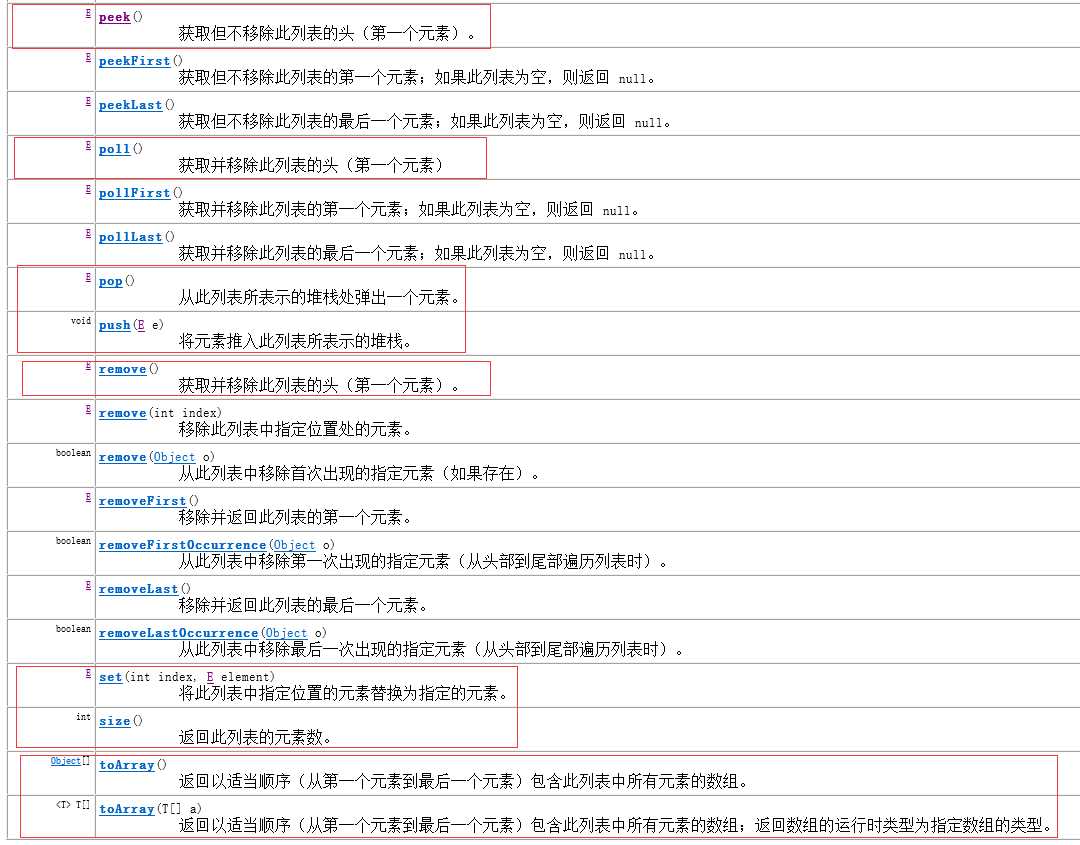
测试 LinkedList:
 1 import org.junit.Test;
 2
 3 import java.util.LinkedList;
 4
 5 public class LinkedListTest {
 6
 7     /**
 8     * 测试LinkedList
 9      ArrayList : 基于数组,可以重复,有索引,记录添加顺序(有序), 查找比较快;
10      LinkedList: 基于链表,可以重复,有索引,记录添加顺序(有序),添加删除比较快;多了一些操作头尾的方法,可以充当堆栈,队列;
11     */
12     @Test
13     public void test(){
14         LinkedList<Object> linkedList = new LinkedList<>();
15         linkedList.add("11");
16         linkedList.add("22");
17         linkedList.add("33");
18         linkedList.add("44");
19
20         System.out.println(linkedList);
21         //遍历LinkedList
22         for (int i = 0; i < linkedList.size(); i++) {
23             System.out.println(linkedList.pop());
24         }
25         System.out.println(linkedList);
26     }
27 }
3、 ArrayList 和 LinkedList 的区别
ArrayList 和 LinkedList 都是线程不安全的。
ArrayList 是 List 接口的一种实现,它是使用数组来实现的,即使用数组方式存储。
LinkedList 是 List 接口的一种实现,它是使用链表来实现的,即使用双向链表实现存储。
ArrayList 遍历和查找元素比较快。LinkedList 遍历和查找元素比较慢。
ArrayList 添加、删除元素比较慢。LinkedList 添加、删除元素比较快。
三、set 接口
1、HashSet
不能添加重复的元素,并且是无序的。
HashSet判断是否相同的规则: ①判断hashcode ②判断equals ,如果两个对象的hashCode值相等,并且equals返回为true 就表示相等(重复)。
 1 import org.junit.Test;
 2
 3 import java.util.HashSet;
 4
 5 public class HashSetTest {
 6     /**
 7      * 测试HashSet
 8      * 如果两个对象的hashCode值相等,并且equals返回为true 就表示相等(重复).
 9      */
10     @Test
11     public void testHashSet() {
12         HashSet<Object> hashSet = new HashSet<>();
13         hashSet.add("11");
14         hashSet.add("55");
15         hashSet.add("22");
16         hashSet.add("33");
17         hashSet.add("44");
18         hashSet.add("22");
19
20         System.out.println(hashSet);  //[11, 55, 22, 33, 44] 和添加顺序不一样
21
22     }
23
24     /**
25      * 测试HashSet1
26      * HashSet特点:
27      * ①不能添加重复元素,(通过调用对象的hashcode和equals);
28      * ②无序(添加顺序,和打印出来的顺序并不相同);
29      * <p>
30      * 区别
31      * HashSet :通过hashcode和equals判断重复;
32      * TreeSet : 判断重复
33      * ①使用元素的自然排序,(Comparable接口,使用其中的compareTo方法,返回0,表示相等,compareTo里面的参数只有一个);
34      * ②使用比较器Comparator接口,其中的方法compare(Object o1,Object o2)返回0,表示相等
35      */
36     @Test
37     public void testHashSet1() {
38         HashSet set = new HashSet();
39         Student s1 = new Student("悟空", 500);
40         Student s2 = new Student("悟空", 500);
41         set.add(s1);
42         set.add(s2);
43
44         System.out.println(set);  //[Student{name=‘悟空‘, age=500}]
45     }
46 }
自定义类 Student :
 1 public class Student {
 2     private String name;
 3     private Integer age;
 4
 5     public Student(String name, Integer age) {
 6         this.name = name;
 7         this.age = age;
 8     }
 9
10     public String getName() {
11         return name;
12     }
13
14     public void setName(String name) {
15         this.name = name;
16     }
17
18     public Integer getAge() {
19         return age;
20     }
21
22     public void setAge(Integer age) {
23         this.age = age;
24     }
25
26
27     /**
28      * 假设传入的对象也是student,根据业务对象的字段进行比较
29      *
30      * @param o
31      * @return
32      */
33     @Override
34     public boolean equals(Object o) {
35         if (this == o) return true;
36         if (o == null || getClass() != o.getClass()) return false;
37
38         Student student = (Student) o;
39
40         if (this.name.equals(student.getName()) && this.age == student.getAge()) {
41             return true;
42         } else {
43             return false;
44         }
45     }
46
47     @Override
48     public int hashCode() {
49         int result = name != null ? name.hashCode() : 0;
50         result = 31 * result + (age != null ? age.hashCode() : 0);
51         return result;
52     }
53
54     @Override
55     public String toString() {
56         return "Student{" +
57                 "name=‘" + name + ‘\‘‘ +
58                 ", age=" + age +
59                 ‘}‘;
60     }
61 }
2、TreeSet
TreeSet 和 HashSet 很多方面也是类似的;特点和 HashSet 也是一样的;
TreeSet 的特点:不能添加重复元素,无序的(不记录添加顺序)。
2.1 TreeSet 排序
1、自然排序
自然排序:此接口强行对实现它的每个类的对象进行整体排序,这种排序被称为类的自然排序。
可以让类实现 Comparable 接口,通过 compareTo(Object obj) 方法,如果方法返回 0 表示相等,否则不等。
实现了 Comparable 接口的 student 类:
 1 public class Student implements Comparable<Student> {
 2     private String name;
 3     private Integer age;
 4
 5     public Student(String name, Integer age) {
 6         this.name = name;
 7         this.age = age;
 8     }
 9
10     public String getName() {
11         return name;
12     }
13
14     public void setName(String name) {
15         this.name = name;
16     }
17
18     public Integer getAge() {
19         return age;
20     }
21
22     public void setAge(Integer age) {
23         this.age = age;
24     }
25
26
27     /**
28      * 假设传入的对象也是student,根据业务对象的字段进行比较
29      *
30      * @param o
31      * @return
32      */
33     @Override
34     public boolean equals(Object o) {
35         if (this == o) return true;
36         if (o == null || getClass() != o.getClass()) return false;
37
38         Student student = (Student) o;
39
40         if (this.name.equals(student.getName()) && this.age == student.getAge()) {
41             return true;
42         } else {
43             return false;
44         }
45     }
46
47     @Override
48     public int hashCode() {
49         int result = name != null ? name.hashCode() : 0;
50         result = 31 * result + (age != null ? age.hashCode() : 0);
51         return result;
52     }
53
54     @Override
55     public String toString() {
56         return "Student{" +
57                 "name=‘" + name + ‘\‘‘ +
58                 ", age=" + age +
59                 ‘}‘;
60     }
61
62
63     /**
64      * 覆写 compareTo
65      *
66      * @param s
67      * @return
68      */
69     @Override
70     public int compareTo(Student s) {
71         if (this.age > s.getAge()) {
72             return -1;
73         } else if (this.age < s.getAge()) {
74             return 1;
75         } else {
76             //return this.name.compareTo(s.getName()); 自动比较
77             return 0;
78         }
79     }
80 }
2、定制排序
如果没有实现 Comparable 接口,需要自定义一个类,实现 Comparator 接口,覆写比较方法;
比较器的实现代码:
 1 import java.util.Comparator;
 2
 3 /**
 4  * 定制排序
 5  */
 6 public class StudentComparator implements Comparator {
 7     @Override
 8     public int compare(Object o1, Object o2) {
 9         Student s1 = (Student)o1;
10         Student s2 = (Student)o2;
11         if (s1.getAge() > s2.getAge()){
12             return 1;
13         }else if(s1.getAge() < s2.getAge()){
14             return -1;
15         }else {
16             return 0;
17         }
18     }
19 }
3、TreeSet 自然排序和定制排序的区别
一般来说,先写一个比较规则,让它实现 Comparable 接口,作为默认的比较规则,如果不写比较器,则比较使用默认规则,如果觉得默认比较规则不够好,可以自己写个比较器,当通过存在默认比较规则和比较器时,优先选择使用比较器,因为比较器更能满足需求。
测试TreeSet:
 1 import org.junit.Test;
 2
 3 import java.util.TreeSet;
 4
 5 public class TreeSetTest {
 6
 7     /**
 8      * 测试TreeSet
 9      */
10     @Test
11     public void testTreeSet() {
12         TreeSet<Object> treeSet = new TreeSet<>();
13         treeSet.add("11");
14         treeSet.add("33");
15         treeSet.add("22");
16         treeSet.add("44");
17
18         System.out.println(treeSet);  //[11, 22, 33, 44]
19     }
20
21     @Test
22     public void testTreeSet2() {
23         TreeSet<Object> treeSet = new TreeSet<>();
24         Student student1 = new Student("张", 8);
25         Student student2 = new Student("张", 10);
26         Student student3 = new Student("张", 7);
27         Student student5 = new Student("张", 9);
28         Student student4 = new Student("张", 11);
29         treeSet.add(student3);
30         treeSet.add(student4);
31         treeSet.add(student2);
32         treeSet.add(student1);
33         treeSet.add(student5);
34
35         System.out.println(treeSet);
36     }
37
38
39     /**
40      * 测试比较器TreeSet
41      */
42     @Test
43     public void testTreeSet3() {
44         TreeSet<Object> treeSet = new TreeSet<>(new StudentComparator()); //优先选择比较器,如果选默认的,就不能满足要求呢;
45         Student student1 = new Student("张", 8);
46         Student student2 = new Student("张", 10);
47         Student student3 = new Student("张", 7);
48         Student student5 = new Student("张", 9);
49         Student student4 = new Student("张", 11);
50         treeSet.add(student3);
51         treeSet.add(student4);
52         treeSet.add(student2);
53         treeSet.add(student1);
54         treeSet.add(student5);
55
56         System.out.println(treeSet);
57     }
58 }
3、HashSet 和 TreeSet 总结
HashSet特点:不重复,无序(通过 hashCode 方法和equals 方法,判断重复)。
TreeSet 特点:不重复,无序(添加顺序与打印顺序不一样),但是打印顺序按照一定规则排序;排序有自然排序和定制排序。
四、Map 接口
Map 简单理解成映射;
Map:将键映射到值的对象。一个映射不能包含重复的键;每个键最多只能包含一个值。
1、hashMap
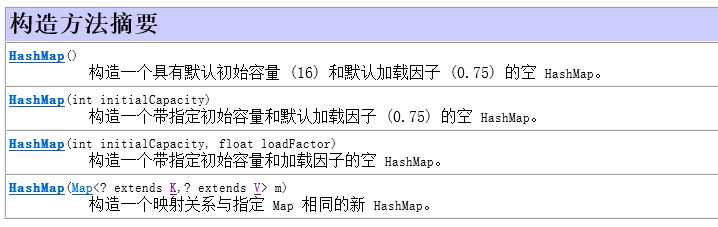
1、hashMap 的构造方法
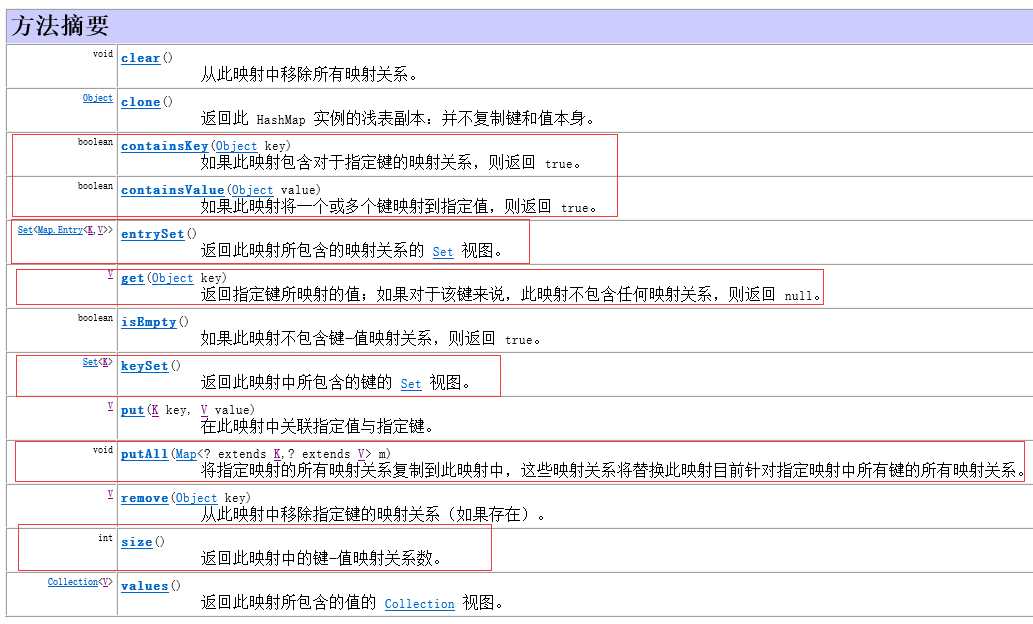
2、hashMap 的方法
3、测试 hashMap
具体测试代码:
 1 import org.junit.Test;
 2
 3 import java.util.*;
 4
 5 public class HashMapTest {
 6     /**
 7      * Map是什么?
 8      * 简单理解成是映射;
 9      * 判断重复的标准和HashSet一致,通过键的hashCode和equals;
10      * 测试hashMap
11      */
12     @Test
13     public void testHashMap() {
14         Map<Object, Object> hashMap = new HashMap<>();
15         hashMap.put("key1", "test1");  //存值
16         hashMap.put("key2", "test2");
17         hashMap.put("key2", "test3");
18
19         System.out.println(hashMap);  //{key1=test1, key2=test3} 一个键只能有一个值,后面的值覆盖了前面的值
20         System.out.println(hashMap.get("key1")); //取值 test1
21         System.out.println(hashMap.containsKey("key")); //判断是否包含这个键 false
22         System.out.println(hashMap.containsValue("test"));  //判断是否包含着个值 false
23
24         Map<Object, Object> hashMap1 = new HashMap<>();
25         hashMap1.put("key3", "test3");
26         hashMap1.put("key4", "test4");
27         System.out.println(hashMap1);  //{key3=test3, key4=test4}
28
29         hashMap.putAll(hashMap1); //将hashMap1的所有映射关系复制到hashMap
30         System.out.println(hashMap);  //{key1=test1, key2=test3, key3=test3, key4=test4}
31         System.out.println(hashMap.size());  // 4
32
33         //遍历方法一:获取所有映射
34         Set<Map.Entry<Object, Object>> entrySet = hashMap.entrySet();
35         for (Map.Entry<Object, Object> entry : entrySet) {
36             System.out.println("entry ==[" + entry);
37         }
38
39         //遍历方法二:获取所有键的集合
40         Set<Object> keySet = hashMap.keySet();
41         for (Object o1 : keySet) {
42             //通过键返回值
43             System.out.println("key = [" + o1 + "] ---> value = " + "[" + hashMap.get(o1) + "]" );
44
45         }
46     }
47 }
2、Map小结
HashMap 是一个散列表,它存储的内容是键值对(key-value)映射。该类实现了Map 接口,根据键的 HashCode 值存储数据,具有很快的访问速度,最多允许一条记录的键为null,不支持线程同步。
Map接口
HashMap 判断重复的标准和HashSet一致,通过键的 hashCode 和 equals;
TreeMap 判断重复的标准和TreeSet一致,1:通过自然排序(Comparable 接口),2:定制排序(Compartor 比较器)。
五、集合算法 Collections
完全由在 collection 上进行操作或返回 collection 的静态方法组成。它包含在 collection 上操作的多态算法,即“包装器”,包装器返回由指定 collection 支持的新 collection,以及少数其他内容。例如:搜索和排序。
1、Collections 的方法
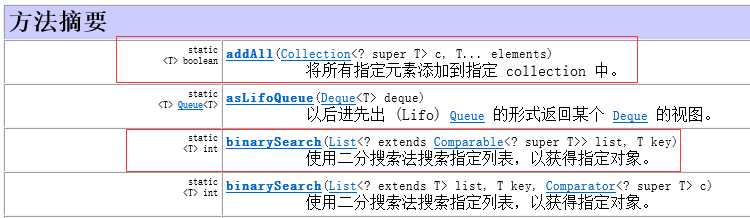


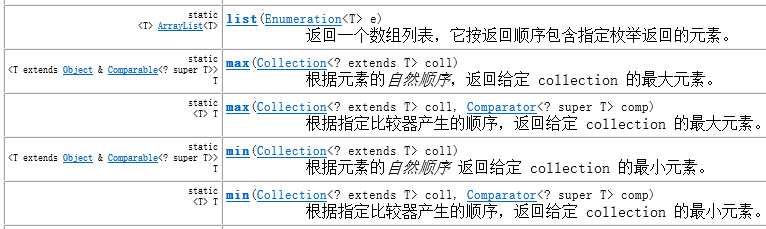


上面是 Collections 类的一些常用方法,具体所有方法,可以自己查看API文档。
测试 Collections 的一些常用方法:
 1 import org.junit.Test;
 2
 3 import java.util.ArrayList;
 4 import java.util.Collections;
 5 import java.util.List;
 6
 7 /**
 8  * 测试collections
 9  */
10 public class CollectionsTest {
11     @Test
12     public void testCollections(){
13         List list = new ArrayList();
14
15         //addAll 将所有指定元素添加到指定 collection 中。
16         Collections.addAll(list, 123, 456, false, null, "2333");
17         System.out.println(list); //[123, 456, false, null, 2333]
18
19         List list2 = new ArrayList();
20         Collections.addAll(list2, 1, 1, 1, 1, 1, 2222222, 333333, "444444");
21         Collections.copy(list2, list);  //复制
22         System.out.println(list2);  //[123, 456, false, null, 2333, 2222222, 333333, 444444]
23
24         List list3 = new ArrayList();
25         for (int i =0; i<10; i++){
26             list3.add(i);
27         }
28         System.out.println("list3 "+ list3);  //list3 [0, 1, 2, 3, 4, 5, 6, 7, 8, 9]
29         Collections.shuffle(list3);  //乱序
30         System.out.println("list3 " + list3);  //list3 [4, 1, 9, 7, 2, 6, 3, 8, 0, 5]
31
32         System.out.println(Collections.max(list3));  //数组中最大值 9
33         Collections.sort(list3); //排序
34         System.out.println(list3);  //[0, 1, 2, 3, 4, 5, 6, 7, 8, 9]
35
36         Collections.fill(list3, 2);  // fill 使用指定元素替换指定列表中的所有元素。
37         System.out.println(list3);  //[2, 2, 2, 2, 2, 2, 2, 2, 2, 2]
38     }
39 }
六、集合框架总结
1、List,Set,还有它们下面的子类都可以看成容器,都实现了超级的接口Collection;(查看API文档)
List,Set 和Collection之间的关系是继承关系,因为接口与接口之后,只能是继承的关系。
2、ArrayList,LinkedList,HashSet,TreeSet 四个容器类的特点:
ArrayList:实现 List 接口,基于数组,可以重复,有索引,记录添加顺序,即有序,查找比较快。
LinkedList:实现 List 接口,基于链表,可以重复,有索引,记录添加顺序,即有序,添加删除比较快,多了一些操作头尾的方法,可以充当堆栈,队列。
HashSet:实现 Set 接口,不重复,无序(通过 hashCode 方法和equals 方法,判断重复)。
TreeSet:实现 Set 接口,不重复,无序(添加顺序与打印顺序不一样),但是打印顺序按照一定规则排序;排序有自然排序和定制排序。①使用元素的自然排序,(Comparable 接口,使用其中的 compareTo 方法,返回0,表示相等,compareTo 里面的参数只有一个);②使用比较器 Comparator 接口,其中的方法 compare(Object o1,Object o2)返回0,表示相等。
3、Comparable 和 Comparator 的区别:
Comparable 是一个比较的标准,里面有比较的方法,对象要具有比较的标准,就必须实现 Comparable 接口;类实现这个接口,就有比较的方法;把元素放到 TreeSet 里面去,就会自动的调用 CompareTo 方法;但是这个 Comparable 并不是专为 TreeSet 设计的;只是说,TreeSet 顺便利用而已;就像 HashCode 和 equals 也一样,不是专门为 HashSet 设计一样;只是你顺便利用而已。
Compartor 是个比较器,也不是专门为TreeSet设计. 就是一个第三方的比较器接口;如果对象没有比较性,自己就可以按照比较器的标准,设计一个比较器,创建一个类,实现这个接口,覆写方法。
4、HashMap,TreeMap的特点:
HashMap:实现 Map 接口,是一个散列表,它存储的内容是键值对(key-value)映射。根据键的 HashCode 值存储数据,具有很快的访问速度,最多允许一条记录的键为null,不支持线程同步。判断重复的标准和 HashSet 一致,通过键的 hashCode 和 equals。
TreeMap:实现 Map 接口,判断重复的标准和TreeSet一致,1:通过自然排序(Comparable 接口),2:定制排序(Compartor 比较器)。
