
标签:project assert status requests expected with open main save value
整个项目分层如图
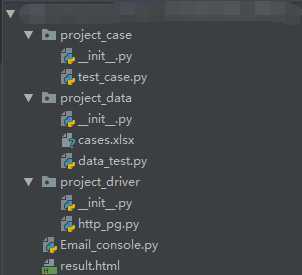
然后上代码
#test_case.py
from project_data.data_test import *
from project_driver.http_pg import *
import unittest
import json
from ddt import data,unpack,ddt

@ddt
class test_case(unittest.TestCase):
    @classmethod
    def setUpClass(cls):
        cls.http_test = HTTP_CONSOLE()
    @classmethod
    def tearDownClass(cls):
        print("用例执行完毕")

    @data(*Date_test.Date_test_1())
    @unpack
    def test_case_1(self,case_id,url,data,Method,expected):
        result = self.http_test.http_console(Method=Method, url=url, parameter=eval(data))
        Date_test().Date_test_2(test_function=result.text, x=case_id)
        self.assertEqual(json.loads(result.text)["status"], eval(expected)["status"])
        self.assertEqual(json.loads(result.text)["code"], eval(expected)["code"])
        self.assertEqual(json.loads(result.text)["msg"], eval(expected)["msg"])


if __name__ == ‘__main__‘:
    unittest.main()
#data_test.py
from openpyxl import load_workbook
import json
import os

class Date_test():
    filepath = os.path.dirname(os.path.dirname(__file__))
    @classmethod
    def Date_test_1(cls):
        """
        配置文件读取模块
        :return:
        """
        wb = load_workbook(Date_test().filepath + "\project_data\cases.xlsx")
        ws = wb["test"]
        url = ‘http://test.lemonban.com/futureloan/mvc/api‘
        list = []
        for i in range(2,ws.max_row + 1):
            result = {}
            result["case_id"] = ws.cell(i, 1).value
            result["url"] = url + ws.cell(i,3).value
            result["data"] = ws.cell(i,4).value
            result["Method"] = ws.cell(i,5).value
            result["expected"] = ws.cell(i,6).value
            list.append(result)
        wb.close()
        return list

    def Date_test_2(self, test_function, x):
        """
        运行结果写入模块
        :param test_function:
        :param test_text:
        :param x:
        :return:
        """
        Dict = {}
        wb = load_workbook(Date_test().filepath+"\project_data\cases.xlsx")
        ws = wb["test"]
        test_function = json.loads(test_function)
        Dict["status"] = test_function["status"]
        Dict["code"] = test_function["code"]
        Dict["msg"] = test_function["msg"]
        ws.cell(x+1, 7).value = str(Dict)
        if ws.cell(x+1,6).value == ws.cell(x+1, 7).value:
            ws.cell(x+1, 8).value = "PASS"
        else:
            ws.cell(x+1, 8).value = "FAIL"
        ws.cell(x+1, 9).value = str(test_function["data"])
        wb.save(Date_test().filepath+"\project_data\cases.xlsx")
        wb.close()

    @staticmethod
    def Email_Date():
        username = "username"
        password = "password"
        To_Email = "To_Email_1,To_Email_2"
        return username, password, To_Email
#http_pg.py
import requests
class HTTP_CONSOLE():
    def __init__(self):
        self.session = requests.session()
    def http_console(self, Method, url, parameter = None,json = None ,Cookies=None):
        if parameter == None:
            result = self.session.post(url=url, json=eval(json), cookies=Cookies)
        else:
            Method = Method.upper()
            if Method == "GET":
                result = self.session.get(url=url, params=parameter, cookies=Cookies)
            elif Method == "POST":
                result = self.session.post(url=url, data=parameter, cookies=Cookies)
            else:
                print("请求方式输入错误,目前仅支持POST/GET两种请求方式!")

        return result
#Email_console.py
import HTMLTestRunnerNew
from email.mime.text import MIMEText
from email.header import Header
import smtplib
import unittest
from project_data.data_test import *
from email.mime.multipart import MIMEMultipart


class Email_Console():
    def __init__(self):
        self.username, self.password, self.To_Email = Date_test.Email_Date()

    def send_main(self, file_new):
        """
        发送邮件方法
        :param file_new:
        :return:
        """
        msg = MIMEMultipart("Emaik_TestText")
        msg[‘Subject‘] = Header(‘自动化测试报告‘, ‘utf-8‘)
        msg[‘From‘] = self.username
        msg[‘To‘] = self.To_Email
        with open(file_new, ‘rb‘) as f:
            mail_body = f.read()
            msg.attach(MIMEText(mail_body, ‘html‘, ‘utf-8‘))
        # 添加附件result.html
        with open("result.html", "rb") as f:
            mail_attach = f.read()
            att1 = MIMEText(mail_attach, ‘base64‘, ‘utf-8‘)
            att1["Content-Type"] = ‘application/octet-stream‘
            att1["Content-Disposition"] = ‘attachment; filename="report_test.html"‘
            msg.attach(att1)
        # 获取路径
        filepath = Date_test().filepath + "\project_data\cases.xlsx"
        # 添加附件cases.xlsx
        with open(filepath, "rb") as f:
            mail_attach = f.read()
            att2 = MIMEText(mail_attach, ‘base64‘, ‘utf-8‘)
            att2["Content-Type"] = ‘application/octet-stream‘
            att2["Content-Disposition"] = ‘attachment; filename=filepath‘
            msg.attach(att2)
        try:
            smtp = smtplib.SMTP()
            smtp.connect("smtp.163.com", 25)
            smtp.login(self.username, self.password)
            smtp.sendmail(self.username, self.To_Email.split(","), msg.as_string())
            smtp.quit()
        except Exception as e:
            print("Send Email Failed!!!")
            raise e

    def new_report(self, testreport):
        """
        生成并查找查找最新测试报告方法
        :param testreport:
        :return:
        """
        # 生成测试用例
        fp = open("result.html", ‘wb‘)
        runner = HTMLTestRunnerNew.HTMLTestRunner(stream=fp, title=‘2019年4月11日前程贷接口测试报告‘, description=‘所有测试情况‘,
                                                  tester="桂马")
        discove = unittest.defaultTestLoader.discover(".", pattern="test_*.py")
        runner.run(discove)
        fp.close()
        # 查找测试用例
        lists = os.listdir(testreport)
        lists.sort(key=lambda fn: os.path.getmtime(testreport + "\\" + fn))
        file_new = os.path.join(testreport, lists[-1])
        print(file_new)
        return file_new


if __name__ == "__main__":
    email_test = Email_Console()
    file_path = email_test.new_report(os.getcwd())  # 查找新生的报告
    email_test.send_main(file_new=file_path)  # 调用发邮件模块(调用前需要修改data_test.py配置文件中email配置模块数据 )
然后配置文件的xlsx文件格式

注意点:
1.用例的expected一栏,也就是预期结果一栏要注意参数是否有类似时间戳的不断变更的参数,然后根据这个参数的重要性来选择是添加还是删去
2.返回值如果有json格式注意和预知结果格式的一致性,我这次就是在这里被绊了一下,单双引号要注意
3.原本的用例格式没有最后一栏也就是result_data,但是这次用例涉及存取金额,所以我还是加了一行用来检查数据的正确性
4.搬代码的朋友注意下我的配置文件中,邮件模块是没有写参数的,用的变量代替,所以要用的话要自己改一下
5.setupclass和tearDownclass要配合@classmethod装饰器使用,是一次运行只执行一次的用法,要牢记,感觉以后会用不少次
标签:project assert status requests expected with open main save value
原文地址:https://www.cnblogs.com/keima/p/10709675.html
