
标签:exports 路由器 color details get template lse bsp lin
<!--The content below is only a placeholder and can be replaced.-->
<h1>Angular Router</h1>
<nav>
  <!-- 路由跳转一 -->
<a [routerLink]="[ ‘/crisis-center‘ ]" routerLinkActive="active">Crisis Center</a>
<a [routerLink]="[ ‘/heroes‘ ]" routerLinkActive="active">heroes</a>
<!-- 第二路由的导航显示 -->
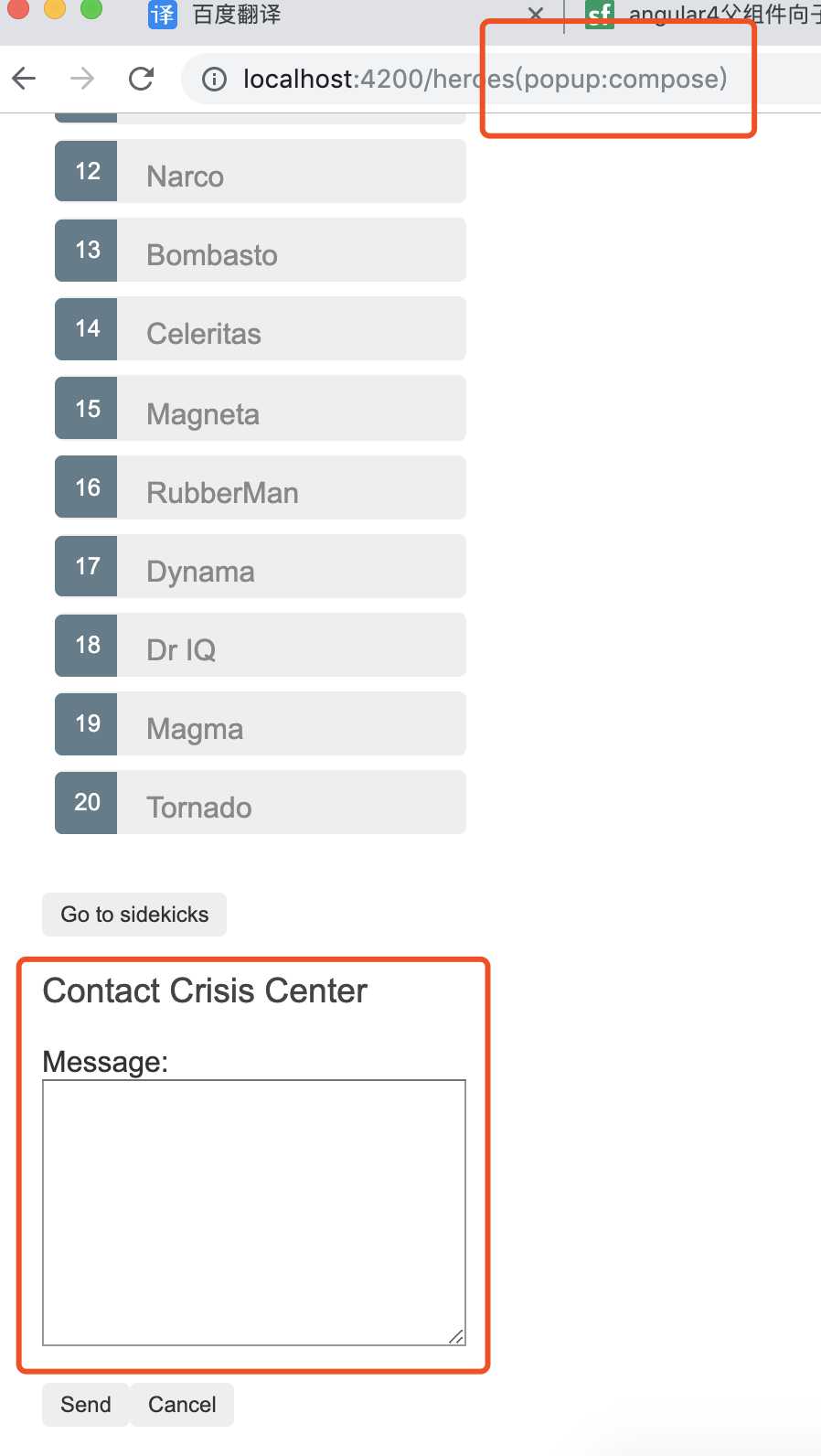
<a [routerLink]="[{ outlets: { popup: [‘compose‘]}}]">第二路由Contact</a>
  <!-- 路由跳转二 -->
<!-- <a routerLink="/crisis-center" routerLinkActive="active">Crisis Center</a>
<a routerLink="/heroes" routerLinkActive="active">heroes</a> -->
</nav>
<!-- 路由出口,占位符,可将显示在出口的组件显示在这里 -->
<!-- 转场:让@routeAnimation 触发器绑定到需要应用路由动画到元素上,routerOutlet 导出成outlet 变量,绑定一个到路由出口的引用
    函数根据activatedRoute 提供的data对象来返回动画属性
-->
<div [@routeAnimation]="getAnimationData(routerOutlet)">
    <router-outlet #routerOutlet="outlet"></router-outlet>
  </div>
<!-- 每个模块,路由器只能支持一个无名主路由出口,模块可以有多个命名路由出口,以此可以同时根据不同路由显示不同内容 -->
  <!-- 第二路由出口: 不依赖主路由,可以和其他路由组合使用,显示在命令出口位置 -->
  <router-outlet name="popup"></router-outlet>
import { NgModule } from ‘@angular/core‘;
import { Routes, RouterModule } from ‘@angular/router‘;


import { PageNotFoundComponent } from ‘./page-not-found/page-not-found.component‘;
import { ComposeMessageComponent } from ‘./compose-message/compose-message.component‘;
// 添加第二路由
const routes: Routes = [
  { path: ‘compose‘ , component: ComposeMessageComponent, outlet: ‘popup‘},
  { path: ‘‘, redirectTo: ‘heroes‘, pathMatch: ‘full‘ },
  { path: ‘**‘, component: PageNotFoundComponent }

];
// .forRoot()-- 在应用的顶级配置路由器,提供路由需要的服务提供商和指令,基于浏览器当前URL执行首次导航
// enableTarcing -- 查看导航在生命周期中发生的事件,并输出到控制台
@NgModule({
  imports: [
    RouterModule.forRoot(routes, { enableTracing: false })
  ],
  exports: [RouterModule]
})
export class AppRoutingModule { }
<h3>Contact Crisis Center</h3>
<div *ngIf="details">
  {{ details }}
</div>
<div>
  <div>
    <label>Message: </label>
  </div>
  <div>
    <textarea [(ngModel)]="message" rows="10" cols="35" [disabled]="sending"></textarea>
  </div>
</div>
<p *ngIf="!sending">
  <button (click)="send()">Send</button>
  <button (click)="cancel()">Cancel</button>
</p>
import { Component, HostBinding } from ‘@angular/core‘;
import { Router } from ‘@angular/router‘;

@Component({
  selector: ‘app-compose-message‘,
  templateUrl: ‘./compose-message.component.html‘,
  styleUrls: [‘./compose-message.component.css‘]
})
export class ComposeMessageComponent {
  details: string;
  message: string;
  sending = false;

  constructor(private router: Router) { }

  send() {
    this.sending = true;
    this.details = ‘Sending Message...‘;

    setTimeout(() => {
      this.sending = false;
      this.closePopup();
    }, 1000);
  }

  cancel() {
    this.closePopup();
  }
//  清除第二路由;即移除路由出口,清除导航url显示
  closePopup() {
    // Providing a `null` value to the named outlet
    // clears the contents of the named outlet
    this.router.navigate([{ outlets: { popup: null } }]);
  }
}
标签:exports 路由器 color details get template lse bsp lin
原文地址:https://www.cnblogs.com/gushiyoyo/p/11268273.html
