
标签:fresh 颜色 title 效果 lld put direction 很多 onclick
refresh 踩坑
有很多人会认为refresh的2个属性是不管用的 。 这是理解有误。 这2个属性并非是组件的设置。而且代表加载按钮的颜色和背景,如图所示
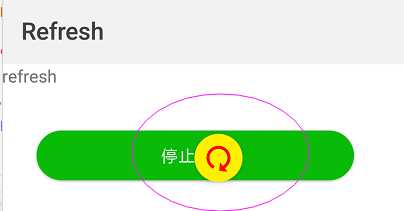
示例代码如下--转自官方demo
<template>
  <!-- template里只能有一个根节点 -->
  <div class="demo-page">
     <refresh class="refresh" onrefresh="refresh" refreshing="{{isRefreshing}}" type="{{refreshType}}">
      <div class="page-title-wrap">
          <text class="page-title ">{{componentName}}</text>
      </div>
      <div class="item-container">
        <input class="btn" type="button" value="停止刷新" onclick="stopRefresh"/>
        <input class="btn" type="button" value="{{refreshType === ‘auto‘ ? ‘开启下拉回弹效果‘ : ‘关闭下拉回弹效果‘}}" onclick="changeType"/>
      </div>
    </refresh>
  </div>
</template>

<script>
 import prompt from ‘@system.prompt‘

  export default {
    private: {
      componentName: ‘refresh‘,
      isRefreshing: false,
      refreshType: ‘auto‘
    },
    onInit () {
      this.$page.setTitleBar({text: ‘Refresh‘})
    },
    changeType () {
      this.refreshType = this.refreshType === ‘auto‘ ? ‘pulldown‘ : ‘auto‘
    },
    refresh (e) {
      const self = this
      // 更新刷新状态(属性refreshing的值从false改为true会触发refresh组件的状态更新,反之亦然)
      self.isRefreshing = e.refreshing
      setTimeout(function(){
        // 关闭刷新状态
        self.isRefreshing = false
        prompt.showToast({
          message: ‘刷新完成‘
        })
      },3000)
    },
    stopRefresh () {
      this.isRefreshing = false
    },
  }
</script>

<style>
  .demo-page {
    flex-direction: column;
    justify-content: center;
    align-items: center;
  }
    .refresh{
    flex-direction: column;
    flex: 1;
    progress-color: #ff0000;
    background-color:#fff000;
  }

  .item-container{
    margin-bottom: 50px;
    margin-right: 60px;
    margin-left: 60px;
    flex-direction: column;
  }

  .title {
    font-size: 40px;
    text-align: center;
  }

  .btn {
    width: 550px;
    height: 86px;
    margin-top: 75px;
    border-radius: 43px;
    background-color: #09ba07;
    font-size: 30px;
    color: #ffffff;
  }
</style>
标签:fresh 颜色 title 效果 lld put direction 很多 onclick
原文地址:https://www.cnblogs.com/maomao-Sunshine/p/11769624.html
