
标签:初始 operation rev export next enter refresh ati 二次
我感觉是最简单的,
因为我看别人的实现,要么带sync,要么传父组件函数。
而我这个,我觉得隔离得比较好。
pagnation.vue(父组件传一个pageRequest过来,分页组件返回给父组件一个refreshPageRequest)
)
<template>
    <div>
        <div class="toolbar" style="padding:10px;">
            <el-pagination
              layout="total, prev, pager, next, jumper"
              @current-change="refreshPageRequest"
              :current-page="pageRequest.pageNum"
              :page-size="pageRequest.pageSize"
              :total="pageRequest.totalSize"
              style="float: right;">
            </el-pagination>
        </div>

    </div>
</template>

<script>
    export default {
        name: ‘Pagnation‘,
        props: {
            pageRequest: {
                type: Object,
                required: true
            }
        },
        methods: {
            refreshPageRequest: function(pageNum) {
                this.$emit(‘refreshPageRequest‘, pageNum)
            }
        }
    }
</script>

<style>
</style>
调用组件方
注意,按如下更新pageSize和totalSize,才会分页显示正常,相当于其它人提到的再次刷新。
this.$set(this.pageRequest,"pageSize", res.data.pageSize)
this.$set(this.pageRequest,"totalSize", res.data.totalSize)
<template>
    <div>
        <div class="toolbar" style="float:left;">
            <el-form :inline="true" :model="Filters" :size="size">
                <el-form-item>
                    <el-input v-model="Filters.label" placeholder="Pod名称"></el-input>
                </el-form-item>
                <el-form-item>
                    <kt-button icon="fa fa-search" :label="$t(‘action.search‘)" type="primary" @click="listPod(null)"/>
                </el-form-item>
            </el-form>
        </div>
        <el-table
          :data="pageResult.content"
          :highlight-current-row="highlightCurrentRow"
          v-loading="loading"
          :element-loading-text="$t(‘action.loading‘)"
          :border="border"
          :stripe="stripe"
          :show-overflow-tooltip="showOverflowTooltip"
          :max-height="maxHeight"
          :size="size"
          :align="align"
          style="width:100%;">
            <el-table-column
              v-for="column in podColumns"
              header-align="center"
              align="center"
              :prop="column.prop"
              :label="column.label"
              :width="column.width"
              :min-width="column.minWidth"
              :fixed="column.fixed"
              :key="column.pro"
              :type="column.type"
              :formatter="column.formatter"
              :sortable="column.sortable==null?true:column.sortable">
            </el-table-column>
            <el-table-column
              :lable="$t(‘action.operation‘)"
              width="185"
              fixed="right"
              header-align="center"
              align="center">
                <template slot-scope="scope">
                    <kt-button
                      :label="$t(‘action.terminal‘)"
                      :size="size"
                      type="primary"
                      @click="handleEnter(scope.row)" />
                </template>
            </el-table-column>
        </el-table>
        <pagnation :pageRequest="pageRequest" @refreshPageRequest="refreshPageRequest" />
    </div>
</template>

<script>
    import KtButton from ‘@/views/core/KtButton‘
    import Pagnation from ‘@/components/Pagnation‘
    export default {
        name: ‘KtTable‘,
        components: {
            KtButton,
            Pagnation
        },
        data() {
            return {
                size: ‘small‘,
                loading: false,
                Filters: {
                    label: ‘‘
                },
                pageshow: false,
                podColumns: [
                    {prop:"id", label:"ID", minWidth:50},
                    {prop:"nameSpace", label:"NameSpace", minWidth:120},
                    {prop:"service", label:"Service", minWidth:120},
                    {prop:"deploy", label:"Deploy", minWidth:120},
                    {prop:"label", label:"Pod", minWidth:120},
                    {prop:"createTime", label:"创建时间", minWidth:120, formatter:this.dateFormat}
                ],

                pageRequest: { pageNum: 1},
                pageResult: {},
                align: ‘left‘,
                maxHeight: 420,
                showOperation: true,
                border: false,
                stripe: true,
                highlightCurrentRow: true,
                showOverflowTooltip: true
            }
        },
        methods: {
            listPod: function (data) {
                // 在获取到数据之前,显示加载中状态
                this.loading = true
                // 如果是查询数据,则传递给listApp的是null,这个时机,可以获取查询的参数,并重新请求第1页。
                // 否则, 参数为分页的对象
                if (data === null) {
                    this.pageRequest.pageNum = 1
                    this.pageRequest.params = [{name:‘label‘, value:this.Filters.label}]
                } else {
                    this.pageRequest = data
                }

                // 前端只需要初始化一个pageNum, 其它分页数据由后端获取
                this.$api.pod.listPod(this.pageRequest).then((res) => {
                    this.pageResult = res.data
                    this.$set(this.pageRequest,"pageSize", res.data.pageSize)
                    this.$set(this.pageRequest,"totalSize", res.data.totalSize)
                })

                // 在获取到数据之后,取消加截中的状态
                this.loading = false
            },

            refreshPageRequest: function(pageNum) {
                this.pageRequest.pageNum = pageNum
                this.listPod(this.pageRequest)
            },
            handleEnter: function(row) {
                this.$emit(‘handleEnter‘, {row:row})
            }
        },
        mounted() {
            this.listPod(this.pageRequest)
        }
    }
</script>
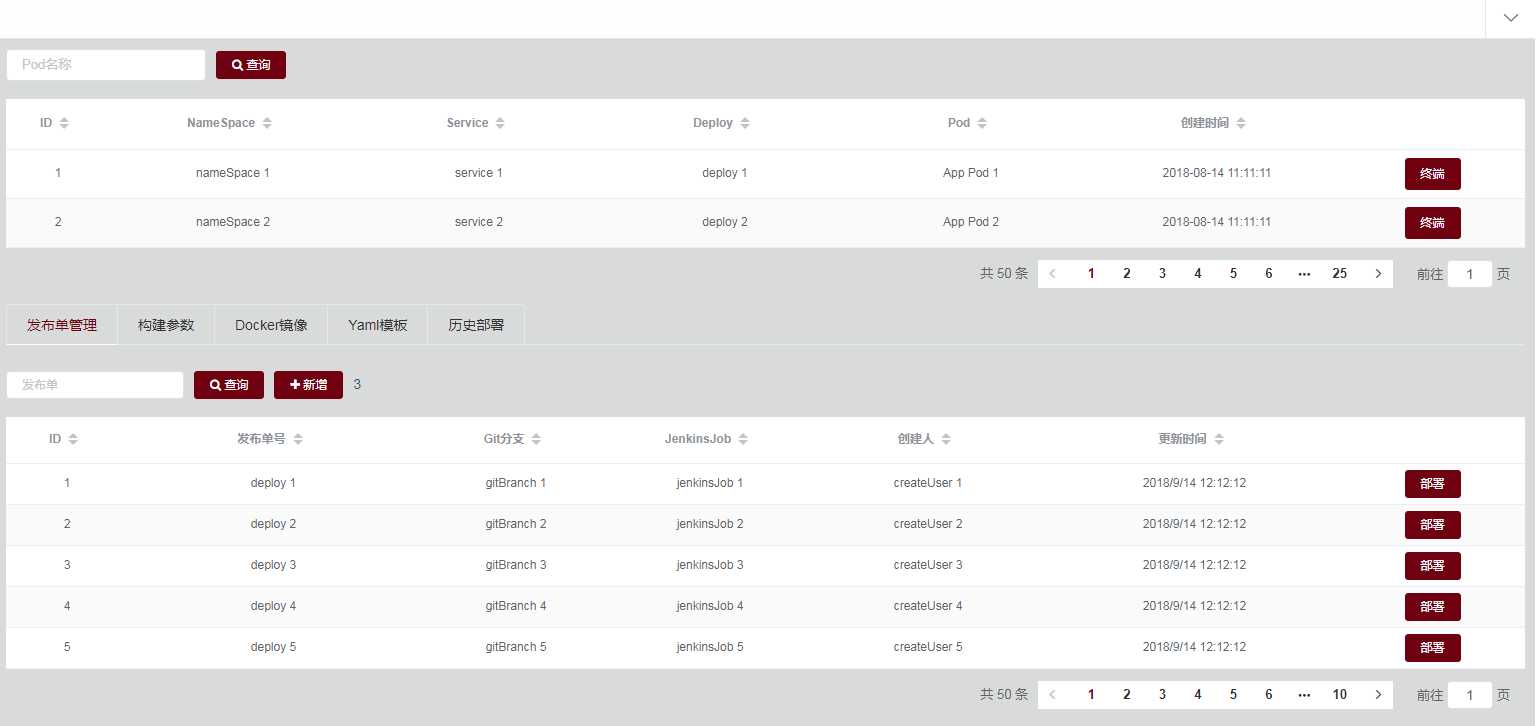
这样一来,同一个网页,多个分页都不干扰。
标签:初始 operation rev export next enter refresh ati 二次
原文地址:https://www.cnblogs.com/aguncn/p/12355303.html
