
标签:style c class blog code tar
procedure TForm1.FormCreate(Sender: TObject);
var
  i: Integer;
  LCode: Integer;
begin
  {给 FDSQLiteCollation1 设定参数}
  FDSQLiteCollation1.DriverLink := FDPhysSQLiteDriverLink1;
//  FDSQLiteCollation1.CollationKind := scCompareString; //这是默认值(Unicode 不区分大小写, 在 Win 下是调用 WinAPI.CompareString); 使用其他选项需要自定义排序规则
  FDSQLiteCollation1.LocaleName := ‘zh-CN‘;
  FDSQLiteCollation1.Flags := [sfIgnoreCase];
  FDSQLiteCollation1.CollationName := ‘MyCollation‘;     //下面所有的调用全要依赖这个名称
  FDSQLiteCollation1.Active := True;

  FDConnection1.Params.Add(‘DriverID=SQLite‘);
//  FDConnection1.Params.Add(‘OpenMode=CreateUTF8‘); //这是默认值, 可选 CreateUTF16(Unicode)

  {建立测试表, 三个字段 str(汉字), code(汉字对应的 Unicode 值), id(添加顺序)}
  FDConnection1.ExecSQL(‘CREATE TABLE MyTable(str string(10), code integer, id integer)‘);
//  FDConnection1.ExecSQL(‘CREATE TABLE MyTable(str string(10) COLLATE MyCollation, code integer, id integer)‘); //用在表设计时

  {添加测试数据数据}
  for i := 0 to 99 do
  begin
    LCode := Random($9FA5-$4E00);
    FDConnection1.ExecSQL(‘INSERT INTO MyTable(str, code, id) VALUES(:1, :2, :3)‘, [WideChar($4E00 + LCode), LCode, i+1]);
  end;

  FDQuery1.Open(‘SELECT * FROM MyTable‘); //无排序
end;

procedure TForm1.Button1Click(Sender: TObject);
begin
  FDQuery1.Open(‘SELECT * FROM MyTable ORDER BY str‘); //SQLite 内置排序
end;

procedure TForm1.Button2Click(Sender: TObject);
begin
  FDQuery1.Open(‘SELECT * FROM MyTable ORDER BY str COLLATE MyCollation‘); //FireDAC 默认排序
end;
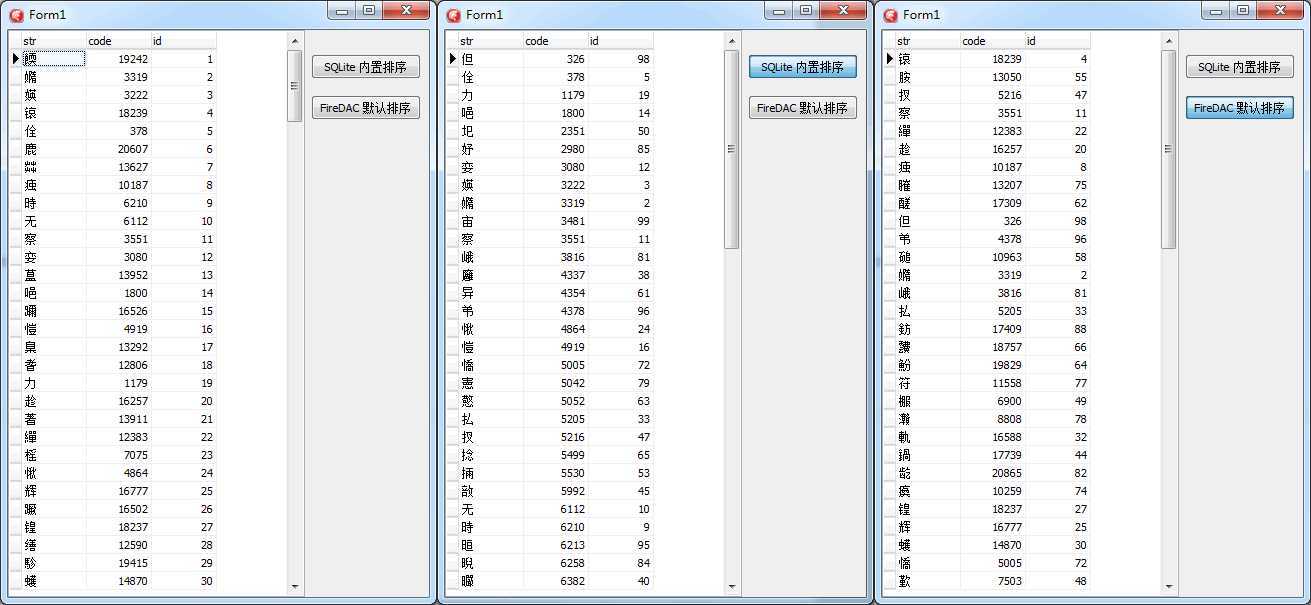
FireDAC 下的 Sqlite [9] - 关于排序,布布扣,bubuko.com
标签:style c class blog code tar
原文地址:http://www.cnblogs.com/del/p/3746725.html
