
标签:
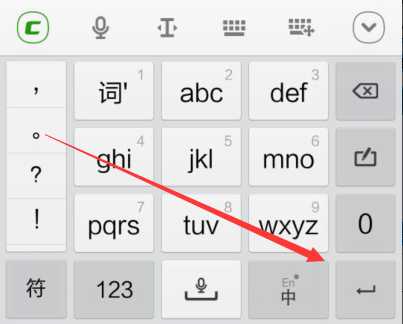
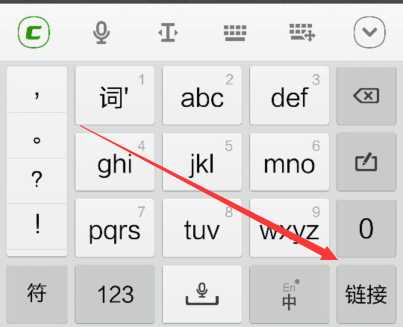
在不同的输入框,我们会看到输入法软键盘右下角的字或符号会有所不同
有的显示为一个回车图标,有的是连接,有的是发送等
决定这个图标的参数是EditText中的android:imeOptions=""
android:imeOptions=""的值有actionGo、 actionSend 、actionSearch、actionDone等
不同的值可以监听特定的动作或时间
<EditText
            android:id="@+id/net_address"
            android:layout_height="wrap_content"
	    android:imeOptions="actionGo"
            android:layout_width="match_parent"/>
在Java代码中对应的值为EditorInfo.IME_ACTION_XXX
在代码中通过editText.setOnEditorActionListener方法添加相应的监听,因为有些action是需要在代码中添加具体的相关操作的
EditText dt = (EditText)findViewById(R.id.editText);
        et.setOnEditorActionListener(new OnEditorActionListener() {
            @Override
            public boolean onEditorAction(TextView v, int actionId,   KeyEvent event) {
                if (actionId == EditorInfo.IME_ACTION_SEARCH) {
                    Toast.makeText(getActivity(), "1111111",Toast.LENGTH_SHORT).show();
                }

                return false;
            }
        });
上面的代码还需要设置别的属性才能使它生效,是输入框打开后软键盘右下角的键变换
我们可以用下面两种方法之一来设置
将
1.singleLine设置为true
2.inputType设置为text
<EditText
            android:id="@+id/net_address"
            android:layout_height="wrap_content"
	    android:imeOptions="actionGo"
            android:layout_width="match_parent"
	    android:singleLine="true" />
或者
<EditText
            android:id="@+id/net_address"
            android:layout_height="wrap_content"
	    android:imeOptions="actionGo"
            android:layout_width="match_parent"
            android:inputType="text"/>
Java代码的设置
editText.setImeOptions(EditorInfo.IME_ACTION_SEARCH);
editText.setInputType(EditorInfo.TYPE_CLASS_TEXT);
editText.setSingleLine(true);
标签:
原文地址:http://www.cnblogs.com/w-xc/p/4638707.html
