
标签:daemon gui ges ack tran storage bubuko reg onresume
JPush是经过考验的大规模APP推送平台,每天推送消息数超过5亿条。 开发者集成SDK后,可以通过调用API推送消息。同时,JPush提供可视化的web端控制台发送通知,统计分析推送效果。 JPush全面支持 Android, iOS, Winphone 三大手机平台。
JPush提供四种消息形式:通知,自定义消息,富媒体和本地通知。
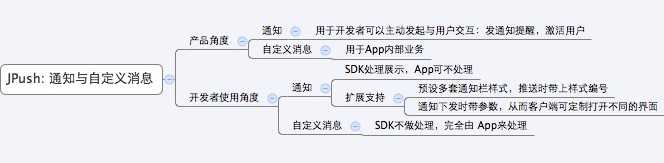
或者说 Push Notification,即指在手机的通知栏(状态栏)上会显示的一条通知信息。 通知主要用于提示用户的目的,应用于新闻内容、促销活动、产品信息、版本更新提醒、订单状态提醒等多种场景
开发者参考文档:Push API v3 notification
自定义消息不是通知,所以不会被SDK展示到通知栏上。其内容完全由开发者自己定义。 自定义消息主要用于应用的内部业务逻辑。一条自定义消息推送过来,有可能没有任何界面显示。
开发者参考文档:Push API v3 message
JPush支持开发者发送图文并茂的通知,从而更好的传达信息,带来更丰富的用户互动。 JPush提供了5种模板,开发者可以通过填充模板的内容,发送landing page、弹窗、信息流形式的富媒体通知。 开发者还可以直接通过URL发送预先编辑好的页面。 富媒体当前支持Android平台,为更好的使用富媒体的功能,建议更新当前SDK版本至v2.1.8及以上。 暂时只能通过极光推送的控制台发送,不支持API形式。
Android 开发者参考文档:Rich Push开发指南
本地通知API不依赖于网络,无网条件下依旧可以触发;本地通知的定时时间是自发送时算起的,不受中间关机等操作的影响。 本地通知与网络推送的通知是相互独立的,不受保留最近通知条数上限的限制。 本地通知适用于在特定时间发出的通知,如一些Todo和闹钟类的应用,在每周、每月固定时间提醒用户回到应用查看任务。
Android 开发者参考文档:Android 本地通知 iOS 开发者参考文档:iOS 本地通知
通过使用标签,别名,Registration ID 和用户分群,开发者可以向特定的一个或多个用户推送消息。
为安装了应用程序的用户打上标签,其目的主要是方便开发者根据标签,来批量下发 Push 消息。 可为每个用户打多个标签。 举例: game, old_page, women
每个用户只能指定一个别名(意思是说,一个别名可以有多个用户)。 同一个应用程序内,对不同的用户,建议取不同的别名。这样,尽可能根据别名来唯一确定用户。
Android 开发者参考文档:Android 标签和别名 iOS 开发者参考文档:iOS 标签和别名 使用别名和标签推送请参考文档:Push API v3 Audience
客户端初始化 JPush 成功后,JPush 服务端会分配一个 Registration ID,作为此设备的标识(同一个手机不同 APP 的 Registration ID 是不同的)。开发者可以通过指定具体的 Registration ID 来进行对单一设备的推送。
用户分群的筛选条件有:标签、地理位置、系统版本、注册时间、活跃用户和在线用户。 比如,开发者可以设置这样的用户分群:位于北京、上海、广州和深圳,并且最近7天在线的用户。 开发者可以通过在控制台设置好用户分群之后,在控制台推送时指定该分群的名称或使用API调用该分群的id发送。
用户分群控制台使用指南:用户分群
JPush支持推送数量、用户打开次数、用户使用时长、新增用户、活跃用户等数据的统计。 Android开发者需要实现了相关的统计API,才可以进行用户相关的统计。 iOS的开发者不需要实现统计API,可以直接在【控制台】-【统计】页面查看相关数据。
Android 开发者参考文档:统计分析API
我们建议开发者不要推送保密的信息,就像QQ建议你不要在聊天时发送保密的信息一样。
如果开发者的确有保密的信息,需要送达到用户,则可以考虑这样做:
先通过 JPush 推送一条消息,这条消息触发客户端App去与开发者服务器交互保密信息。
后台主要使用纯 C 语言实现。
使用自定义的二进制协议,以尽可能节约流量。
推送消息本身是限定长度的文本。
不直接支持文件的推送,但可以通过推送 url 来实现。
即先推送文件下载 url,到客户端触发逻辑来通过 url 下载文件。
<permission android:name="您应用的包名.permission.JPUSH_MESSAGE" android:protectionLevel="signature" />
<uses-permission android:name="您应用的包名.permission.JPUSH_MESSAGE" /><permission android:name="您应用的包名.permission.JPUSH_MESSAGE" android:protectionLevel="signature" /><uses-permission android:name="您应用的包名.permission.JPUSH_MESSAGE" />| 关键字 | 类型 | 选项 | 含义 |
|---|---|---|---|
| msg_content | string | 必填 | 消息内容本身 |
| title | string | 可选 | 消息标题 |
| content_type | string | 可选 | 消息内容类型 |
| extras | JSON Object | 可选 | JSON 格式的可选参数 |
JPushInterface.setDebugMode(true);    // 设置开启日志,发布时请关闭日志
JPushInterface.init(this);            // 初始化 JPush
x
JPushInterface.setDebugMode(true); // 设置开启日志,发布时请关闭日志JPushInterface.init(this); // 初始化 JPushpublic class JpushMainActivity extends ListActivity {
public static boolean isForeground = false;
protected void onCreate(Bundle savedInstanceState) {
super.onCreate(savedInstanceState);
TextView tv = new TextView(this);
tv.setTextColor(Color.BLUE);
String string = "AppKey: " + PushUtil.getAppKey(this) + "\n" +
"IMEI: " + PushUtil.getImei(this, "") + "\n" +
"RegId:" + JPushInterface.getRegistrationID(this) + "\n" +
"PackageName: " + getPackageName() + "\n" +
"deviceId:" + PushUtil.getDeviceId(this) + "\n" +
"Version: " + PushUtil.GetVersionName(this);
tv.setText(string);
getListView().addHeaderView(tv);
String[] array = {"initPush", "stopPush", "resumePush",};
setListAdapter(new ArrayAdapter<>(this, android.R.layout.simple_list_item_1, new ArrayList<>(Arrays.asList(array))));
EventBus.getDefault().register(this);
}
@Override
protected void onListItemClick(ListView l, View v, int position, long id) {
switch (position - 1) {
case 0:
JPushInterface.init(this);// 初始化 JPush。如果已经初始化,但没有登录成功,则执行重新登录。
break;
case 1:
JPushInterface.stopPush(this);
break;
case 2:
JPushInterface.resumePush(this);
break;
}
}
@Override
protected void onResume() {
isForeground = true;
super.onResume();
}
@Override
protected void onPause() {
isForeground = false;
super.onPause();
}
@Override
protected void onDestroy() {
super.onDestroy();
EventBus.getDefault().unregister(this);
}
@Subscribe(threadMode = ThreadMode.MAIN)
public void onPushEvent(BasePushBean bean) {
TextView tv = new TextView(this);
tv.setTextColor(Color.BLUE);
tv.setText(bean.msg);
getListView().addFooterView(tv);
}
}x
public class JpushMainActivity extends ListActivity { public static boolean isForeground = false; protected void onCreate(Bundle savedInstanceState) { super.onCreate(savedInstanceState); TextView tv = new TextView(this); tv.setTextColor(Color.BLUE); String string = "AppKey: " + PushUtil.getAppKey(this) + "\n" + "IMEI: " + PushUtil.getImei(this, "") + "\n" + "RegId:" + JPushInterface.getRegistrationID(this) + "\n" + "PackageName: " + getPackageName() + "\n" + "deviceId:" + PushUtil.getDeviceId(this) + "\n" + "Version: " + PushUtil.GetVersionName(this); tv.setText(string); getListView().addHeaderView(tv); String[] array = {"initPush", "stopPush", "resumePush",}; setListAdapter(new ArrayAdapter<>(this, android.R.layout.simple_list_item_1, new ArrayList<>(Arrays.asList(array)))); EventBus.getDefault().register(this); } protected void onListItemClick(ListView l, View v, int position, long id) { switch (position - 1) { case 0: JPushInterface.init(this);// 初始化 JPush。如果已经初始化,但没有登录成功,则执行重新登录。 break; case 1: JPushInterface.stopPush(this); break; case 2: JPushInterface.resumePush(this); break; } } protected void onResume() { isForeground = true; super.onResume(); } protected void onPause() { isForeground = false; super.onPause(); } protected void onDestroy() { super.onDestroy(); EventBus.getDefault().unregister(this); } (threadMode = ThreadMode.MAIN) public void onPushEvent(BasePushBean bean) { TextView tv = new TextView(this); tv.setTextColor(Color.BLUE); tv.setText(bean.msg); getListView().addFooterView(tv); }}/**
* 自定义接收器。如果不定义这个 Receiver,则默认用户会打开主界面,接收不到自定义消息
*/
public class MyReceiver extends BroadcastReceiver {
@Override
public void onReceive(Context context, Intent intent) {
if (intent == null || intent.getAction() == null) return;
Bundle bundle = intent.getExtras();
Log.i("bqt", "【MyReceiver】Action:" + intent.getAction() + "\nextras:" + printBundle(bundle));
switch (intent.getAction()) {
case JPushInterface.ACTION_REGISTRATION_ID:
String regId = bundle == null ? "" : bundle.getString(JPushInterface.EXTRA_REGISTRATION_ID);
Log.i("bqt", "【MyReceiver】接收Registration Id : " + regId);
break;
case JPushInterface.ACTION_MESSAGE_RECEIVED://将自定义消息转发到需要的地方
Log.i("bqt", "【MyReceiver】接收到推送下来的自定义消息");
if (JpushMainActivity.isForeground && bundle != null) {
String message = bundle.getString(JPushInterface.EXTRA_MESSAGE);
String extras = bundle.getString(JPushInterface.EXTRA_EXTRA);
String msg = "message:" + message + "\nextras:" + extras;
EventBus.getDefault().post(new BasePushBean(msg, BasePushBean.TYPE_STRING));
}
break;
case JPushInterface.ACTION_NOTIFICATION_RECEIVED:
Log.i("bqt", "【MyReceiver】接收到推送下来的通知");
int notifactionId = bundle == null ? -1 : bundle.getInt(JPushInterface.EXTRA_NOTIFICATION_ID);
Log.i("bqt", "【MyReceiver】接收到推送下来的通知的ID: " + notifactionId);
break;
case JPushInterface.ACTION_NOTIFICATION_OPENED:
Log.i("bqt", "【MyReceiver】用户点击打开了通知");
break;
case JPushInterface.ACTION_RICHPUSH_CALLBACK: // 根据 JPushInterface.EXTRA_EXTRA 的内容处理代码
String extra = bundle == null ? "" : bundle.getString(JPushInterface.EXTRA_EXTRA);
Log.i("bqt", "【MyReceiver】用户收到到RICH PUSH CALLBACK: " + extra);
break;
case JPushInterface.ACTION_CONNECTION_CHANGE:
boolean connected = intent.getBooleanExtra(JPushInterface.EXTRA_CONNECTION_CHANGE, false);
Log.i("bqt", "【MyReceiver】" + intent.getAction() + " connected state change to " + connected);
break;
default:
Log.i("bqt", "【MyReceiver】Unhandled intent - " + intent.getAction());
break;
}
}
// 打印所有的 intent extra 数据
private static String printBundle(Bundle bundle) {
if (bundle == null) return "";
StringBuilder sb = new StringBuilder();
for (String key : bundle.keySet()) {
switch (key) {
case JPushInterface.EXTRA_NOTIFICATION_ID:
sb.append("\nkey:").append(key).append(", value:").append(bundle.getInt(key));
break;
case JPushInterface.EXTRA_CONNECTION_CHANGE:
sb.append("\nkey:").append(key).append(", value:").append(bundle.getBoolean(key));
break;
case JPushInterface.EXTRA_EXTRA:
if (TextUtils.isEmpty(bundle.getString(JPushInterface.EXTRA_EXTRA))) {
Log.i("bqt", "This message has no Extra data");
continue;
}
try {
JSONObject json = new JSONObject(bundle.getString(JPushInterface.EXTRA_EXTRA));
Iterator<String> it = json.keys();
while (it.hasNext()) {
String myKey = it.next();
sb.append("\nkey:").append(key)
.append(", value: [").append(myKey)
.append(" - ").append(json.optString(myKey)).append("]");
}
} catch (JSONException e) {
Log.e("bqt", "Get message extra JSON error!");
}
break;
default:
sb.append("\nkey:").append(key).append(", value:").append(bundle.getString(key));
break;
}
}
return sb.toString();
}
}x
/** * 自定义接收器。如果不定义这个 Receiver,则默认用户会打开主界面,接收不到自定义消息 */public class MyReceiver extends BroadcastReceiver { public void onReceive(Context context, Intent intent) { if (intent == null || intent.getAction() == null) return; Bundle bundle = intent.getExtras(); Log.i("bqt", "【MyReceiver】Action:" + intent.getAction() + "\nextras:" + printBundle(bundle)); switch (intent.getAction()) { case JPushInterface.ACTION_REGISTRATION_ID: String regId = bundle == null ? "" : bundle.getString(JPushInterface.EXTRA_REGISTRATION_ID); Log.i("bqt", "【MyReceiver】接收Registration Id : " + regId); break; case JPushInterface.ACTION_MESSAGE_RECEIVED://将自定义消息转发到需要的地方 Log.i("bqt", "【MyReceiver】接收到推送下来的自定义消息"); if (JpushMainActivity.isForeground && bundle != null) { String message = bundle.getString(JPushInterface.EXTRA_MESSAGE); String extras = bundle.getString(JPushInterface.EXTRA_EXTRA); String msg = "message:" + message + "\nextras:" + extras; EventBus.getDefault().post(new BasePushBean(msg, BasePushBean.TYPE_STRING)); } break; case JPushInterface.ACTION_NOTIFICATION_RECEIVED: Log.i("bqt", "【MyReceiver】接收到推送下来的通知"); int notifactionId = bundle == null ? -1 : bundle.getInt(JPushInterface.EXTRA_NOTIFICATION_ID); Log.i("bqt", "【MyReceiver】接收到推送下来的通知的ID: " + notifactionId); break; case JPushInterface.ACTION_NOTIFICATION_OPENED: Log.i("bqt", "【MyReceiver】用户点击打开了通知"); break; case JPushInterface.ACTION_RICHPUSH_CALLBACK: // 根据 JPushInterface.EXTRA_EXTRA 的内容处理代码 String extra = bundle == null ? "" : bundle.getString(JPushInterface.EXTRA_EXTRA); Log.i("bqt", "【MyReceiver】用户收到到RICH PUSH CALLBACK: " + extra); break; case JPushInterface.ACTION_CONNECTION_CHANGE: boolean connected = intent.getBooleanExtra(JPushInterface.EXTRA_CONNECTION_CHANGE, false); Log.i("bqt", "【MyReceiver】" + intent.getAction() + " connected state change to " + connected); break; default: Log.i("bqt", "【MyReceiver】Unhandled intent - " + intent.getAction()); break; } } // 打印所有的 intent extra 数据 private static String printBundle(Bundle bundle) { if (bundle == null) return ""; StringBuilder sb = new StringBuilder(); for (String key : bundle.keySet()) { switch (key) { case JPushInterface.EXTRA_NOTIFICATION_ID: sb.append("\nkey:").append(key).append(", value:").append(bundle.getInt(key)); break; case JPushInterface.EXTRA_CONNECTION_CHANGE: sb.append("\nkey:").append(key).append(", value:").append(bundle.getBoolean(key)); break; case JPushInterface.EXTRA_EXTRA: if (TextUtils.isEmpty(bundle.getString(JPushInterface.EXTRA_EXTRA))) { Log.i("bqt", "This message has no Extra data"); continue; } try { JSONObject json = new JSONObject(bundle.getString(JPushInterface.EXTRA_EXTRA)); Iterator<String> it = json.keys(); while (it.hasNext()) { String myKey = it.next(); sb.append("\nkey:").append(key) .append(", value: [").append(myKey) .append(" - ").append(json.optString(myKey)).append("]"); } } catch (JSONException e) { Log.e("bqt", "Get message extra JSON error!"); } break; default: sb.append("\nkey:").append(key).append(", value:").append(bundle.getString(key)); break; } } return sb.toString(); }}implementation files(‘libs/jcore-android-1.2.0.jar‘)
implementation files(‘libs/jpush-android-3.1.2.jar‘)
implementation ‘org.greenrobot:eventbus:3.1.1‘x
implementation files(‘libs/jcore-android-1.2.0.jar‘)implementation files(‘libs/jpush-android-3.1.2.jar‘)implementation ‘org.greenrobot:eventbus:3.1.1‘-dontoptimize
-dontpreverify
-dontwarn cn.jpush.**
-keep class cn.jpush.** { *; }
#v2.0.5 及以上的版本由于引入了protobuf ,在上面基础之上增加排除混淆的配置。
#==================gson==========================
-dontwarn com.google.**
-keep class com.google.gson.** {*;}
#==================protobuf======================
-dontwarn com.google.**
-keep class com.google.protobuf.** {*;}-dontoptimize-dontpreverify-dontwarn cn.jpush.**-keep class cn.jpush.** { *; }#v2.0.5 及以上的版本由于引入了protobuf ,在上面基础之上增加排除混淆的配置。#==================gson==========================-dontwarn com.google.**-keep class com.google.gson.** {*;}#==================protobuf======================-dontwarn com.google.**-keep class com.google.protobuf.** {*;}<?xml version="1.0" encoding="utf-8"?>
<manifest xmlns:android="http://schemas.android.com/apk/res/android"
xmlns:tools="http://schemas.android.com/tools"
package="com.bqt.push">
<permission
android:name="com.bqt.push.permission.JPUSH_MESSAGE"
android:protectionLevel="signature"/>
<!-- Required 一些系统要求的权限,如访问网络等-->
<uses-permission android:name="com.bqt.push.permission.JPUSH_MESSAGE"/>
<uses-permission android:name="android.permission.RECEIVE_USER_PRESENT"/>
<uses-permission android:name="android.permission.INTERNET"/>
<uses-permission android:name="android.permission.WAKE_LOCK"/>
<uses-permission android:name="android.permission.READ_PHONE_STATE"/>
<uses-permission android:name="android.permission.WRITE_EXTERNAL_STORAGE"/>
<uses-permission android:name="android.permission.READ_EXTERNAL_STORAGE"/>
<uses-permission android:name="android.permission.VIBRATE"/>
<uses-permission android:name="android.permission.ACCESS_NETWORK_STATE"/>
<uses-permission android:name="android.permission.ACCESS_WIFI_STATE"/>
<application
android:name=".APP"
android:allowBackup="false"
android:icon="@drawable/ic_launcher">
<activity
android:name=".MainActivity">
<intent-filter>
<action android:name="android.intent.action.MAIN"/>
<category android:name="android.intent.category.LAUNCHER"/>
</intent-filter>
</activity>
<activity android:name=".jpush.JpushMainActivity"/>
<activity
android:name="cn.jpush.android.ui.PopWinActivity"
android:exported="false"
android:theme="@style/MyDialogStyle">
</activity>
<activity
android:name="cn.jpush.android.ui.PushActivity"
android:configChanges="orientation|keyboardHidden"
android:exported="false"
android:theme="@android:style/Theme.NoTitleBar">
<intent-filter>
<action android:name="cn.jpush.android.ui.PushActivity"/>
<category android:name="android.intent.category.DEFAULT"/>
<category android:name="com.bqt.push"/>
</intent-filter>
</activity>
<service
android:name="cn.jpush.android.service.PushService"
android:exported="false"
android:process=":mult">
<intent-filter>
<action android:name="cn.jpush.android.intent.REGISTER"/>
<action android:name="cn.jpush.android.intent.REPORT"/>
<action android:name="cn.jpush.android.intent.PushService"/>
<action android:name="cn.jpush.android.intent.PUSH_TIME"/>
</intent-filter>
</service>
<provider
android:name="cn.jpush.android.service.DataProvider"
android:authorities="com.bqt.push.DataProvider"
android:exported="false"/>
<!-- 可选项。用于同一设备中不同应用的JPush服务相互拉起的功能。 -->
<!-- 若不启用该功能可删除该组件,将不拉起其他应用也不能被其他应用拉起 -->
<service
android:name="cn.jpush.android.service.DaemonService"
android:enabled="true"
android:exported="true"
tools:ignore="ExportedService">
<intent-filter>
<action android:name="cn.jpush.android.intent.DaemonService"/>
<category android:name="com.bqt.push"/>
</intent-filter>
</service>
<provider
android:name="cn.jpush.android.service.DownloadProvider"
android:authorities="com.bqt.push.DownloadProvider"
android:exported="true"
tools:ignore="ExportedContentProvider"/>
<receiver
android:name="cn.jpush.android.service.PushReceiver"
android:enabled="true"
android:exported="false">
<intent-filter android:priority="1000">
<action android:name="cn.jpush.android.intent.NOTIFICATION_RECEIVED_PROXY"/> <!--Required 显示通知栏 -->
<category android:name="com.bqt.push"/>
</intent-filter>
<intent-filter>
<action android:name="android.intent.action.USER_PRESENT"/>
<action
android:name="android.net.conn.CONNECTIVITY_CHANGE"
tools:ignore="BatteryLife"/>
</intent-filter>
<!-- Optional -->
<intent-filter>
<action android:name="android.intent.action.PACKAGE_ADDED"/>
<action android:name="android.intent.action.PACKAGE_REMOVED"/>
<data android:scheme="package"/>
</intent-filter>
</receiver>
<receiver
android:name="cn.jpush.android.service.AlarmReceiver"
android:exported="false"/>
<!-- User defined. 用户自定义的广播接收器-->
<receiver
android:name="com.bqt.push.jpush.MyReceiver"
android:enabled="true"
android:exported="false">
<intent-filter>
<action android:name="cn.jpush.android.intent.REGISTRATION"/> <!--Required 用户注册SDK的intent-->
<action android:name="cn.jpush.android.intent.MESSAGE_RECEIVED"/> <!--Required 用户接收SDK消息的intent-->
<action android:name="cn.jpush.android.intent.NOTIFICATION_RECEIVED"/> <!--Required 用户接收SDK通知栏信息的intent-->
<action android:name="cn.jpush.android.intent.NOTIFICATION_OPENED"/> <!--Required 用户打开自定义通知栏的intent-->
<action android:name="cn.jpush.android.intent.CONNECTION"/><!-- 接收网络变化 连接/断开 since 1.6.3 -->
<category android:name="com.bqt.push"/>
</intent-filter>
</receiver>
<!-- Enable it you can get statistics data with channel -->
<meta-data
android:name="JPUSH_CHANNEL"
android:value="developer-default"/>
<meta-data
android:name="JPUSH_APPKEY"
android:value="7ced56a29466cb706362bb82"/> <!-- 值来自开发者平台取得的AppKey-->
</application>
</manifest>x
<?xml version="1.0" encoding="utf-8"?><manifest xmlns:android="http://schemas.android.com/apk/res/android" xmlns:tools="http://schemas.android.com/tools" package="com.bqt.push"> <permission android:name="com.bqt.push.permission.JPUSH_MESSAGE" android:protectionLevel="signature"/> <!-- Required 一些系统要求的权限,如访问网络等--> <uses-permission android:name="com.bqt.push.permission.JPUSH_MESSAGE"/> <uses-permission android:name="android.permission.RECEIVE_USER_PRESENT"/> <uses-permission android:name="android.permission.INTERNET"/> <uses-permission android:name="android.permission.WAKE_LOCK"/> <uses-permission android:name="android.permission.READ_PHONE_STATE"/> <uses-permission android:name="android.permission.WRITE_EXTERNAL_STORAGE"/> <uses-permission android:name="android.permission.READ_EXTERNAL_STORAGE"/> <uses-permission android:name="android.permission.VIBRATE"/> <uses-permission android:name="android.permission.ACCESS_NETWORK_STATE"/> <uses-permission android:name="android.permission.ACCESS_WIFI_STATE"/> <application android:name=".APP" android:allowBackup="false" android:icon="@drawable/ic_launcher"> <activity android:name=".MainActivity"> <intent-filter> <action android:name="android.intent.action.MAIN"/> <category android:name="android.intent.category.LAUNCHER"/> </intent-filter> </activity> <activity android:name=".jpush.JpushMainActivity"/> <activity android:name="cn.jpush.android.ui.PopWinActivity" android:exported="false" android:theme="@style/MyDialogStyle"> </activity> <activity android:name="cn.jpush.android.ui.PushActivity" android:configChanges="orientation|keyboardHidden" android:exported="false" android:theme="@android:style/Theme.NoTitleBar"> <intent-filter> <action android:name="cn.jpush.android.ui.PushActivity"/> <category android:name="android.intent.category.DEFAULT"/> <category android:name="com.bqt.push"/> </intent-filter> </activity> <service android:name="cn.jpush.android.service.PushService" android:exported="false" android:process=":mult"> <intent-filter> <action android:name="cn.jpush.android.intent.REGISTER"/> <action android:name="cn.jpush.android.intent.REPORT"/> <action android:name="cn.jpush.android.intent.PushService"/> <action android:name="cn.jpush.android.intent.PUSH_TIME"/> </intent-filter> </service> <provider android:name="cn.jpush.android.service.DataProvider" android:authorities="com.bqt.push.DataProvider" android:exported="false"/> <!-- 可选项。用于同一设备中不同应用的JPush服务相互拉起的功能。 --> <!-- 若不启用该功能可删除该组件,将不拉起其他应用也不能被其他应用拉起 --> <service android:name="cn.jpush.android.service.DaemonService" android:enabled="true" android:exported="true" tools:ignore="ExportedService"> <intent-filter> <action android:name="cn.jpush.android.intent.DaemonService"/> <category android:name="com.bqt.push"/> </intent-filter> </service> <provider android:name="cn.jpush.android.service.DownloadProvider" android:authorities="com.bqt.push.DownloadProvider" android:exported="true" tools:ignore="ExportedContentProvider"/> <receiver android:name="cn.jpush.android.service.PushReceiver" android:enabled="true" android:exported="false"> <intent-filter android:priority="1000"> <action android:name="cn.jpush.android.intent.NOTIFICATION_RECEIVED_PROXY"/> <!--Required 显示通知栏 --> <category android:name="com.bqt.push"/> </intent-filter> <intent-filter> <action android:name="android.intent.action.USER_PRESENT"/> <action android:name="android.net.conn.CONNECTIVITY_CHANGE" tools:ignore="BatteryLife"/> </intent-filter> <!-- Optional --> <intent-filter> <action android:name="android.intent.action.PACKAGE_ADDED"/> <action android:name="android.intent.action.PACKAGE_REMOVED"/> <data android:scheme="package"/> </intent-filter> </receiver> <receiver android:name="cn.jpush.android.service.AlarmReceiver" android:exported="false"/> <!-- User defined. 用户自定义的广播接收器--> <receiver android:name="com.bqt.push.jpush.MyReceiver" android:enabled="true" android:exported="false"> <intent-filter> <action android:name="cn.jpush.android.intent.REGISTRATION"/> <!--Required 用户注册SDK的intent--> <action android:name="cn.jpush.android.intent.MESSAGE_RECEIVED"/> <!--Required 用户接收SDK消息的intent--> <action android:name="cn.jpush.android.intent.NOTIFICATION_RECEIVED"/> <!--Required 用户接收SDK通知栏信息的intent--> <action android:name="cn.jpush.android.intent.NOTIFICATION_OPENED"/> <!--Required 用户打开自定义通知栏的intent--> <action android:name="cn.jpush.android.intent.CONNECTION"/><!-- 接收网络变化 连接/断开 since 1.6.3 --> <category android:name="com.bqt.push"/> </intent-filter> </receiver> <!-- Enable it you can get statistics data with channel --> <meta-data android:name="JPUSH_CHANNEL" android:value="developer-default"/> <meta-data android:name="JPUSH_APPKEY" android:value="7ced56a29466cb706362bb82"/> <!-- 值来自开发者平台取得的AppKey--> </application></manifest>标签:daemon gui ges ack tran storage bubuko reg onresume
原文地址:https://www.cnblogs.com/baiqiantao/p/dd54cd8aeefa23749026cf60b1614496.html
