
标签:des android class blog code http
#Region  Project Attributes
	#ApplicationLabel: ListViewTest
	#VersionCode: 20140625
	#VersionName:
	‘SupportedOrientations possible values: unspecified, landscape or portrait.
	#SupportedOrientations: unspecified
	#CanInstallToExternalStorage: False
#End Region

#Region  Activity Attributes
	#FullScreen: False
	#IncludeTitle: True
#End Region

Sub Process_Globals
	‘These global variables will be declared once when the application starts.
	‘These variables can be accessed from all modules.
	‘ 本工程修改于《basic4android 开发教程翻译(八)使用ListView 》
End Sub

Sub Globals
	‘These global variables will be redeclared each time the activity is created.
	‘These variables can only be accessed from this module.

	Private lvwBrowser As ListView ‘ 声明组件
End Sub

Sub Activity_Create(FirstTime As Boolean)
	‘Do not forget to load the layout file created with the visual designer. For example:
	Activity.LoadLayout("1")
	Dim gd As GradientDrawable ‘ 渐变效果类,GradientDrawable 支持使用渐变色来绘制图形

	gd.Initialize("TOP_BOTTOM", Array As Int(Colors.Black , Colors.LightGray))

	‘第一个参数定义渐变的方向,有下列值供选择
	‘"TOP_BOTTOM" "顶部->底部"
	‘"TR_BL" (Top-Right To Bottom-Left) (右上->左下)
	‘"RIGHT_LEFT" "右->左"
	‘"BR_TL" (Bottom-Right To Top-Left) "BR_TL" (左下->右上)
	‘"BOTTOM_TOP" "底部->顶部"
	‘"BL_TR" (Bottom-Left To Top-Right) "BL_TR" (左下->右上)
	‘"LEFT_RIGHT" "左->右"
	‘"TL_BR" (Top-Left To Bottom-Right) (左上->到右下)

	Activity.Background = gd ‘ Activity窗体背景使用渐变色效果

	lvwBrowser.Width =100%x
	lvwBrowser.ScrollingBackgroundColor = Colors.Transparent ‘ 纵向滚动条背景色=透明

	lvwBrowser.Initialize ("lvwBrowser")
	lvwBrowser.SingleLineLayout.Label.TextSize =20 ‘ 字体大小
	lvwBrowser.SingleLineLayout.Label.TextColor = Colors.Green ‘ 字体颜色
	lvwBrowser.SingleLineLayout.Label.Gravity =Gravity.LEFT ‘ 字体显示位置
	lvwBrowser.SingleLineLayout.ItemHeight = 60dip ‘ 行高度

	lvwBrowser.TwoLinesLayout.Label.TextSize =20 ‘ 字体大小
	lvwBrowser.TwoLinesLayout.Label.TextColor =Colors.Yellow ‘ 字体颜色

	lvwBrowser.TwoLinesLayout.SecondLabel.TextSize =20 ‘ 字体大小
	lvwBrowser.TwoLinesLayout.SecondLabel.TextColor =Colors.Red ‘ 字体颜色

	lvwBrowser.FastScrollEnabled = True ‘ 快速滚动器

	Dim BitmapIcon As Bitmap
	BitmapIcon.Initialize(File.DirAssets, "1.png")

	Dim i As Int
	For i=1 To 20

		lvwBrowser.AddSingleLine("单行项(AddSingleLine) " & i)
		lvwBrowser.AddTwoLines ("文本双行项(AddTwoLines)" & i," —— 第二行Text —— " & i)
		lvwBrowser.AddTwoLinesAndBitmap("图形双行项" & i, " —— 第二行Text —— " & i,BitmapIcon)

	Next
	Activity.AddView(lvwBrowser, 0, 0, 100%x, 100%y)


End Sub

Sub Activity_Resume

End Sub

Sub Activity_Pause (UserClosed As Boolean)

End Sub

Sub lvwBrowser_ItemClick (Position As Int, Value As Object)
	‘ 参数 Position 是列表项目索引
	‘ 参数 Value 	 是列表项目文本

	Activity.Title = "( " & Position & " )" & "-" & Value

End Sub
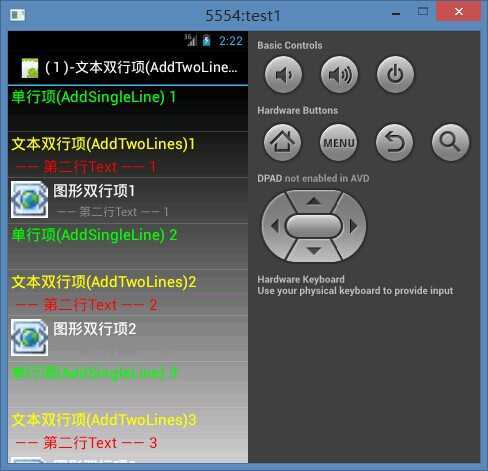
Basic4Android中ListView组建的演示,布布扣,bubuko.com
标签:des android class blog code http
原文地址:http://www.cnblogs.com/moodsky/p/3809074.html
